Showing posts with label or. Show all posts

Monday, October 17, 2016

How to Flash or Install S5830XXKPT Firmware Upgrade Samsung Galaxy Ace to Android 2 3 6 Gingerbread

How to Flash or Install S5830XXKPT Firmware Upgrade Samsung Galaxy Ace to Android 2 3 6 Gingerbread


Heres the procedure on how to manually upgrade the Samsung Galaxy Ace GT-S5830 to Android 2.3.6 Gingerbread using the stock ROM S5830XXKPT. This is a Russian official firmware update for Galaxy Ace that has been recently released this March 2012. Some changes is the lock screen features, much more faster than the previous buildS5830XXKPP and S5830XWKT7.  Some European languages are included on this  packaged, so anyone who prepares an English (UK and US) and European languages can use this ROM. The default language is set in Russian, but you can change it to your desired local language  after installation. 


Note: This ROM may only flashable for Galaxy Ace GT-S5830 only.
Download the stock ROM S5830XXKPT
firmware info:
PDA: S5830XXKPT
CSC: S5830SERKPT
Phone: S5830XXKPT

Version: Android 2.3.6 Gingerbread
Country: Russia
Build date: March 03, 2012
stock ROM GT-S830_SER_S5830XXKPT_S5830SERKPT_S5830XXKPT

Grab the ODIN Multi Downloader and OPS File: Cooper_v1.0.ops

Samsung Galaxy Ace Odin flashing  S5830XXKPT Android 2.3.6 stock firmware

- Make sure you are running Windows on your PC with USB driver installed or have Kies installed.
A USB cable wire of your device, a good working USB serial port, sometimes the connection issues occurs because of a bad USB port of your PC and the USB cable.
- Make a back up copy of all important files stored on your phone, the file is a none wipe but it is better to have an extra precautions if something went wrong.
- Disable any antivirus and Kies installed, this program might also interrupt Odin while in flashing process.

1.  After youve done downloaded theS5830XXKPT stock ROM, just simply extract it using winrar, winzip, 7zip or any rar file extractor program you have. Then you in the folder you can see the file
S5830XXKPT_S5830XXKPT_S5830SERKPT_HOME.tar.md5 
SS_DL.dll
we dont need this SS_DL.dll on this flashing, but dont delete it.
 2. Extract and run also the Odin v4.38 on your desktop.
3. On ODIN clickt the OPS button and load the Cooper_v1.0.ops file on it.
4. Hit the One packaged in the checkboxes options (the Auto reboot and protect OPS remain checked,
then at the lower part of Odin click on the One Packaged button then select and load the
S5830XXKPT_S5830XXKPT_S5830SERKPT_HOME.tar.md5


5. Set the Samsung Galaxy Ace inDownload Mode:
Turn the OFF the phone or remove the battery for a couple of seconds then put it back again. By pressing Volume Down+Power+ Middle buttonssimultaneously the phone will then reboot into download mode. 

samsung galaxy Ace Download mode
 6. If the device is already in download mode, connect the phone to PC, on ODIN window a COM Port mapping  turn to color yellow and indicates that the device is already added -  means connected.
7. Once the connection set up is okay, begin the flashing by hitting the Startbutton.

It only takes around 4 to 5 minutes to complete,  a progress bar on the left side of ODIN will show you the downloading progress. A word "PASS" will display once it finishes.
Its time to unplug the phone from PC, then do a factory data reset to clean all data caches and have a fresh firmware installed,  you can do this by Recovery Mode button - Home + Power Button, then toggle on using the volume button and select Wipe Data/ Factory Reset or by typing this code *2767*3855#.
To check the newly installed firmware update - by typing *#1234#.
Change the default Russian language to your Region, go to settings and then locate the locale and text icon, then find your native language. You may then also often check out the Samsung Galaxy Ace stock ROM list for future firmware updates.

Go to link download

Read more »

Thursday, October 6, 2016

Increase traffic in your blogger blog or in your website very fast

Increase traffic in your blogger blog or in your website very fast


Today I will show you how to Increase traffic in your blogger blog or in your website very fast.The main aim for making the blog on blogger is to getting traffic on the blog and there are many ways to get the traffic on your site. Its very easy you have to keep updating your blog and do some work onsocial media and linking and you will get your traffic after the time passed. 

Here i am showing you some major techniques which allows you get maximum traffic to your blogger blog. You just have to do some little work on it.


There are many sources that you can increase the visitors to your site but here i am showing you the ways that not only enhance your traffic but also cause to increase your site visibility on search engines. here they are,

  •  Facebook page and group posting
  • Yahoo answers and groups
  • Tumblr, twitter and other social media post
  • Guest post on your related niche sites
  • Google adword traffic
  • High traffic blog comments
  • forum posting on high PR
  • Google plus traffic
  • Press releases, news and classified submit
 Now just in final case your are qualify for all of that ways i mentions above you will not only get traffic from it but also increase your site ranking overall in search engines.

Facebook Page and Group Post:                                                     


As everybody know the importance of like on Facebook and its traffic, You must make an official page of your site on facebook, Add it on your site to like your website page, Go and search facebook groups join the groups which has more then 20,000 members and post your website on it. This way you will get many visitors to your site for free.
(If you direct post your facbook fan page url, you will get maximum likes to your site)

Yahoo Answers and Groups:                                                          


Yahoo answers and groups are also best place to get traffic to your website you can enhance your site links and visitors by using this method, You must post your site where its relevant to it. Like if your site is all about fashion then you have to link it to fashion topic question or groups in  yahoo, It will also increase site performance.

Twitter Tumblr and other social network:                                    


You should also make some profiles on twitter, tumblr and other social networks like Xanga, Linkedin. Delicious, Pintrest and many more. On that point you will also get little but traffic but its increase your site ranking in Google search engine and you will got many powerful visitors to your site. If the social points not bring the visitors then it really cause to make you better in search eyes.

Guest Post on Related Websites:                                                    


Thats the most powerful way to get instant traffic to your website if you find some related to your niche sites simple contact them and ask that you have some good articles and want to publish on there website, If you article is good and enough you got approved, Now simple in article foot add little description about your site and article writer, Thats it when someone reads it they surely get involved in your site while clicking on the link that you leave on the footer of article.
Suppose your site is all about seo tips then the big site which accept the guest post is moz.com/blogyou just have to signup on it and provide the valuable content on it, Remember your article not only should be unique but also provide the unique idea on it. At this time of posting its Alexa rank is 256

Google Adword Traffic:                                                                 


There is also another way to get the target traffic to your website, you just have to add a campaign toGoogle adword which is pay method to do, you have to pay per click on your site to get traffic, this is fully target traffic, you need to put the keywords and some description to add the profile, minimum you can get 0.02$ per click to your aid.

Blog comments:                                                                              


At this time even blog comments comes into the spam category in google eyes, but still you can get better traffic from it, Some high pr blogs and high level alexa traffic rank sites you can get better traffic for you. Sites like moz.com/blog, techchrunch, mashable, and other major sites still bring some better visitors to your website. Just try to get it. Must leave relevant comment to get faster approval.

Forum Posting:                                                                               


Forums are also better way to get targated traffic to your site, if you are good internet searcher you can try to find top alexa rank forums where the traffic should be huge, can also incrase your site traffic. I would like to show some sites like skyscrapercity.com, forums.seochat.com, forums.digitalpoint.comare most common and well know websites. you can try to get post your site link in thread reply.

Press Release News Classifieds:                                                   


You should try to get post on press release sites like prlog.com, pr.com, and sbwire.com these are the most powerful sites or you have to search in google for top press release websites and then post you information on it.

You can also bring some serious visitors from classifieds websites, you should post some classifieds on ebuyclassifieds.com craiglist.org and gumtree.com and some other high traffic websites. With this way you can also get the better traffic to your website.

Go to link download

Read more »

Monday, September 19, 2016

How to remove screen lock or pattern lock and hard reset android phone

How to remove screen lock or pattern lock and hard reset android phone


Every android phone has screen lock or pattern lock some time may be block this lock.when block screen lock or pattern lock then need to remove this lock.Now I showing tricks of  how to remove screen lock, pattern lock, or hard reset.There are have some method for remove screen lock and hard reset.Now I discuss about those method.


remove screen lock pattern lock

Method number 1 # 

 press and hold "V+ and power button" together some second.After some second you will see factory mood on your phone screen as like as step-2 picture next select wipe data / factory reset using v+ or v- button and press ok button.Your phone will be restart.


undefined
Step-2 

undefined


Method number 2 #
  1. At first Switch off your phone.
  2. Press and hold volume up + call button and + power button, while still holding before showing android logo then wait some time.After that 
  3. If you see recovery menu / factory menu  then go to step 5
  4. If you dont see   recovery menu / factory menu  then press home button or left key or call button then you will see.When you see recovery menu / factory menu  then go to step 5
  5.  Select Wipe data/Factory and press ok button
  6. Then select delete  all data and press ok button then your phone will be restart and take several minute. 
Method number 3 # 
 When the phone is powered off, press and hold the Volume Up button and the Volume Down button keys both at the same time, then press and hold the Power key until a test screen that shows some available options appears, usually takes about 15-20 seconds. When that screen pops up you can let go of the keys.
Press the Volume Down key to navigate down through the options until it highlights FACTORY RESET then press thePower key to select it.
Method number 4 # 
Power the phone off all the way, press and hold the Volume Down button and press than release the Power button, still holding the volume down button for about 10-15 seconds. When you see some additional options pop up on the screen you can let go of the keys.
Press the Volume Down button select the options until it highlights the reset option; it usually says FACTORY RESET, then press the Power key to make the selection.
Method number 5 # 


Method number 6 # 


Method number 7# 

Method number 8 # 


Method number 9 # 


Go to link download

Read more »

Sunday, September 4, 2016

How to jailbreak your iPhone or iPad running iOS 7 0 4 with evasi0n 7

How to jailbreak your iPhone or iPad running iOS 7 0 4 with evasi0n 7


How to jailbreak your iPhone or iPad running iOS 7.0.4 with evasi0n 7

evasi0n 7 has recently been updated with many fixes to both the jailbreak itself and to Cydia, which solve a lot of the concerns that kept us from recommending it until now. If youve been waiting patiently to jailbreak iOS 7.0.4, we can walk you through the entire process from start to finish. Heres everything you need to know!

evasi0n 7 compatibility

The evasi0n 7 version 1.0.4 jailbreak is compatible with all iPhone, iPad, and iPod touch models running iOS 7.0 thru iOS 7.0.4 including the iPhone 5s, iPad mini with Retina display, iPhone 5, and any other device capable of running iOS 7.

Back up your iPhone or iPad

As always, make sure you backup your iPhone or iPad before attempting to jailbreak. Also, make sure you have updated to iOS 7.0.4 via iTunes and not over-the-air. This is mainly because OTA updates have been known to cause issues with the jailbreak process itself, so be sure you restore or update via iTunes before continuing.

How to jailbreak iOS 7.0.4 with evasi0n 7 version 1.0.4

  1. Back up your iPhone or iPad. Always do this before attempting to jailbreak.
  2. Download the evasi0n jailbreak tool:Download for Mac, Download for PC
  3. Plug your iPhone or iPad into your computer.
  4. Launch evasi0n on your Mac or PC. If youre on a Mac running Mountain Lion or Mavericks, you may have to right click the evasi0n jailbreak tool and click Open and confirm youd like to open it.
  5. Click Jailbreak and then wait.
  6. After a few seconds, youll see a message asking you to unlock your iPhone or iPadand tap on the evasi0n7 icon. Do that now.
  7. You may be asked to unlock your deviceone more time if you have a passcode.
  8. evasi0n should now give you a message that your device was successfully jailbroken and the process is done. Just click Exit on your computer.
  9. Your device may reboot a few more times in order to complete the process and thats it! You should now have Cydia on your iPhone or iPad once more.

Once the jailbreak is complete, youll want to pop into Cydia in order to update it. the filesystem will automatically update on its own but there may be other updates you need to install. Other than that, youre good to go!

Have you jailbroken iOS 7 using evasi0n yet? Let us know what your favorite tweaks are in the comments as well as whether or not youve run into any issues so far!


Go to link download

Read more »

Friday, August 26, 2016

How to Disable or Enable Autoplay

How to Disable or Enable Autoplay


Disable Windows Autoplay


By default, when you insert any removable media (ie. Flash Drive, CD etc.) on your PC, windows will automatically open the drive. Or it may play media or start program contained by that drive. If youre good to go with this Autoplay Policy, then its okay. But if your PC is vulnerable to virus, then you must turn off Autoplay. 


There are different methods for different versions of Windows which you can use to turn off Autoplay. But Im gonna show you a universal method which applies to all running versions of Windows. 


Enable/ Disable Autoplay - Universal Method

Applies to:
  • Windows 2000/ XP
  • Windows Vista/ 7
  • Windows 8/ 8.1

I would like to use Group Policy Editor to perform this task. Simply follow the steps below:
  1. Press Start + R to open Run.
  2. Type gpedit.msc > Press Enter.
  3. Now you will get the Group Policy Editor window.
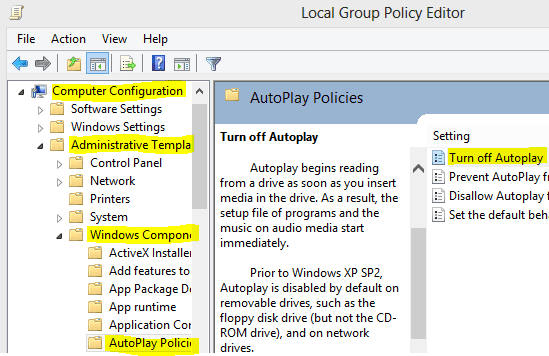
  4. Hit on Administrative Template under Computer Configuration > Windows Components > AutoPlay Policies > Double Click on Turn of Autoplay.
  5. There are three options - Not Configured/ Enabled/ Disabled. To turn off Autoplay, choose - Enabled > Apply > OK. 
  6. If you choose Not Configured or Disabled, Autoplay will be Enabled

How to turn off autoplay by gpedit.msc


Note: Autoplay Policy is available both on Computer and User Configuration. You should always use Computer Configuration. Because if there is any conflict between the two, Computer Configuration settings will be preferred. 


Turn off Autoplay - Shortcut Method

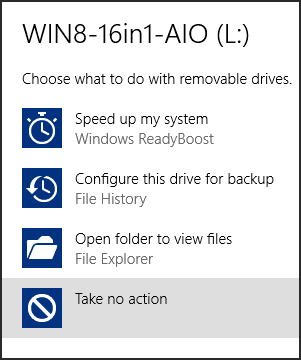
Another handy way to turn off Autoplay is choosing - Take No Action. When you insert any media on your PC, Windows may ask you what to do? 

In that time, you can simply choose Take No Action to turn off Autoplay. 

Turn Off Autoplay


Note: If you choose any action, next time this notification will not appear. 


Turn off/ on Autoplay from Control Panel

You can also turn autoplay on/ off from control panel. Follow the steps below:

  1. Go to Control Panel.
  2. Then open AutoPlay from there. 
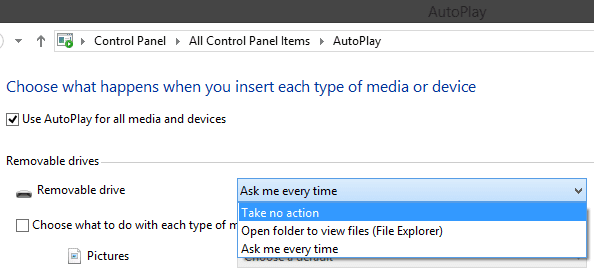
  3. Removable Drives > Choose Take No Action to disable autoplay or Choose Ask me Everytime. 
  4. To enable autoplay, choose Open folders to view files. Thats it. 

Disable Autoplay from Control Panel


If you have any confusion, please leave a comment . . . 


Stay with Marks PC Solution to get more interesting IT topics!


Go to link download

Read more »

Friday, August 19, 2016

Download Windows 10 32Bit Or 64Bit ISO File Home Or Pro Edition Free Download

Download Windows 10 32Bit Or 64Bit ISO File Home Or Pro Edition Free Download


Windows OS is most widely used operating system for different devices. Windows OS is a Microsoft product. Windows OS update its version from time to time with its new amazing features. Its start its journey from Windows 95 and till update to its subsequent versions like 98, 2000, ME, Vista, XP, 7, 8, 8.1, and 10. Windows 10 is frequently launched and its become so much popular because of its new features. One reason of becoming popular of Windows 10 is that is freely provided by Microsoft corporation. Also there are many software compatibility issues with Windows 8.1. So Windows 10 is released with its new features which resolve all its software compatibility issues. Windows 10 also resolve the device driver compatibility issues. It do no need any device driver. It also provide basic inbuilt software like Winrar, PDF reader, Microsoft office document support. Windows 10 is also available for both 32 bit and 64 bit processor. Windows 10 also a provide a special feature called multiple desktop in which we can access multiple desktop, each with a different task. If you also want new awesome features of Windows 10 then this post is really for you. In this Article we are going to explain about the new features and step by step download procedure of Windows 10. 

Requirements for Windows 10                                                                                       


1 GB RAM.
1 Gigahertz Processor.
16 GB of Free Hard disk space.  
Graphics card: Microsoft DirectX 9 graphics device with WDDM driver.

Improvements In Windows 10


Improved Command Prompt.
Unified app store.
Multiple desktops.
Return of Start menus.
Advanced menu for settings.
More options for Task View.
Revised File Explorer and icons.
Single platform for smartphones, tablets, and PCs.
New browser, code-named Spartan.
Cortana personal assistant for desktops.


Comparison Between Windows 10 And Windows 8 


1. Edge Browser  Edge browser is one of the important feature of the Window 10 which is not available in Windows 8. Edge browser provide you the most optimize speed and feature. Its speed is more fast.
2. Start Menu changes Windows 10 also provide the changes in its design. Windows 10 embed Windows 8 tiles desktop into its start button which give it a more attractive look. 
3. Introducing personal assistant Windows 10 introduce a new feature called cortana. Cortana is a Windows 10 personal assistant which provide help about Windows 10. It also provide a way of entertainment. You just need to provide your Email and phone number.It is not available in Windows 8.
windows-10-cortana
4. Multiple Desktops Windows 10 also a provide a special feature called multiple desktop in which we can access multiple desktop, each with a different task.

Steps To Download Window 10 Or Upgrade From Older Version


1. First of all click on the download now button. Download tool now for 32 bit and 64 bit. Depend upon your processor click one of the button.

Download Now

2. After clicking the button your tool will start downloading. You will see the Windows 10 setup wizard with two radio buttons. One is upgrade this PC now and second is Create media installation file for other PC.
windows-10-upgrade-pc
4. If you want to upgrade from lower version of Windows like Windows XP, 7, 8 then you have to select first radio button. If you want to download the file then you have to select second radio button. 5. After selecting the update this PC button Windows 10 start downloading and after downloading it will start installing into your PC.
6. If you have valid version of Windows 7 and 8 you do not need an Activation key. After installation it will automatically search for drivers
7. If you want to install on multiple PCs then you have to create an ISO image file or directly burn it into the USB.
8. After selecting the create media file button you will see the Windows 10 setup wizard. In this wizard you have to select Language, Edition and CPU architecture.
windows-10-select-edition
9. Then you have to click on the next button then you see the next wizard. In this wizard you have to select one of two options. One is USB flash drive and second is ISO image. Select the button according to your choice. Then click next button and file start downloading.
windows 10 usb flash drive or iso file
10. Now your Windows 10 is ready install it into different PC.

Go to link download

Read more »

Tuesday, August 16, 2016

How To Verify Your Facebook Page or Profile Submit Request

How To Verify Your Facebook Page or Profile Submit Request


facebook verified PageFacebook recently introduce new feature to show that a page or profile is verified or not. As a normal Facebook user we all create account or page with our name and it is also possible to create multiple account on same name. Their are number of same name pages or account for any celebrity, public figure or for any business. So Facebook take serious step to make clear that which one is official and all the rest of others are not. This verification show that the page or profile your are visiting official represent someone or maybe a property of anybody. Facebook verify pages according to there online and offline presence. If you are real famous personally and well known by public then it will be very easy. Facebook verify pages for celebrities and public figures easily as compare to brand, websites based pages. So verification is just depend on our luck and popularity. For any famous celebrity you cant get his or her page verified until you are authorized representative or that celebrity manually submit request. So in this topic i will explain you both method for Automatic process and manual process and i hope this help you to understand in best way about verification.


What is Verified Profile or Page ?


According to this new option some pages and Profiles are  claim as Official and verified by Facebook. You may observe on many profiles and pages their is Blue Color Tick Badge just in the next of name. 
facebook verified badge


Facebook only four type of pages or profiles which are
  • Celebrities
  • Journalists
  • Government Officials
  • Popular Brand or Businesses
These are four categories whose pages and profiles are claimed by Facebook based on their popular. Suppose if you have any local business which is popular then Facebook may claimed your page if you are official representative. Then their is no need to submit any type of request to Facebook. They automatically claim your page as verified depend on some details and minimum requirements mention by Facebook.

How To Get Facebook Page Verified ?


If your profile or any Page whose your are official representative and also based on above mention categories then their are chances of your page to get verified. Actually Facebook does not have any request form to claim verified this is totally automatic process done from Facebook side. So to become verified in future you should have to do some changes in your Profile or Page
  • Your page should be official represent your local business or any personality and may be have some popularity on Facebook.
For Facebook claiming process your page or profile must have minimum details because if you add full details accurately then Facebook automatically check your provided information if they find your page or profile details accurate and helpful then verify your page here are two parts mention by Facebook to become verified
  • Link To Your Profile or Page From Official Website and also link website on your page or profile.
  • Provide accurate information in details about your business in About Section of Page or Profile
In About section must add significant long and short description, keyword who represent your business, Email, Website, Products and verified page location with claimed business address and other details in Page Info tab. Just for example as shown below

facebook page about
For more details visit help center here for Profile or Page About info.

These are some tips which help you to get verified if your profile or page is official. Facebook dont guaranteed  about all pages to get verified because its totally depend on Popularity and accuracy. So add all information and wait until page processed your profile or page to make you verify. According to me it takes almost 40-50 days after adding info to get verify if Facebook approved your account or page.


Submit Request For Verification Manually


Recently Facebook update the latest for submit request for verification badge. As many users are cheated by fake agents and agencies so finally Facebook decide to introduce a request form for normal users to submit request for verification. To submit request manually visit below given form


Like us To Unlock This Content
This content is locked. Like us on Facebook, Twitter or Google plus to unlock it.

Open this form from that account in which are admin of that or in that account which authorized representative of that person.

Simply select the page and upload ID proof and verification letter official signed by Celebrity.

Pages of Celebrities and Public figures are currently accepted. Business and websites based pages are not accepted.

Your will receive an email from Facebook team regarding verification. It takes around 24-48 hour about your page status.

For more details checkout below given article. If you will help you to understand more about verification.

I hope you learn something new in this article to make your business or powerful and trusted on Facebook also. If you have any question feel free to share your comment.

Go to link download

Read more »