
Showing posts with label file. Show all posts
Showing posts with label file. Show all posts
Wednesday, October 19, 2016
Tutorial on Goal Seek Project File Included
Tutorial on Goal Seek Project File Included

Goal Seek helps you to find a specific target from a given data. Suppose you are required to adjust either cost or price or production unit to make a certain amount of profit. In this situation, you can use Goal Seek to find out the optimum level of input to meet your target. Here you must know that the Goal Seek can only work with a single variable.
Note: This tutorial is prepared on Excel 2013. Excel 2007 and 2010 will be much similar to version 2013.
Example 1
Lets start by a simple example. Go to Excel > Open a Blank Worksheet > Input the data as shown below:
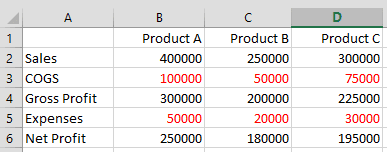
The red figures are negative values.
- Input the figures in Sales for Product A, B and C.
- Enter Cost of Goods Sold in the next row.
- Deduct 3rd row from 2nd row to find out the Gross Profit. (i.e. =B2-B3)
- Enter the other expenses in the 5th row.
- Deduct expenses from Gross profit to find Net Profit. (i.e. =B4-B5)
Important: you must find out the Gross Profit, Net Profit through formula. Otherwise, the Goal Seek function may not work.
At the 6th row, we get the Net Profit for Product A, B and C as 250000, 180000 and 195000 respectively.
Problems & Solutions
In this settings, how can we increase the Net Profit of Product C from 195000 to 200000?
Ans: You can either increase sales, or decrease COGS and other expenses. But you have only one choice. Choose any of the three variables what you are supposed to change. Suppose, you have to change COGS. That means, cell D3. Use Goal Seek as follows:
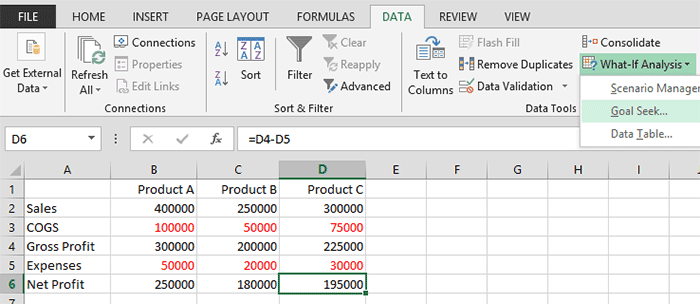
- Select the D6 cell. Move to the DATA tab > What-If Analysis > Choose Goal Seek.

- Make sure that the Set Cell box contains D6.
- Type 200000 in To Value box.
- Click on the By changing cell box and choose D3 from the worksheet. Then it will be automatically converted to $D$3.
- Hit OK > You will get the following result -

This example is easy to calculate. You can find the result through manual process. Now I would like to move to the more complex example.
Example 2
Go to Excel > Create a new worksheet. Input the data as shown below:
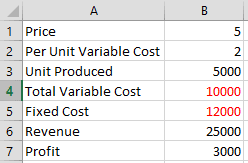
- Input the price of finished goods in B1.
- Per unit variable cost in B2.
- Enter the total number of units produced in B3.
- Get total variable cost by multiplying variable cost and total unit (=B3*B2).
- Enter the fixed cost as given.
- Multiply price with total number of units produced to find out Revenue (=B3*B1).
- Deduct fixed cost and variable cost from revenue to determine profit (=B6-B5-B4).
In the above example, the profit is 3000. How to make it 5000?
Well, you may have several choice as:
- Changing the price
- Reducing the variable cost
- Increasing the production unit etc.
Suppose, you have no way to reduce the cost or increase the production. In that situation, you can only adjust the price. Lets raise it through Goal Seek . . .

- Click on the cell B1
- Move to Data > What-It Analysis > Goal Seek
- Set Cell B1
- To Value 5000
- By Changing Cell, choose B1 ($B$1)
- Hit OK > Finally Get the following result -
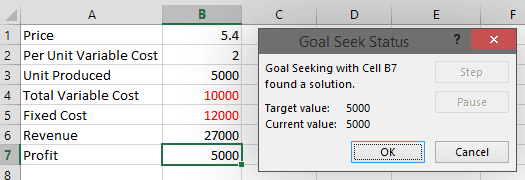
Within wasting much time, you can calculate the optimum product price to earn your target profit. You just raise the price by .40 to increase the profit from 3000 to 5000. Similarly, you can also adjust variable cost or production unit. But you cant work with more than one variable at a time.
Project File
Ive uploaded the project file in Google Drive. You can download this if necessary. The project file is saved as .xlsx format. You must need at least Excel 2007 or above to open this file.
There are two sheets - Sheet 1 and Sheet 2. Download the Goal Seek tutorial . . .
Project File
Ive uploaded the project file in Google Drive. You can download this if necessary. The project file is saved as .xlsx format. You must need at least Excel 2007 or above to open this file.
There are two sheets - Sheet 1 and Sheet 2. Download the Goal Seek tutorial . . .
Stay with Marks PC Solution to get more interesting IT topics!
Go to link download

Wednesday, October 12, 2016
210 RM 924 BANGLA FLASH FILE BY helpful man 100 Free
210 RM 924 BANGLA FLASH FILE BY helpful man 100 Free
210..RM-924 BANGLA FLASH FILE
BY
helpful-man
DOWNLOAD
http://www.4shared.com/rar/2E_yzkjyce/RM-924-BANGLA_FLASH_FILE_BY_he.html
How To Update Galaxy S 3 LTE 4.4.4 Software Full Solution Way Tutirial
Go to link download
Saturday, October 8, 2016
Nokia 114 RM 827 Flash File Latest Version Free Download
Nokia 114 RM 827 Flash File Latest Version Free Download
Nokia 114 flash file latest version firmware free download:
Nokia 114 flash file latest version firmware free download. Nokia 114 flash file latest version has been released lot of new features and ready to free download. If you want to download nokia 114 flash file latest version just clicking its official downloading link, which is given at the end of this article. Nokia 114 flash file latest version is most helpful for you to flash or update your nokia phone. After installing this flash file you can enjoy its latest amazing features.
This flash file firmware for this phone is introduced by Nokia inc and provides completely free for their users. You can download nokia flash file latest version 114 by following the given official downloading link. If you want to download any other Nokia phone latest firmware then click here.
Download Link:
http://www.4shared.com/rar/V3eOsN8e/RM-827.htm
Go to link download
Thursday, October 6, 2016
Monday, October 3, 2016
IDM After finish Downloading it say File has been Moved Fix it Now!
IDM After finish Downloading it say File has been Moved Fix it Now!
This thing has been happening to me more than one time a week, to be honest i couldnt know what to do next. I finish downloading a file with 889MB by using IDM but After i finish download and want to open it it prompt " ......file has been moved".
 The massage was killing me because I could find where the file has been moved. So I think and decide to go and check on IDM temporary files downloads. Final image to see the file but still can not be open.....that was another problem, check the file extension and notice has no file extension so I change file extension to .mp4 as my file was in Mp4 format while i was downloading it. And it work like waooooooh!!!!
I made it.
NB:
Remember to change extension File format after see your file, then move it to any place you want
 The massage was killing me because I could find where the file has been moved. So I think and decide to go and check on IDM temporary files downloads. Final image to see the file but still can not be open.....that was another problem, check the file extension and notice has no file extension so I change file extension to .mp4 as my file was in Mp4 format while i was downloading it. And it work like waooooooh!!!!
I made it.
 |
| Allocate IDM temporary file folder |
 |
| Follow the Step to Find your hidden ////File |
Remember to change extension File format after see your file, then move it to any place you want
For any Comment, advice or Question do not be uncomfortable...
Just leave a Comment Below
And I will Help. Or send a Mail through my Contact:
Raymkindo02@gmail.com
+255718574710
Go to link download
Saturday, October 1, 2016
Nokia Asha 301 Rm 839 Latest Firmware Flash File Free Download
Nokia Asha 301 Rm 839 Latest Firmware Flash File Free Download
Nokia Asha 301 Rm-839:
Rm-839 is the latest firmware for Nokia asha 301 dual sim phone. Rm-839 latest firmware for Nokia model has been released recently and ready to free download. You can download this latest firmware for Nokia asha 301 dual sim phone,just click the download link which is given at the end of this post. This is its official downloading link.
Rm-839 latest firmware for Nokia is divided into three types (CNT, MCU, PPM) these are available at the end of this article. If you want to install this firmwares on your Nokia set then you download first these three files. Click the downloading link to download the latest firmware for Nokia asha phone.
When the downloading is completed you must need a box (ATF, Miracle, etc) to install this files to your Nokia set. Click the given downloading to start download now.
CNT Download Here:
MCU Download Here:
PPM Download Here:
Go to link download
Friday, September 30, 2016

Wednesday, September 21, 2016

Tuesday, September 13, 2016
Western D35i Flash file
Western D35i Flash file
CPU TYPE:625A
Flash ID: 00EF0040
Flash Type: SF_W25Q32BV
Chip Capacity: 0x300000(3MB)
Password:- Liton_Bkash
Flash ID: 00EF0040
Flash Type: SF_W25Q32BV
Chip Capacity: 0x300000(3MB)
Password:- Liton_Bkash
Download

Go to link download
Symphony W100 Orignal Flash File Without password
Symphony W100 Orignal Flash File Without password

ITS OTHERS BRAND MODEL FILE BUT NO PROBLEM I M TESTED
DOWNLOAD
Go to link download
Thursday, September 8, 2016
Symphony D130 MTK 6250 Flash File tested
Symphony D130 MTK 6250 Flash File tested
Symphony D130 (MTK-6250)

Info : 01
WBG1309SY_0201_PCB01_GPRS_MT6250_S00.1309SY_0201_V 0656.BIN
Project ID : 1309SY_0201_V0656
CPU_ID : MT625A
Flash Size : 0x100000(16MB)
Password : Ashfaq Tawhid Raya
Info : 01
WBG1309SY_0201_PCB01_GPRS_MT6250_S00.1309SY_0201_V 0656.BIN
Project ID : 1309SY_0201_V0656
CPU_ID : MT625A
Flash Size : 0x100000(16MB)
Password : Ashfaq Tawhid Raya
Symphony D130
Go to link download
Thursday, September 1, 2016
updated Distributed File System benchmark
updated Distributed File System benchmark
Note: this is an update to my previous test
Im investigating various distributed file systems (loosely termed here to include SAN-like solutions) for use in Docker, Drupal, etc. and couldnt find recent benchmark stats for some popular solutions so I figured Id put one together.
Disclaimer: This is a simple benchmark test with no optimization or advanced configuration so the results should not be interpreted as authoritative. Rather, its a rough ballpark product comparison to augment additional testing and review.
My Requirements:
- No single-point-of-failure (masterless, multi-master, or automatic near-instantaneous master failover)
- POSIX-compliant (user-land FUSE)
- Open source (non-proprietary)
- Production ready (version 1.0+, self-proclaimed, or widely recognized as production-grade)
- New GA release within the past 12 months
- Ubuntu-compatible and easy enough to set up via CloudFormation (for benchmark testing purposes)
Products Tested:
- GlusterFS 3.7.6 [2015-11-09]
- (replicated volume configuration) - CloudFormation script
- LizardFS 3.9.4 [2015-12-09]
- CloudFormation script
XtreemFS 1.5.1 [2015-03-12]- couldnt get write-replication (WqRq or WaR1) to work ("Input/output error") - CloudFormation script
- CephFS 9.2.0 [2015-11-06]
- CloudFormation script
SheepFS 0.9.3 [2015-11-05]- cant write any files to the client mounted folder ("cannot touch text.txt: Function not implemented") - CloudFormation script
- SXFS 2.0 [2015-12-15]
- CloudFormation script
- Bazil is not production ready
- BeeGFS server-side components are not open source (EULA, Section 2)
- Behrooz (BFS) is not production ready
- Chirp/Parrot does not have a *.deb package
- Gfarm version 2.6.8 compiled from source kept returning x.xx/x.xx/x.xx for gfhost -H for any non-local filesystem node (and in general the documentation and setup process was terrible)
- GPFS is proprietary
- Hadoops HDFS is not POSIX-compliant
- Lustre does not have a *.deb package and requires a patched kernel
- MaggieFS has a single point of failure
- MapR-FS is proprietary
- MooseFS only provides high availability in their commercial professional edition
- ObjectiveFS is proprietary
- OpenAFS kerberos requirement is too complex for CloudFormation
- OrangeFS is not POSIX-compliant
- Ori latest release Jan 2014
- QuantcastFS has a single point of failure
- PlasmaFS latest release Oct 2011
- Pomegranate (PFS) latest release Feb 2013
- S3QL does not support concurrent mounts and read/write from multiple machines
- SeaweedFS is not POSIX-compliant
- Tahoe-LAFS is not recommended for POSIX/fuse use cases
- TokuFS latest release Feb 2014
AWS Test Instances:
- Ubuntu 14.04 LTS paravirtual x86_64 (AMI)
- m1.medium (1 vCPU, 3.75 GB memory, moderate network performance)
- 410 GB hard drive (local instance storage)
Test Configuration:
Three master servers were used for each test of 2, 4, and 6 clients. Each client runs a small amount of background disk usage (file create and update):
(crontab -l ; echo "* * * * * ( echo $(date) >> /mnt/glusterfs/$(hostname).txt && echo $(date) > /mnt/glusterfs/$(hostname)_$(cat /dev/urandom | tr -dc a-zA-Z0-9 | fold -w 25 | head -n 1).txt )") | sort - | uniq - | crontab -
Results of the three tests were averaged. Benchmark testing was performed with bonnie++ 1.97 and fio 2.1.3.
Example Run:
$ sudo su -
# apt-get update -y && apt-get install -y bonnie++ fio
# screen
# bonnie++ -d /mnt/glusterfs -u root -n 1:50m:1k:6 -m GlusterFS with 2 data nodes -q | bon_csv2html >> /tmp/bonnie.html
# cd /tmp
# wget -O crystaldiskmark.fio http://www.winkey.jp/downloads/visit.php/fio-crystaldiskmark
# sed -i s/directory=/tmp//directory=/mnt/glusterfs/ crystaldiskmark.fio
# sed -i s/direct=1/direct=0/ crystaldiskmark.fio
# fio crystaldiskmark.fio
Translation: "Login as root, update the server, install bonnie++ and fio, then run the bonnie++ benchmark tool in the GlusterFS-synchronized directory as the root user using a test sample of 1,024 files ranging between 1 KB and 50 MB in size spread out across 6 sub-directories. When finished, send the raw CSV result to the html converter and output the result as /tmp/bonnie.html. Next, run the fio benchmark tool using the CrystalDiskMark script by WinKey referenced here."
Important Notes:
1. Only GlusterFS and LizardFS could complete the intense multi-day bonnie++ test. The others failed with these errors:
- CephFS (both kernel and fuse)
- Cant write block.: Software caused connection abort
- Cant write block 585215.
- Cant sync file.
- SXFS
- Cant write data.
| Seq Create (sec) | Rand Create (sec) | |
|---|---|---|
| GlusterFS 3.7.6 | 173 | 164 |
| LizardFS 3.9.4 | 3 | 3 |
3. GlusterFS took at least twice as long as LizardFS to complete the bonnie++ tests (literally 48 hours!). Switching to xfs out of curiosity helped performance significantly (less than 24 hours), however all tests were done with ext4 (Ubuntu default).
4. CephFS did not complete the "Rand-Read-4K-QD32" fio test
Results (click to view larger image):


(Note: raw results can be found here)
_______________________________________________________
Concluding Remarks:
- Since GlusterFS and LizardFS were the only ones that could complete the more intense bonnie++ test, I would feel more confident recommending them as "production ready" for heavy, long-term loads.
- Also (as mentioned above), LizardFS was much faster than GlusterFS (at the cost of higher CPU usage).
- In terms of setup and configuration, GlusterFS was easiest, followed by LizardFS, then SXFS, and finally (in a distant last place) CephFS.
- SXFS shows promise but theyll need to simplify their setup process (especially for non-interactive configuration) and resolve the bonnie++ failure.
- My overall recommendation is currently LizardFS
Go to link download
Tuesday, August 30, 2016
How To Create a scatter file for android MT6595 MT6582 MT6589 MT6592 MT6577 MT6589T MT6572
How To Create a scatter file for android MT6595 MT6582 MT6589 MT6592 MT6577 MT6589T MT6572
If youre looking for a tutorial on how to make a scatter file for MTK6582, MTK6595, MTK6589, MTK6592, MTK6577, MTK6589T, MTK6572, then youve come to the right place.
What youll need:
- MTK / MediaTek based smartphone
- USB Data Cable
- USB ADB VCOM drivers
- MTK Droid Tools
- Step 1 - Enable USB debugging
- Step 2 - Install the PDANet USB ADB VCOM drivers - http://www.gizbeat.c...r-windows/
- Step 3 - Download, extract, and run the latest version of MTK Droid Tools.

- Step 4 - Your phone should be on at this point. Connect the data USB cable to your phone and wait about 10 seconds. Eventually you should see the phones information come up.
- Step 5 - Click blocks map. A new window should open with all your phones block information and where each portion of your firmware is stored on ROM.

Step 6 - Click create scatter file. Navigate to where you want to save it. Save it in a place where you wont lose it. If you need it for flashing firmware, save it in the folder of the firmware. If you need it for flashing a recovery, save it in the folder with the recovery.
Go to link download
Wednesday, August 24, 2016
Distributed File System benchmark
Distributed File System benchmark
See my updated post here
Im investigating various distributed file systems (loosely termed here to include SAN-like solutions) for use in Docker, Drupal, etc. and couldnt find recent benchmark stats for some popular solutions so I figured Id put one together.
Disclaimer: This is a simple benchmark test with no optimization or advanced configuration so the results should not be interpreted as authoritative. Rather, its a rough ballpark product comparison to augment additional testing and review.
My Requirements:
- No single-point-of-failure (masterless, multi-master, or automatic near-instantaneous master failover)
- POSIX-compliant (user-land FUSE)
- Open source (non-proprietary)
- Production ready (version 1.0+, self-proclaimed, or widely recognized as production-grade)
- New GA release within the past 12 months
- *.deb package and easy enough to set up via CloudFormation (for benchmark testing purposes)
Products Tested:
- GlusterFS 3.6.2 [2015-01-27]
- (replicated volume configuration) - CloudFormation script (Ubuntu version)
- LizardFS 2.5.4 [2014-11-07]
- CloudFormation script (Ubuntu version)
XtreemFS 1.5.1 [2015-03-12]- couldnt get product to work ("Input/output error") - CloudFormation script (Ubuntu version)
- Bazil is not production ready
- BeeGFS server-side components are not open source (EULA, Section 2)
- Behrooz (BFS) is not production ready
- CephFS -- will be included in next round of testing
- Chirp/Parrot does not have a *.deb package
- Gfarm version 2.6.8 compiled from source kept returning x.xx/x.xx/x.xx for gfhost -H for any non-local filesystem node (and in general the documentation and setup was terrible)
- GPFS is proprietary
- Hadoops HDFS is not POSIX-compliant
- Lustre does not have a *.deb package
- MaggieFS has a single point of failure
- MapR-FS is proprietary
- MooseFS only provides high availability in their commercial professional edition
- ObjectiveFS is proprietary
- OpenAFS kerberos requirement is too complex for CloudFormation
- OrangeFS is not POSIX-compliant
- Ori latest release Jan 2014
- QuantcastFS has a single point of failure
- PlasmaFS latest release Oct 2011
- Pomegranate (PFS) latest release Feb 2013
- S3QL does not support concurrent mounts and read/write from multiple machines
- SeaweedFS is not POSIX-compliant
- SheepFS -- will be included in next round of testing
- SXFS -- will be included in next round of testing
- Tahoe-LAFS is not recommended for POSIX/fuse use cases
- TokuFS is latest release Feb 2014
AWS Test Instances:
- Debian 7 (wheezy) paravirtual x86_64 (AMI)
- m1.medium (1 vCPU, 3.75 GB memory, moderate network performance)
- 410 GB hard drive (local instance storage)
Test Configuration:
Two master servers were used for each test of 2, 10, and 18 clients. Results of the three tests were averaged. Benchmark testing was performed with bonnie++ 1.96 and fio 2.0.8.
Example Run:
$ sudo su -
# apt-get update -y && apt-get install -y bonnie++ fio
# screen
# bonnie++ -d /mnt/glusterfs -u root -n 4:50m:1k:6 -m GlusterFS with 2 data nodes -q | bon_csv2html >> /tmp/bonnie.html
# cd /tmp
# wget -O crystaldiskmark.fio http://www.winkey.jp/downloads/visit.php/fio-crystaldiskmark
# sed -i s/directory=/tmp//directory=/mnt/glusterfs/ crystaldiskmark.fio
# sed -i s/direct=1/direct=0/ crystaldiskmark.fio
# fio crystaldiskmark.fio
Translation: "Login as root, update the server, install bonnie++ and fio, then run the bonnie++ benchmark tool in the GlusterFS-synchronized directory as the root user using a test sample of 4,096 files (4*1024) ranging between 1 KB and 50 MB in size spread out across 6 sub-directories. When finished, send the raw CSV result to the html converter and output the result as /tmp/bonnie.html. Next, run the fio benchmark tool using the CrystalDiskMark script by WinKey referenced here."
Results (click to view larger image):


(Note: raw results can be found here)
_______________________________________________________
Concluding Remarks:
Both GlusterFS and LizardFS had strong showings with pros and cons for each. Both should work fine for production use. While not an endorsement, I will mention that GlusterFS had more consistent results (less spikes and outliers) between each test and I also like the fact that GlusterFS doesnt distinguish between master servers (master-master peers versus LizardFS master-shadow[slave] configuration).
Update: GlusterFS requires your number of bricks to be a multiple of the replica count. This adds complexity to your scaling solution. For example, if you want two copies of each file kept in the cluster you must add/remove bricks in multiples of two. Similarly, if you want three copies of each file kept in the cluster you must add/remove bricks in multiples of three. And so on. Since they recommend one brick per server as a best practice, this will also likely add cost to your scaling solution. For this reason, Im now preferring LizardFS over GlusterFS since it does not impose that limitation.
P.S. Check out this related article by Luis Elizondo for further reading on Docker and distributed file systems.
Go to link download
Tuesday, August 23, 2016
How To Extract apk File From Android Phone
How To Extract apk File From Android Phone
Best Ways To Extract .APK files On Android.
Method 1st:- Extract By Using APK Extractor
 Apk Extractor is one the most popular Android Application which is Available on Google Play Store for free. This Application allow you to extract .apk file from installed App in any Android device. It also allow you take backup of any App and move it into SD card or another device like computer and Laptop and also allow you to upload into Google Drive. Approximately 5 Million install this App. After getting the .apk file you can share it with others. It is a easy to use and fast application which allow
- Extract all most all Applications include system Inbuilt application.
- NO device rooting of Android is needed.
- It provide search option to search different applications.
- It can extract multiple Apps files together.
- Compatible from Android version 2.2 to 5.0.
Steps To Extract .apk With APK Extractor
1. Install Apk extractor into your Android device using the Button given below.

2. You can also download file manager to find the .apk file after extracting the file. By default the files are stored in /sdcard/ExtractedApks/.
3. Open the Apk extractor App on your device.
4. After launching the App you will see a list of installed Applications on your Android device.

5. Select the App whose .apk file you want to get.
6. You can also share the apk file tap and select the share option.
7. Tap the menu button-> then setting to change the path where you want to save .apk file.
Method 2nd:- Extract By Using ES File Explorer
 Es file explorer is one the famous file manager available on Google play store for free. It not only manage the files but also perform various tasks like download manager, task killer, cloud storage client, file sharing etc. It is available in 30 different languages. It is compatible with all Android versions. It also provide built in support for text, images, audio, video, Rar and Zip files. It can act as file manager, App manager, task manager, Bluetooth file browsing and sharing, text and photo editor. One of its most important feature is extracting .apk file from installed Apps and provide backup and sharing facility also. Approximately 300 Million users install this App. It provide easy to use tools and attractive interface.
Steps To Extract .apk File Using ES File Explorer
1. Install and download the Es file Explorer into your device by clicking the following button.
2. Open the and launch the App in your Android Device.
3. After Launching the App navigate to the tool menu.
4. In the tool menu select the application manager.

5. In the application manager you will see a list of Apps installed in your device.
6. Select the App whose .apk file you want to get.
7. click on Backup and your .apk file will start extracting.
8. Browse the path where you want to save the file.
Go to link download
Saturday, August 20, 2016
GFIVE M99 Flash File
GFIVE M99 Flash File
GFIVE M99 Flash File

Specifications
Display Features
* Radio Band: GSM 900/1800/850/1900 MHz
* Form Factor: Bar Phone
* Dual SIM, Dual Standby
* Display: 2.6? Color TFT Touch Screen
* Resolution: 240*320 Pixels
* Handset Colors: Grey
* Dimensions: 116*51*14.6 MM
Phonebook
* Messages: SMS and MMS
* Input Method: English, French, Arabic and Hindi
Data Application Functions
* Bluetooth: Version 2.0
* Data Service: GPRS
* WAP: Version 2.0
* Data Cable Chipset: USB 2.0
Camera Function
* Camera: Built-in 1.3 MP Camera
* Shooting Mode: Continuous and Still Shooting
* White Balance Modes Available : Automatic, Sunny Day, Cloudy Day, Incandescent Lamp and Fluorescent
* Photograph Mode: Taking Photograph with maximum resolution at 1024*1024 Pixels
* Video Shooting: Shooting with Sound
Recreational Functions
* Multimedia: FM Radio, Built-in 3D sound effect loudspeaker and USB Earphone Connector
* Audio playing in MP3 and WMA(Boom Music Voice With YAMAHA Sound Effects IC) Format
* Video Playing in 3GP and WMV Format
* FM Radio
Main Functions
* Built-in Antenna
* Built-in Vibration
* User Profile
* Reminding on Talk Time
* Hands free
* Standby Picture / Animation
* Screen Protection
* Caller Picture Identification
* Caller Ringtone Identification
Additional Functions
* Alarm
* Calendar
* Calculator
* Schedule
* World Time
* Currency Exchange
* Unit Changer
* Stopwatch
* Games: Built-in Games
* Recording
* Ringtones: MP3, WAM and CHORD -GFIVE M99 Flash File Download
Go to link download
Friday, August 19, 2016
Download Windows 10 32Bit Or 64Bit ISO File Home Or Pro Edition Free Download
Download Windows 10 32Bit Or 64Bit ISO File Home Or Pro Edition Free Download

Windows OS is most widely used operating system for different devices. Windows OS is a Microsoft product. Windows OS update its version from time to time with its new amazing features. Its start its journey from Windows 95 and till update to its subsequent versions like 98, 2000, ME, Vista, XP, 7, 8, 8.1, and 10. Windows 10 is frequently launched and its become so much popular because of its new features. One reason of becoming popular of Windows 10 is that is freely provided by Microsoft corporation. Also there are many software compatibility issues with Windows 8.1. So Windows 10 is released with its new features which resolve all its software compatibility issues. Windows 10 also resolve the device driver compatibility issues. It do no need any device driver. It also provide basic inbuilt software like Winrar, PDF reader, Microsoft office document support. Windows 10 is also available for both 32 bit and 64 bit processor. Windows 10 also a provide a special feature called multiple desktop in which we can access multiple desktop, each with a different task. If you also want new awesome features of Windows 10 then this post is really for you. In this Article we are going to explain about the new features and step by step download procedure of Windows 10.
Requirements for Windows 10
1 GB RAM.
1 Gigahertz Processor.
16 GB of Free Hard disk space.
Graphics card: Microsoft DirectX 9 graphics device with WDDM driver.
Improved Command Prompt.
Unified app store.
Improvements In Windows 10
Improved Command Prompt.
Unified app store.
Multiple desktops.
Return of Start menus.
Advanced menu for settings.
More options for Task View.
Revised File Explorer and icons.
Advanced menu for settings.
More options for Task View.
Revised File Explorer and icons.
Single platform for smartphones, tablets, and PCs.
New browser, code-named Spartan.
Cortana personal assistant for desktops.
1. Edge Browser Edge browser is one of the important feature of the Window 10 which is not available in Windows 8. Edge browser provide you the most optimize speed and feature. Its speed is more fast.
New browser, code-named Spartan.
Cortana personal assistant for desktops.
Comparison Between Windows 10 And Windows 8
1. Edge Browser Edge browser is one of the important feature of the Window 10 which is not available in Windows 8. Edge browser provide you the most optimize speed and feature. Its speed is more fast.
2. Start Menu changes Windows 10 also provide the changes in its design. Windows 10 embed Windows 8 tiles desktop into its start button which give it a more attractive look.
3. Introducing personal assistant Windows 10 introduce a new feature called cortana. Cortana is a Windows 10 personal assistant which provide help about Windows 10. It also provide a way of entertainment. You just need to provide your Email and phone number.It is not available in Windows 8.

4. Multiple Desktops Windows 10 also a provide a special feature called multiple desktop in which we can access multiple desktop, each with a different task.
Steps To Download Window 10 Or Upgrade From Older Version
1. First of all click on the download now button. Download tool now for 32 bit and 64 bit. Depend upon your processor click one of the button.
Download Now
2. After clicking the button your tool will start downloading. You will see the Windows 10 setup wizard with two radio buttons. One is upgrade this PC now and second is Create media installation file for other PC.

6. If you have valid version of Windows 7 and 8 you do not need an Activation key. After installation it will automatically search for drivers.
7. If you want to install on multiple PCs then you have to create an ISO image file or directly burn it into the USB.
8. After selecting the create media file button you will see the Windows 10 setup wizard. In this wizard you have to select Language, Edition and CPU architecture.


Go to link download
Thursday, August 18, 2016
GDL Xtreme 1 Flash File WITHOUT PASSWORD tested
GDL Xtreme 1 Flash File WITHOUT PASSWORD tested
GDL Xtreme-1 Flash File WITHOUT PASSWORD tested

DOWNLOAD
WITHOUT PASSWORD
Go to link download
Subscribe to:
Posts (Atom)