Tuesday, October 18, 2016
Hard Reset your BS Mobile Stark and remove password pattern lock gmail account
Hard Reset your BS Mobile Stark and remove password pattern lock gmail account
This tutorial is for BS Mobile Stark, follow my guide below.
This phone has Spreadtrum Chip (SPD6825) my gadget do not support this kind of chip. Im lucky that I found out the recovery mode after an hour.
Hopefully this tutorial will help you to unlock or fix your phone.

Hard resetting / factory resetting your phone will solve the following issues:
1. If you forgot your pattern lock
2. If you forgot your gmail account
3. If you forgot your password
4. Apps that automatically force closing
5. Stuck in BS Mobile Logo (sometimes does not work if the firmware is totally damage)
NOTE: Performing hard reset will erase your data.
To hard reset:
1. Turn off your phone
2. Press and Hold Volume Down + Power Button simultaneously. Keep holding the buttons until the phone power up. When you see the BS Mobile Logo immediately Press the HOME Button without releasing VOLUME DOWN + POWER Button.
3. An android Robot with red exclamation mark will appear. Press POWER button to activate Android System Recovery
4. Select wipe data / factory reset, then YES -- delete all user data, press Volume rocker to navigate and press the POWER button to confirm the selection
5. Reboot your phone.
Note:
If performing hard reset did not succeed, you need to wipe the cache first in the android system recovery before performing wipe / factory
reset.
I hope this tutorial helps you.. If you have any question just drop a comment.
Go to link download

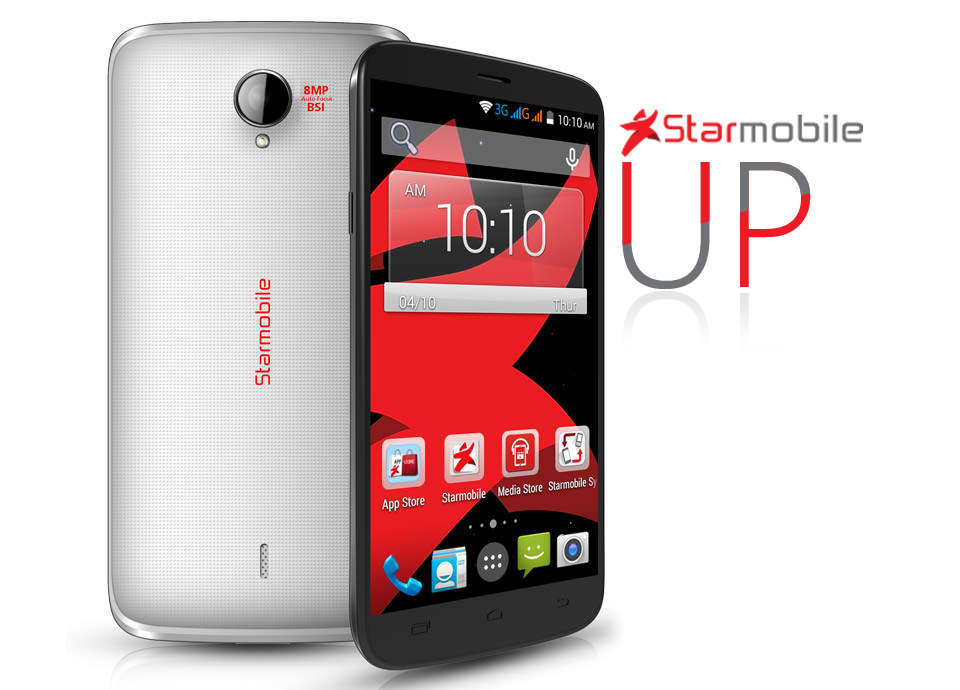
Hard Reset your Star Mobile Up and remove password pattern lock gmail account
Hard Reset your Star Mobile Up and remove password pattern lock gmail account
This tutorial is for Star Mobile Up. Just follow the instruction below. I will post my full ROM dump of this phone. Im still uploading the files.
Hard resetting / factory resetting your phone will solve the following issues:
1. If you forgot your pattern lock
2. If you forgot your gmail account
3. If you forgot your password
4. Apps that automatically force closing
5. Stuck in Star Mobile Logo (sometimes does not work if the firmware is totally damage)
NOTE: Performing hard reset will erase your data.
To hard reset:
1. Turn off your phone
2. Press and Hold Volume UP + Power Button simultaneously. Keep holding the buttons until the phone power up and you will see an android robot.
3. An Android with exclamation will appear with "no command." word in it. Press POWER Button to activate android system recovery.
5. Select wipe data / factory reset, press Volume rocker to navigate and press the VOLUME UP to confirm the selection
6. Reboot your phone.
Note:
If performing hard reset did not succeed, you need to wipe the cache
first in the android system recovery before performing wipe / factory
reset.
I hope this tutorial helps you.. If you have any question just drop a comment.
Go to link download
Sunday, October 16, 2016
iPhone 4 0 and iPhone 3 1 3 Unlock Release Confirmed for this Month
iPhone 4 0 and iPhone 3 1 3 Unlock Release Confirmed for this Month
Here we go. The waiting will finally be over.
It is now confirmed by a member of the iPhone Dev Team that full carrier unlock for iPhone OS 3.1.3 and 4.0 will be available this month.
check out the details below.
----------------------------------------------------------------------------------
We have been hearing about this one aren’t we? but what we have now is final confirmation. According to the member of iPhone Dev Team, full carrier unlocks for iPhone OS 3.1.3, and iPhone OS 4.0 will be released this month once Apple has released both the final version of iPhone OS 4, and the next iPhone 4G / HD.

People still ask, but sure, with both 4.0 & iPhoneHD coming out this month, so too will the 3.1.3/4.0 carrier unlocks
----------------------------------------------------------------------------
source
Go to link download
Hard Reset your LG Optimus G E971 E973 and remove password pattern lock and gmail account
Hard Reset your LG Optimus G E971 E973 and remove password pattern lock and gmail account
Hey,
I have a new tutorial for LG device. And this one is for LG Optimus G E971 this also work in E973 variant.
.jpg)
Hard resetting / factory resetting your phone will solve the following issues:
1. If you forgot your pattern lock
2. If you forgot your gmail account
3. If you forgot your password
4. Apps that automatically force closing
5. Stuck in LG Logo (sometimes does not work if the firmware is totally damage)
NOTE: Performing hard reset will erase your data.
To hard reset:
1. Turn off your phone.
2. Press and Hold VOLUME DOWN + Power button. Then immediately insert the USB cable. Your usb cable must be plugged in a power on laptop or pc. You should see a text with a black ground in it.
3. Press Power Button two times to Factory Reset your phone.
4. Reboot your phone.
Note:
If performing hard reset did not succeed, you need to wipe the cache first in the android system recovery before performing wipe / factory reset.
I hope this tutorial helps you.. If you have any question just drop a
comment.
Go to link download
Saturday, October 15, 2016
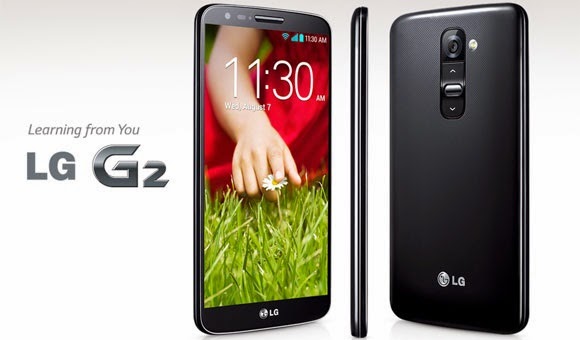
Hard Reset your LG G2 D802 and remove password pattern lock gmail account
Hard Reset your LG G2 D802 and remove password pattern lock gmail account
Hey,
I have a new tutorial and this for LG G2 or LG D802. Just keep on trying when you are factory resetting. It takes me on 5-7 attempts to successfully hard reset this phone.
Hard resetting / factory resetting your tablet will solve the following issues:
1. If you forgot your pattern lock
2. If you forgot your gmail account
3. If you forgot your password
4. Apps that automatically force closing
5. Stuck in LG LOGO(sometimes does not work if the firmware is totally damage)
NOTE: Performing hard reset will erase your data.
To hard reset:
1. Turn off your phone.
2. Press and Hold VOLUME DOWN + Power button. When it powers up, release the all the Button.
3. When you see the LG LOGO, press the POWER Button 3 times. After pressing it 3 times. It should bring you in a text mode with indication if you are going to factory reset your phone.
4. Just press the POWER Button and it will reboot and automatically wipe all your data.
I hope this tutorial helps you.. If you have any question just drop a comment.
Go to link download
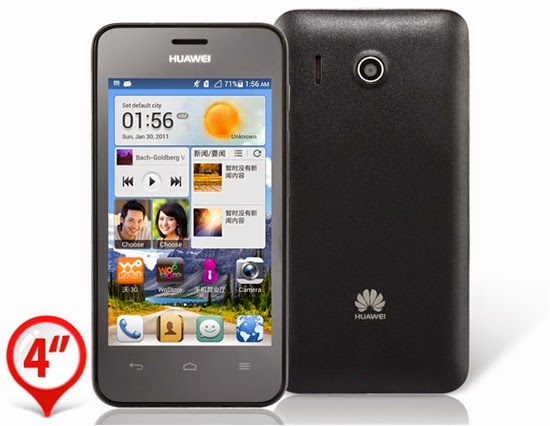
Hard Reset your Huawei Y320 U10 and remove password pattern lock gmail account
Hard Reset your Huawei Y320 U10 and remove password pattern lock gmail account
This tutorial is for Huawei Y3200-U10....
Hard resetting / factory resetting your phone will solve the following issues:
1. If you forgot your pattern lock
2. If you forgot your gmail account
3. If you forgot your password
4. Apps that automatically force closing
5. Stuck in Huawei Logo (sometimes does not work if the firmware is totally damage)
NOTE: Performing hard reset will erase your data.
To hard reset:
1. Turn off your phone
2. Press and Hold Volume UP + Power Button simultaneously. A boot menu will appear. Select Recovery Mode. Press VOLUME UP to navigate and PRESS VOLUME DOWN to confirm your selection.
3. An Android with exclamation will appear with "no command." word in it. Press option key (right side of home key) to activate android system recovery.
5. Select wipe datta / factory reset, press Volume rocker to navigate and press the HOME KEY to confirm the selection
6. Reboot your phone.
Note:
If performing hard reset did not succeed, you need to wipe the cache
first in the android system recovery before performing wipe / factory
reset.
I hope this tutorial helps you.. If you have any question just drop a comment.
Go to link download
Hard Reset your Cherry Mobile Bubble and remove password pattern lock and gmail account
Hard Reset your Cherry Mobile Bubble and remove password pattern lock and gmail account
This tutorial is for Cherry Mobile Bubble for board version 1 and version 2, follow my guide below.
Hard resetting / factory resetting your phone will solve the following issues:
1. If you forgot your pattern lock
2. If you forgot your gmail account
3. If you forgot your password
4. Apps that automatically force closing
5. Stuck in Cherry Mobile Logo (sometimes does not work if the firmware is totally damage)
NOTE: Performing hard reset will erase your data.
To hard reset:
1. Turn off your phone
2. Press and Hold Volume Down + Power button simultaneously, keep on pressing until the phone power up.
3. A phone with exclamation mark will appear. Press HOME BUTTON to activate Android System Recovery.
4. Select wipe data / factory reset, then YES -- delete all user data, press Volume rocker to navigate and press the POWER button to confirm the selection
5. Reboot your phone.
Note:
If performing hard reset did not succeed, you need to wipe the cache first in the android system recovery before performing wipe / factory reset.
I hope this tutorial helps you.. If you have any question just drop a comment.
Go to link download
Friday, October 14, 2016
ReMarketing and Affinity Lists for Increased Relevance and Sales
ReMarketing and Affinity Lists for Increased Relevance and Sales
Have you ever wanted to reach potential customers who have visited your website and keep your brand in front of them and have another chance to earn their business? Yeah. We all would. This has been possible for a few years and gets easier with each passing year. If you’re confused about remarketing vs retargeting, don’t worry; they’re the same thing. The team at Google just has to be different so they call it remarketing.
You put in a lot of energy to get customers on your website or in your store. I’m sure you want every opportunity to make the sale. Sometimes people just need some extra time for a paycheck to come in or to save up for your product. This is the perfect reason for why EVERY business needs to use remarketing. Naturally, you’re a smart marketer. You should continue to use the tactics that you already know that work. Now while that sounds ridiculously obvious, I understand that it’s actually harder to stick to than you might think; just like that diet plan…
The good news in 2015 is that there is no short supply of data to illustrate why remarketing is so important. Maybe you have seen the stat that shows 49% of customers visit 2 – 4 websites before they decide to make a purchase. Obviously, it should be no surprise to you, then, that 96% of consumers don’t make their purchase on the first visit to a website. Does this describe you and your buying habits?
When was the last time you visited a website to perform research on a product or service to buy later either on the website or in the store?
Did you see ads between the time you first visited the site and the time you returned to buy? Well those ads played a part in persuading you whether you realize it or not and that’s why so many companies are doing this and you should as well.
So let’s create a Remarketing Campaign now. Yes it will be a separate campaign within AdWords. Remarketing lists for search ads (RLSA) will assist in getting in front of those customers. Think of RLSA like a booster rocket for your Google search and Display ad campaign: it essentially puts your great ads in front of highly qualified customers who have already shown interest in your business or your products by visiting your website. Let me clarify something here. There are a few types of remarketing. RLSA is for Search only text ad campaigns. This campaign requires a list of 1000 visitors or cookies placed. The other type of remarketing uses the Google Display Network and uses a mix of text and display (banner or video) ads. This remarketing campaign requires only 100 visitors or cookies before activating. In order to maximize the reach of placements where your ads may appear on the GDN, you will want to use both text, image ads in as many ad sizes as possible to your campaign and if possible, video ads as well. The Ad gallery offers an easy way to create ads. It pulls images from your website and you supply the text. While this works, I recommend you create your own image ads. I’m sure you or your team can be more creative than the gallery tool.
To create your remarketing campaign, follow these ten steps:
- Sign in to your AdWords account.
- Click the Campaign tab at the center of your AdWords user interface screen.
- Click the red + Campaigns button.
- From the drop-down menu, select “Display Network only.” (assuming you don’t want an RLSA campaign)
- Select the “Remarketing” radio button.
- Enter a campaign name, bid strategy, and budget.
- Click the Set up remarketing button. You’ll go through the guided process to set up your remarketing tag and create your lists:
- Next, AdWords will create the remarketing tag for you. You’ll be able to email the tag to yourself or your webmaster or your client, along with instructions on how to add it to each page of your website. Note that If you use Google Analytics, you will see a checkbox to use the tracking code that’s already on your site instead.
- You will see that AdWords has automatically created an “All Visitors” list to get you started, so you don’t need to create this list yourself. The “All Visitors” list includes everyone who has visited any tagged pages on your website. You can later create new lists for your different groups of site visitors (I will discuss this later in this article). Click Return to campaign.
- Click Save and continue.
- Just like other campaigns, enter the ad group name and a bid that you feel will be competitive.
Click Save and continue if you want to create your ads, or Skip ad creation if you want to do this later.
So how do you create RLSA or Display Audience Lists?
It’s a simple 4 step process.- Within AdWords when creating a remarketing campaign you will 1st create an audience list and when you create that list you will be given some javascript tagging code. You will place that code on every single page of your site.
- To set up an audience list you will simply go to Share library > Audiences > Create a remarketing list. This step automatically creates the main remarketing list which captures all of your visitors. You can then create as many lists as you want based on the sections of your website which people visit. The cool thing is that there is no need to add a separate tag for each list; one tag will segment all of the lists used.
- Create Multiple Lists Focusing on general (all) visitors, recent shoppers who purchased and, those who abandon the shopping cart.
- As a rule of thumb use 35% – 40% of the entire SEM budget on remarketing.
- Keep all targeting options turned off because you want your special offer remarketing ads to follow your visitors EVERYWHERE they go for a time period from 30 to 540 days.
Most of the time, the remarketing campaign will have zero constraints. No In-Market groups, affinity groups, demographic segments or placements set because you want the ads to follow the person everywhere they go. There may be times when you don’t want to be so blatantly obvious there is remarketing going on. To go covert, you can now use Custom Affinity Audiences which allows you the marketer to define who you want to get in front of across the web, regardless of the device they are using to access the internet. Custom affinity audience option works across the entire Google Display Network, which, according to ComScore, reaches 94% of the web in the United States on a monthly basis, and 89% of global internet users. How’s that for reach?
You can create a custom list that targets only people who visit specific pages on your site or watch a specific video and a different list for a different event, product or service page. Staying in front of this list will increase sales.
Good luck.
Go to link download
Wednesday, October 12, 2016
Apple Jailbreak Unlock iPhone 5 5s 4s with iOS 7 0 4 and 7 0 5 7 0 6 Untethered Version Just Released Today
Apple Jailbreak Unlock iPhone 5 5s 4s with iOS 7 0 4 and 7 0 5 7 0 6 Untethered Version Just Released Today
This is most certainly a rarity. Usually, whenever a jailbreak is released, Apple works to deliver an update to prevent it, and the next iOS release is thus unjailbreakable. However, a couple of timely bugs have emerged which, from a PR point of view, are a tad more pressing, and following on from the release of http://tinyurl.com/GTB365 to jailbreak the iPhone it’s likely a similar update has arrived for them to work with iOS 7.0.4.
@GettheBest365: Have tested all devices, and it’s looking good for 7.0.4. iPad mini wi-fi and iPhone 5,4S,4,3GS are still jailbreakable.
getthebest365.com from http://goo.gl/ttTG2k has been downloaded by over 250,000 customers located in over 145 countries. To further ensure customers of its products usability, getthebest365.com offers a 100% full money back guarantee on all orders. Customers dissatisfied with the company’s product will be given a full refund, no questions asked.Safe Jailbreak Team has confirmed that unlock and untethered jailbreak iPhone 5,4/4S iOS 7.0.4/ 7.0.6/7 is covered successfully in openanyphone.com. So the unlockers are now performing their tests and modification on iOS 7.0.4/ 7.0.6/7 and they releasedhttp://tinyurl.com/GTB365 unlock and untethered jailbreak iPhone 4/4S/3GS iOS 7.0.4/ 7.0.5/7 . Precisely, the they found untethered not a new jailbreaks. So the http://tinyurl.com/GTB365 has merged this jailbreak on http://tinyurl.com/GTB365to get the iOS 7.0.4/ 7.0.5/7 untethered jailbreak on your iPhone 5s, 4s, 4, iPod touch 4G, 3G, iPad 2 and latest.
One good advantage of the software is that the jailbreaking and unlocking process is completely reversible and there will be no evidence that the iPhone has been jailbroken and unlocked . iOS 7.0.4/7.0.6/7 comes with many new features and updates for multitasking and storage. By unlocking and jailbreaking the iPhone, unleash unlimited possibilities to improve this already fantastic experience and the iPhone FULL potential.
The benefits of unlocking your iPhone are clear: You will be able to use cheap local (pay as you go) simcards in the phone, and make phone calls at cheaper local rates. You can use the iPhone on cheaper networks (especially as data rates are often very expensive on the standard iPhone carrier networks). You can use more then one phone number on the iPhone, and switch your simcard at any time you wish.Of course you can always use the original simcard after unlocking. The unlock does not affect the way your iPhone works (if you use a good unlocking service such as that offered by (getthebest365.com.com) it enables the phone to accept ANY simcard.Other benefits of unlocking your iPhone are the addition of Cydia and installer on the unlocked iPhone.
To Unlock your iPhone with any carrier visit the official website http://getthebest365.com
Before going through any jailbreak process with getthebest365.com it is always good housekeeping to perform a full backup of all information on the device. It is unlikely that anything will go wrong during the process but when undertaking any process that modifies the internals of a file system it is always prudent to err on the side of caution.
Go to link download
Monday, October 10, 2016
I9195 Root Unlock Full ProcedureStep 4 Turn off the phone Press and hold home volume down and power
I9195 Root Unlock Full ProcedureStep 4 Turn off the phone Press and hold home volume down and power
9195 Root & Unlock Full Procedure
STEP 1.Extract recovery-clockwork-6.0.3.7-serranoltexx.tar.zip file to your computer.(Download hereOdin_v3.09) &
recovery-clockwork-6.0.3.7-serranoltexx.tar(1)
Step 2.Copy the " S4Mini_RootKit_v1.zip" to your device SD card.File hereS4Mini_RootKit_v1
Step 4.Turn off the phone.
Press and hold home, volume down and power
Connect Micro USB cable, and press
Start Odin, and then click AP button.
Select "recovery-clockwork-6.0.3.7-serranoltexx.tar.md5" file that you extracted,
and press Start button. The phone will reboot when finished.
Step 3.After the phone restart on vibrate press hold volume up and home buttons to boot into recovery mode.
Select the option to install the ZIP file (S4Mini_RootKit_v1.zip) you have previously copied to your SD card.
and after installed just reboot, now your phone is succesfully rooted
Step 4.Phone Must be powered on
Step 5.Type *#0808# and choice DM Modem Adb
Step 6.Reboot phone
Step 7.Conect USB cable install drivers.
Step 8.Select Mobile Usb Port
Step 9.Press Unlock
Step 10.Enjoy Unlock Successfully done
Go to link download
Sunday, October 9, 2016
chkrootkit install and daily scan
chkrootkit install and daily scan
Heres a quick one-liner to install chkrootkit and have it run daily:
sudo yum -y install chkrootkit && sudo printf "#"!"/bin/sh echo ### `date` `hostname` >> /tmp/rootkit.log `which chkrootkit` -q >> /tmp/rootkit.log " > /etc/cron.daily/chkrootkit.sh && sudo chmod +x /etc/cron.daily/chkrootkit.sh
Log file: /tmp/rootkit.log
Go to link download
Hard Reset your Cherry Mobile Ace Firefox OS and remove password
Hard Reset your Cherry Mobile Ace Firefox OS and remove password
This tutorial is for Cherry Mobile Ace Firefox OS.....

Hard resetting / factory resetting your phone will solve the following issues:
1. If you forgot your password
2. System Instability
NOTE: Performing hard reset will erase your data.
To hard reset:
1. Turn off your phone
2. Press and Hold Volume UP + Power Button simultaneously.
3. Release the buttons when you see the Ace logo and wait until the phone power up.
4. Herese trick. If your phone has password, slide to unlock first then you will see MMI test on your screen.
5. Tap Restore Factory Settings -- Then tap RESET
6. Your phone will automatically REBOOT.
Here is a video tutorial
I hope this tutorial helps you.. If you have any question just drop a comment.
Go to link download
Saturday, October 8, 2016
6 Ways to Increase Google Adsense Ad RPM and CPC Quickly!
6 Ways to Increase Google Adsense Ad RPM and CPC Quickly!

Anyway today I will discuss some basics of Adsense RPM and other co-factors specially how to increase Adsense RPM to increase Adsense earnings overnight. Lets have some fresh mode before reading...
Factors Related Impressions, Ad RPM and eCPM
Impressions are a normal behavior across website or webpages which relate to advertisements to make earning be displaying ads on requested pages. Ad RPM is auto calculated and reported to publisher account dashboard, eCPM is effective cost per thousand impressions which also relates to Adsense earning. Lets learn them deeply with explanation before diving deep the main article.What is Impression?
In general Impression can be expressed to be an specific item is viewed by a user on a website. This can be body content, a video, images, ad unit or an advertisement, specially this means the focus of a visitor after landing on a webpage. At the same time visitors have freedom to scroll up/down the page, take any action or leave page immediately without any engagement. Impressions are calculated by Google Analytics tracking code and Adsense ad tracking code, and you can see reports on both GA and Adsense account dashboard.What is Ad Impression?
Ad Impression is a bit different term than normal Impression occurs across a webpage. Ad Impression is auto generated and reported whenever an individual ad is requested and displayed on a webpage. Different ad formats generate different ad impression suppose, each time wide skyscraper ad unit displays on your site you see two ad impressions.What is Ad RPM? - Calculate eCPM
Ad RPM is simply meaning the ratio between Estimated earnings and total ad impression are multiplied by 1000. In calculation we see thatAd RPM = (Estimated earnings / Ad impressions) * 1000
To increase and decrease Adsense earnings Ad RPM plays great role indeed, since the advertising bit types are different and many advertisers prefer cost-per-thousand impressions (CPM) rather than CPC or CPE types so you can see a gradual rise up or drop in Adsense earnings which are mainly affected by Ad RPM
For example,
You have chosen two custom ad units "Large Rectangle" and "Leaderboard" respectively to place them on different spaces on your site to only test the eCPM rate. After 24 hours roundup you have checked your Adsense ad channels performances for these two ad units. You have seen the "Large Rectangle" channel receives 500 ad impressions and $3.26 in total earnings whereas the "Leaderboard" gets 200 ad impressions and $2.99 in total earnings by the same period.
To make them figure out you have calculated their Ad RPM rate by the formula above and seen the eCPM rate for "Large Rectangle" is $6.52 and "Leaderboard" is $14.95
So if your ads get 1000 impressions then "Large Rectangle" can generate $6.52 is less than "Leaderboard" who gives you $14.99 by the same impression rate. So this is more effective to place "Leaderboard" on other ad spaces instead the "Large Rectangle" on your site.
How to Improve Adsense RPM?
Use following strategies to increase Adsense Ad RPM effectively and increase your earning overnight.Reduce Bounce Rate
Bounce rate is related to search engine ranking factor which is calculated by measuring the % of visitors leave your site after visiting pages [may be a single page or multiple pages]. If more than half of your visitors leave your site by visiting only one single page then your bounce rate will drastically go up and you will be notified it on Audience overview under Google analytics account dashboard.Increased bounce rate hampers Adsense RPM rapidly!
Suppose you have placed maximum three "Ad units" on every single page of your site and each time a visitor visit your page you get 3 impressions/visit. If that visitor visits three pages at the same then you get 9 impressions/visit.
But if that visitor leaves your site from that single page then you lose 6 impressions from one visit. Thus more than half of your visitors leave by single page visit then you get lower and lower impressions. If it continues day by day you get fewer and fewer earnings day by day.
So you have to understand bounce rate of your site and apply strategies to decrease bounce rate. Here are quite few articles can help you to reduce website bounce rate.
Increase Ad CTR
CTR or Click through rate is calculated by clicks for impressions, views, queries in 100%. CTR is normally calculated and reported to Google webmaster tools also Google analytics when visitors are clicking on links from search engines results pages, social networking sites, or referring pages before entering a webpage.Ad CTR is a bit different than "CTR" which reports clicks for Ad impressions in 100%. To increase Adsense earning this is more important to increase Ad CTR. Read the following article:
How to Improve Google Adsense CPC and CTR up to 75% With These 10 Methods?
Choose Top Performing Ad Sizes
Over a decade Adsense team report many factors about the secrets of Adsense earning where "Top performing Ad Sizes" are one of the remarkable mentions. Adsense annalists have driven test on many Advertisement sizes and found that certain ads out perform and grow higher revenue than other similar ad units. Based on website content, quality and traffic growth there are suggested ad units that perform extremely well and generate double even triple earnings than a publishers expectation.These ad units definitely generate higher CTR which further lead to generate more CPC rate and more earnings.
This article explains what are the "Top Performing Ad Sizes Currently in Google Adsense?"
Switch to both Text & Image Ad
This is recommended by Adsense to create ad unit for both text and image ad in order to lead more competition between advertisers and grow more earnings. Look why we will choose text and image ad rather choosing only text or image ad.Because there are four bid types in AdWords advertising campaigns [cost-per-click (CPC), cost-per-thousand impressions (CPM), Active View cost-per-thousand impressions (Active View CPM), cost-per-engagement (CPE)] and eight Ad types [Text, Image, Rich media, Flash, Video, Animated image, Audio, Link units]
Advertisers choose their target ad spaces based on products and services and willing to pay on four big types. Some will pay you on CPC method and some on CPM, some for Active View CPM and some for CPE. As you dont know which advertisers will pay you for CPC, or CPM etc. bid types so its brilliant decision to switch both text and image ads to run ad competition between all the available advertisers and grow maximum revenue from your website traffic.
Ad Placement on Your Website
This is another strategy to increase your Adsense earning by right placing ads on your website.We know that ads placed above fold can generate more CTR than ads on footer, below content, or lower sections. But there are other valid reasons to give right placements to your ads which are also called the best practices of Ad placement. Look below
Here are two good examples of Adsense ad placement on post pages
Place your ads on right or left side close to the introductory part of your content. [Good practice]
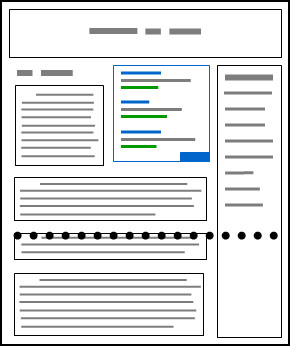
Place ads just after 4/5 sentences of introduction of your content body [Good practice]

The following is bad example of adsense ad placement practices
Place ads right below the fold. [Bad practice]

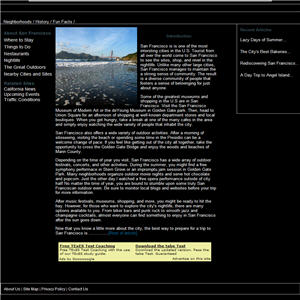
Blend Ad Colors with Website Design
There are three different ad styles that suite a website content.
Blend: To make the background and border color similar to background of article page and match Ad link color similar to anchor text color.

Complement: Use a default ad style which doesnt match article background or text color and provide lesser user experience in visual effect.

Contrast: Choose ad color that are different of website background color. This type of ad style is generally suited for dark background color where text color is white.
Conclusion
Adsense is a powerful ad publisher network in providing more money, highly useful ads from big brands of the world, and good user experience than any other online advertising network right ever now. Over millions of bloggers, and website owners have their career on Adsense revenue so any certain drop in Adsense earning can be an extremely headache to these publishers.Anyway by reading this article I hope you will get crystal clear conception about Adsense revenue per thousands impression "RPM" and how to improve Ad RPM to increase Adsense earnings. If you have any question regarding this article dont forget to ask me through commenting.
Wish you all happy blogging days :)
Go to link download
SEO and Google adsense optimized blogger templates free
SEO and Google adsense optimized blogger templates free
Blogger Template No. 1 – Metro BTK V2
[ Demo - Download ]
Blogger Template No. 2 – Johny Pakdhe
[ Demo - Download ]
Blogger Template No. 3 – MaxMag
[ Demo - Download ]
Blogger Template No. 4 – Bresponsive
[ Demo - Download ]
Blogger Template No. 5 – Media Online
[ Demo - Download ]
Blogger Template No. 6 – Johny Darkfire
[ Demo - Download ]
Blogger Template No. 7 – Metro Simple
[ Demo - Download ]
Blogger Template No. 8 – Devils Workshop
[ Demo - Download ]
Go to link download
Friday, October 7, 2016
Apple iPad 2 Factory Reset Contents and Settings Instruction
Apple iPad 2 Factory Reset Contents and Settings Instruction
Some expected pure gold: a tablet that runs as fast as a laptop and weighs less than a newspaper.
Yet, the reality with the iPad 2 is that Apple has taken an iterative approach. In many ways, the iPad 2 is a crowd pleaser because it does not rock the boat.

Dont worry, heres how to factory reset the Apple iPAD 2
1. On your iPad 2 home screen, tap the Settings icon
2. Tap General in the menu to the left of the screen, then tap Reset
3. Here, you will have two options:
1. "Reset All Settings" will restore all of your app settings to their original status
2. "Erase All Content and Settings" will reset all app settings and erase all of your data (photos, apps, bookmarks, music, etc.)
4. After selecting one of the two options above, your iPad 2 will reboot
5. If you selected "Erase All Content and Settings", you will need to reconnect your iPad 2 to iTunes in order to reactivate it
Go to link download
Sunday, October 2, 2016
Hard Reset your Cherry Mobile Flare S3 Mini and remove password pattern lock and gmail account
Hard Reset your Cherry Mobile Flare S3 Mini and remove password pattern lock and gmail account
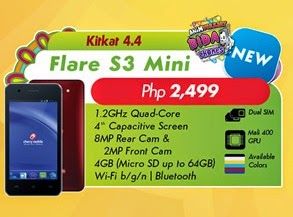
This tutorial is for Cherry Mobile Flare S3 Mini, follow my guide below.
Hard resetting / factory resetting your phone will solve the following issues:
1. If you forgot your pattern lock
2. If you forgot your gmail account
3. If you forgot your password
4. Apps that automatically force closing
5. Stuck in Cherry Mobile Logo (sometimes does not work if the firmware is totally damage)
NOTE: Performing hard reset will erase your data.
To hard reset:
1. Turn off your phone
2. Press and Hold Volume Down + Power button simultaneously, keep on pressing until the phone power up. Release only the Power button when you see the the Flare S3 Mini Logo.
3. An Android Robot will appear with "NO COMMAND" label in it. Press VOLUME DOWN to activate Android System Recovery
4. Select wipe data / factory reset, then YES -- delete all user data, press Volume rocker to navigate and press the POWER button to confirm the selection
5. Reboot your phone.
Note:
If performing hard reset did not succeed, you need to wipe the cache first in the android system recovery before performing wipe / factory
reset.
I hope this tutorial helps you.. If you have any question just drop a comment.
Go to link download
Saturday, October 1, 2016
Hard Reset your Lenovo A680 and remove password pattern lock gmail account
Hard Reset your Lenovo A680 and remove password pattern lock gmail account
Hey,
This tutorial is for Lenovo A680. I will also post the ROM for this particular device.

Hard resetting / factory resetting your phone will solve the following issues:
1. If you forgot your pattern lock
2. If you forgot your gmail account
3. If you forgot your password
4. Apps that automatically force closing
5. Stuck in Lenovo Logo (sometimes does not work if the firmware is totally damage)
NOTE: Performing hard reset will erase your data.
To hard reset:
1. Turn off your phone.
2. Press and Hold VOLUME UP + Power button. Keep pressing and holding until the phone power up, release only the power button when it power up and wait until you enter in Android Recovery Mode
3. Select wipe data / factory reset. To navigate press the VOLUME ROCKER, to confirm your selection PRESS VOLUME UP
4. Reboot your phone.
Note:
If performing hard reset did not succeed, you need to wipe the cache first in the android system recovery before performing wipe / factory reset.
I hope this tutorial helps you.. If you have any question just drop a
comment.
Go to link download
10 new blogger templates 2015 seo and adsense ready free download
10 new blogger templates 2015 seo and adsense ready free download
Blogger Template No. 1 – Norma
[ Demo - Download ]
Blogger Template No. 2 – LightenBlue
[ Demo - Download ]
Blogger Template No. 3 – Instinct
[ Demo - Download ]
Blogger Template No. 4 – Blog Shadow
[ Demo - Download ]
Blogger Template No. 5 – News mash
[ Demo - Download ]
Blogger Template No. 6 – Breaking News
[ Demo - Download ]
Blogger Template No. 7 – News Net
[ Demo - Download ]
Blogger Template No. 8 – SUV Mag
[ Demo - Download ]
Blogger Template No. 9 – SpiceMag
[ Demo - Download ]
Blogger Template No. 10 – Galauness
[ Demo - Download ]
Go to link download