Showing posts with label adsense. Show all posts
Showing posts with label adsense. Show all posts
Saturday, October 8, 2016
6 Ways to Increase Google Adsense Ad RPM and CPC Quickly!
6 Ways to Increase Google Adsense Ad RPM and CPC Quickly!
Well, you might be very worried about sudden reduction in Adsense earning basically in Ad RPM which is said to be going lower and lower by previous month and still continues. Then this article could be extreme remedy for your headache if youre the person who things Adsense earning is getting dropped mainly because of very lower Ad RPM. Look, Ad RPM is not the only reason of Adsene earning reduction but there are four more different bid types in AdWords Ad Inventory allowing advertisers to select their desired bid types also with suggested bid value.
Very largest share of Adsense publishers earnings come from Revenue per thousands impressions (RPM) bid type and this works with image and rich media ads specially. So when Ad RPM goes down your total earnings will be affected though ads can generate money through other three methods [CPC, Active View CPM and CPE]

Anyway today I will discuss some basics of Adsense RPM and other co-factors specially how to increase Adsense RPM to increase Adsense earnings overnight. Lets have some fresh mode before reading...
Factors Related Impressions, Ad RPM and eCPM
Impressions are a normal behavior across website or webpages which relate to advertisements to make earning be displaying ads on requested pages. Ad RPM is auto calculated and reported to publisher account dashboard, eCPM is effective cost per thousand impressions which also relates to Adsense earning. Lets learn them deeply with explanation before diving deep the main article.What is Impression?
In general Impression can be expressed to be an specific item is viewed by a user on a website. This can be body content, a video, images, ad unit or an advertisement, specially this means the focus of a visitor after landing on a webpage. At the same time visitors have freedom to scroll up/down the page, take any action or leave page immediately without any engagement. Impressions are calculated by Google Analytics tracking code and Adsense ad tracking code, and you can see reports on both GA and Adsense account dashboard.What is Ad Impression?
Ad Impression is a bit different term than normal Impression occurs across a webpage. Ad Impression is auto generated and reported whenever an individual ad is requested and displayed on a webpage. Different ad formats generate different ad impression suppose, each time wide skyscraper ad unit displays on your site you see two ad impressions.What is Ad RPM? - Calculate eCPM
Ad RPM is simply meaning the ratio between Estimated earnings and total ad impression are multiplied by 1000. In calculation we see thatAd RPM = (Estimated earnings / Ad impressions) * 1000
To increase and decrease Adsense earnings Ad RPM plays great role indeed, since the advertising bit types are different and many advertisers prefer cost-per-thousand impressions (CPM) rather than CPC or CPE types so you can see a gradual rise up or drop in Adsense earnings which are mainly affected by Ad RPM
For example,
You have chosen two custom ad units "Large Rectangle" and "Leaderboard" respectively to place them on different spaces on your site to only test the eCPM rate. After 24 hours roundup you have checked your Adsense ad channels performances for these two ad units. You have seen the "Large Rectangle" channel receives 500 ad impressions and $3.26 in total earnings whereas the "Leaderboard" gets 200 ad impressions and $2.99 in total earnings by the same period.
To make them figure out you have calculated their Ad RPM rate by the formula above and seen the eCPM rate for "Large Rectangle" is $6.52 and "Leaderboard" is $14.95
So if your ads get 1000 impressions then "Large Rectangle" can generate $6.52 is less than "Leaderboard" who gives you $14.99 by the same impression rate. So this is more effective to place "Leaderboard" on other ad spaces instead the "Large Rectangle" on your site.
How to Improve Adsense RPM?
Use following strategies to increase Adsense Ad RPM effectively and increase your earning overnight.Reduce Bounce Rate
Bounce rate is related to search engine ranking factor which is calculated by measuring the % of visitors leave your site after visiting pages [may be a single page or multiple pages]. If more than half of your visitors leave your site by visiting only one single page then your bounce rate will drastically go up and you will be notified it on Audience overview under Google analytics account dashboard.Increased bounce rate hampers Adsense RPM rapidly!
Suppose you have placed maximum three "Ad units" on every single page of your site and each time a visitor visit your page you get 3 impressions/visit. If that visitor visits three pages at the same then you get 9 impressions/visit.
But if that visitor leaves your site from that single page then you lose 6 impressions from one visit. Thus more than half of your visitors leave by single page visit then you get lower and lower impressions. If it continues day by day you get fewer and fewer earnings day by day.
So you have to understand bounce rate of your site and apply strategies to decrease bounce rate. Here are quite few articles can help you to reduce website bounce rate.
Increase Ad CTR
CTR or Click through rate is calculated by clicks for impressions, views, queries in 100%. CTR is normally calculated and reported to Google webmaster tools also Google analytics when visitors are clicking on links from search engines results pages, social networking sites, or referring pages before entering a webpage.Ad CTR is a bit different than "CTR" which reports clicks for Ad impressions in 100%. To increase Adsense earning this is more important to increase Ad CTR. Read the following article:
How to Improve Google Adsense CPC and CTR up to 75% With These 10 Methods?
Choose Top Performing Ad Sizes
Over a decade Adsense team report many factors about the secrets of Adsense earning where "Top performing Ad Sizes" are one of the remarkable mentions. Adsense annalists have driven test on many Advertisement sizes and found that certain ads out perform and grow higher revenue than other similar ad units. Based on website content, quality and traffic growth there are suggested ad units that perform extremely well and generate double even triple earnings than a publishers expectation.These ad units definitely generate higher CTR which further lead to generate more CPC rate and more earnings.
This article explains what are the "Top Performing Ad Sizes Currently in Google Adsense?"
Switch to both Text & Image Ad
This is recommended by Adsense to create ad unit for both text and image ad in order to lead more competition between advertisers and grow more earnings. Look why we will choose text and image ad rather choosing only text or image ad.Because there are four bid types in AdWords advertising campaigns [cost-per-click (CPC), cost-per-thousand impressions (CPM), Active View cost-per-thousand impressions (Active View CPM), cost-per-engagement (CPE)] and eight Ad types [Text, Image, Rich media, Flash, Video, Animated image, Audio, Link units]
Advertisers choose their target ad spaces based on products and services and willing to pay on four big types. Some will pay you on CPC method and some on CPM, some for Active View CPM and some for CPE. As you dont know which advertisers will pay you for CPC, or CPM etc. bid types so its brilliant decision to switch both text and image ads to run ad competition between all the available advertisers and grow maximum revenue from your website traffic.
Ad Placement on Your Website
This is another strategy to increase your Adsense earning by right placing ads on your website.We know that ads placed above fold can generate more CTR than ads on footer, below content, or lower sections. But there are other valid reasons to give right placements to your ads which are also called the best practices of Ad placement. Look below
Adsense on Post Pages
Here are two good examples of Adsense ad placement on post pages
Place your ads on right or left side close to the introductory part of your content. [Good practice]
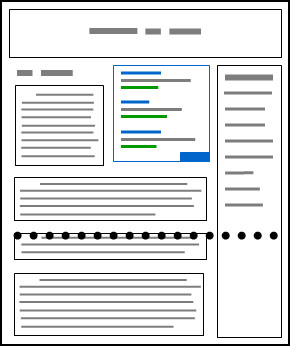
Place ads just after 4/5 sentences of introduction of your content body [Good practice]

The following is bad example of adsense ad placement practices
Place ads right below the fold. [Bad practice]

Since browsers and screen sizes vary, heres a handy tool that allows you to enter any URL, and check whether youve implemented your ads above the fold. To use it, visit as-abovethefold.appspot.com.
Blend Ad Colors with Website Design
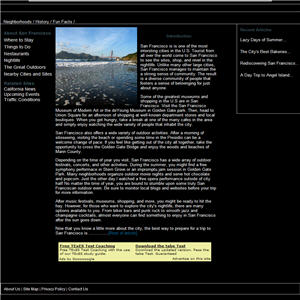
There are three different ad styles that suite a website content.
Blend: To make the background and border color similar to background of article page and match Ad link color similar to anchor text color.

Complement: Use a default ad style which doesnt match article background or text color and provide lesser user experience in visual effect.

Contrast: Choose ad color that are different of website background color. This type of ad style is generally suited for dark background color where text color is white.
Conclusion
Adsense is a powerful ad publisher network in providing more money, highly useful ads from big brands of the world, and good user experience than any other online advertising network right ever now. Over millions of bloggers, and website owners have their career on Adsense revenue so any certain drop in Adsense earning can be an extremely headache to these publishers.Anyway by reading this article I hope you will get crystal clear conception about Adsense revenue per thousands impression "RPM" and how to improve Ad RPM to increase Adsense earnings. If you have any question regarding this article dont forget to ask me through commenting.
Wish you all happy blogging days :)
Go to link download

SEO and Google adsense optimized blogger templates free
SEO and Google adsense optimized blogger templates free
Blogger Template No. 1 – Metro BTK V2
[ Demo - Download ]
Blogger Template No. 2 – Johny Pakdhe
[ Demo - Download ]
Blogger Template No. 3 – MaxMag
[ Demo - Download ]
Blogger Template No. 4 – Bresponsive
[ Demo - Download ]
Blogger Template No. 5 – Media Online
[ Demo - Download ]
Blogger Template No. 6 – Johny Darkfire
[ Demo - Download ]
Blogger Template No. 7 – Metro Simple
[ Demo - Download ]
Blogger Template No. 8 – Devils Workshop
[ Demo - Download ]
Go to link download
Saturday, October 1, 2016
10 new blogger templates 2015 seo and adsense ready free download
10 new blogger templates 2015 seo and adsense ready free download
Blogger Template No. 1 – Norma
[ Demo - Download ]
Blogger Template No. 2 – LightenBlue
[ Demo - Download ]
Blogger Template No. 3 – Instinct
[ Demo - Download ]
Blogger Template No. 4 – Blog Shadow
[ Demo - Download ]
Blogger Template No. 5 – News mash
[ Demo - Download ]
Blogger Template No. 6 – Breaking News
[ Demo - Download ]
Blogger Template No. 7 – News Net
[ Demo - Download ]
Blogger Template No. 8 – SUV Mag
[ Demo - Download ]
Blogger Template No. 9 – SpiceMag
[ Demo - Download ]
Blogger Template No. 10 – Galauness
[ Demo - Download ]
Go to link download
Strategy Awesome Earn 3000 – 5000 Per Month Via AdSense
Strategy Awesome Earn 3000 – 5000 Per Month Via AdSense
Earn $3000 – $5000 Per Month Via AdSense
Though there are many secret strategies to earn money from AdSense, this strategy is my favorite. I have not invested my time in making this kind of blog, but still might try it in future with my team’s help. This simple trick works with few basic rules of creativity, blogging and networking. Okay! Enough of suspense! Now I’ll come to the point straight away.Did you ever click on Facebook memes and troll images which will redirect to a personal website? Possibly yes! and if you are an active member in Facebook, then you might have surely checked hundreds of Facebook pages with millions of likes and comments. So how do they get some many likes and comments on each of their published blog post? And what this has to do with AdSense earnings? That’s what we are here to discuss.

All these blogs and website run with a simple concept called “Facebook Fan Page”. So there is no SEO involved in ranking a website. So if you know the important SEO factors and simple blogging basics, then you are the king. These websites create custom memes, funny pictures, and other applications, which drive thousands of likes in just couple of days. It’s quite simple to set up a blog like Damnlol, but the difficult part is to maintain it consistently. Fortunately there is very little competition from search engines, but what makes your work much difficult is the Facebook likes and fans.
I have spent more than a month to research about this strategy and here it is straight away. I’m sharing you my secret solid research plan, which might help you to make huge money from AdSense. But proceed to read only if you are spending over 18 – 20 hours a day initially. This strategy is not a one man army game, so do involve yourself in partnerships and collaborations.
My Research Strategy on Earning Huge AdSense Income:
I’m listing down the strategy step by step, so that you can exactly repeat the same in future. This solid plan doesn’t depend on luck! It depends on pure hard work, creativity and time sense. So here we are,Keyword Research:
Without checking the below screenshot, you have to tell me what would be the rough CPC of “Funny Pictures”. Guessing somewhere around Rs.50 right? Well, you have to see the screenshot now! It’s freaking Rs. 2,700 ($42) per click. But not all keywords will fetch you that amount!

I use only Long Tail Pro Keyword research to find my high CPC keywords. It’s simple, straight, and affordable. Trust my words, Long Tail Pro will be one awesome keyword tool which you ever buy in your life. Spencer Haws was humble enough to offer Long Tail Pro at a discounted price of $67 for SEOSiren users. (This link is my affiliate link, which might help me to write more awesome posts in SEOSiren)
So if you observe the first keyword in the above screenshot, you might see that “Funny Plumbing Pictures” has a lot of money involved with your AdSense account. But this is not correct always. You might get very less/more than what you see here. But still anything more than $20 is an awesome keyword in my view. Check out few other keywords in the list. Each one of these keywords are so tempting, that anyone could fall for making a website. But wait! There is a proper way of doing it.
I found so many high CPC and low competition keywords in funny pictures niche. In above screenshot, you can see only 10% of actual high CPC keywords from AdSense. There are many more gold nuggets like this, but wait! What will you research if I tell your everything? So find them yourself. Also don’t forget to take a look at the local monthly keywords while researching.
Understand the Competition:
You have to understand the competition to pick the right keywords. Fortunately there is a lot of money involved in “Funny Plumbing Pictures” keyword, which surprisingly have low competition in Google. Check out the below screenshot for Page Authority, Juice Page and Page Rank.

This particular keyword has so less competition, that you might require only couple of months to rank your keyword. According to Spencer Haws and Pat Flynn, any webpage with less than 30 page authority is damn easy to compete. Also the average of all combined page ranks shouldn’t be more than 2%. So if you combine all the page rank totals of these 10 pages to take an average, it comes to 0.3 % only. Wow! this keyword is a utter loot for any experienced SEO blogger or niche marketer.
Use Long Tail Pro to dig out the 10 top keywords with less competition and high CPC. It will take a lot of your time to research low competition keywords via Google Keyword Planner, so understand the point that you have invest your money in something or the other initially.
Website Structure:
Once you have these keywords in hand, make sure to immediately start a blog in Blogspot.com. You should never make a blog on WordPress, as the freaking traffic of this niche will blow of your server in just couple of days. Initially you cannot afford VPS or high end servers to host a high traffic website via WordPress. So go with blogger.com with zero investment on hosting and maintenance.
Make sure to register a 50% Exact Match Domain with your keyword, but never go with 100% exact match domain. So if I consider my keyword to be “Funny Plumbing Pictures”, then I have to make sure it is not FunnyPlumbingPictures.com. Get some similar domain name with little keyword optimization, and redirect to your blogspot blog.
Now create categories or archives in your blogspot and name them with your seed keywords. Also make sure to add proper meta titles and descriptions whenever necessary. I leave the SEO part, so that you can learn something about SEO yourself.
Now make sure you are posting at least 50 to 100 blog posts per day, with Facebook comment system enabled on each post you publish. This is very important, as people tend to post their Facebook comments on wall too.
Producing Content:
Aha! This is where we all lose our heart to maintain a funny blog. Creating content for these kinda blogs is extremely difficult, as you have to be very creative and funny. The images which you see in Damnlol, 9Gag are custom made memes, which generate millions of views every day. You should have a dedicated graphic designer to make your own memes, but for now you can rip off the images from various sources.

I found out few simple ways to rip of the data for your blog. The first one is via browsing each and every torrent site on earth for funny pictures, and second one is stealing images form other Facebook fan pages and groups. There are many automatic bulk image downloading software’s in market. Grab one for time being, and start pulling out the content whenever possible.
Also make sure if you have selected the “Funny Plumbing Pictures” niche, make sure you got every picture on earth related to it. This way people will jump into your site from Google. But make sure you are entertaining your Facebook fans via other images. These images need not be on your website, but make sure to design yourself in future. Because Google hates duplication, and even Images are considered to be plagiarized.
Some people use URL watermarks on their images, which is probably the most stupidest idea to grow as a brand. You should never put URL watermarks on your images. Make a custom logo, and then stamp it on your images with 70% transparency.
Monetizing Your Blog:
So far AdSense is the best method to monetize your blog in these kind of websites. But remember that AdSense will not approve your account for picture blogs that easily. If you have already have an AdSense account, than well and good. If not you can get your Adsense in just 3 days.
When monetizing your blog with AdSense, make sure to wait for couple of months to gain trust, traffic and likeability from your users. Without proper user base, its impossible to earn money from AdSense. So initial base plan is to get more and more Facebook users onto your website.
After a profitable user base, make sure to install 2 large rectangle (336 x 280) AdSense units. You can also install 728 x 90 Leader board in the header part, but make sure there are no much ads in the above fold.
Engaging Users:
You have to post minimum 250 to 300 images each day on your Facebook fan pages to the engage users. Do whatever necessary like tagging your friends, making fake profiles, requesting people, and so on. But make sure to get at least 1000 to 2000 likes per day. Now that’s where you have to put your mind on. I really can’t help you in getting massive likes, because it is you who have to figure it out.
Always make sure to get US traffic which has more CPC and engagement. Focus on current issues like Miley Cyrus Twerking, Justin beiber, so on to get people’s attention. People love to be funny, so take their complete advantage to build your business.
Rinse & Repeat:
You have to repeat these steps to find more and more keywords in future. Make sure to add all these high CPC keywords in your blog somewhere. Make it an authority site, and never let people know where you are getting the content from.
Never lose your heart in making an authority site. God has not created 9Gag, Damnlol and other awesome websites. It always you who should take the initiative to start something different and converting. Though this technique is not taken seriously by many popular bloggers, its still a easy way to earn potential money out of your happiness and creativity. I hope this article will help you to make your own online business. Stay focused an keep asking your queries. Happy Earnings!
Go to link download
Tuesday, September 27, 2016
Get Google Adsense Approval within 3 days – Top 12 Working Strategies
Get Google Adsense Approval within 3 days – Top 12 Working Strategies
Get Google AdSense Approval Within 3 Days:
So before getting started, make sure you follow these guidelines without fail, else your application will be rejected without any further pending approval. Remember that everything which I mentioned below counts. Don’t compromise on number of posts, own domain, good design and other metrics, else the chances of rejection is higher at your end. So here we go, the 15 most important guidelines to follow before applying to Google AdSense.
Minimum Posts/Articles/Pages:
If you are using WordPress, make sure your website/blog has at least 40 quality articles which are not copied from anywhere else. Your content on the articles should be extremely rich and make sure you use relevant images where ever required. Try to include two lengthy articles of 2000 words each, which should be absolutely stunning while anyone reads them on your website. If you are using HTML website or any other non CMS version of blog, make sure you have atleast 50 pages on your website in form or articles or landing pages.If you miss providing this any of the above information on your website, Google might reject your application saying Insufficient Content or Unacceptable Site Content. So make sure they see enough content on your website before applying the program. The more the content, the better chances of approval.
Prohibited Website Niches:
Statistics show that your account will go through a faster approval process if you have more quality articles on Health, Internet Marketing, Business, Law, Technology, Entrepreneurship, Travel, Lifestyle and Social Media. Google will take your application as a serious offense if your website contain any of the prohibited content mentioned in this link here.Some studies have also proved that Google AdSense might reject your approval if your website is on event blogging and micro niche blogging. In this particular blogging, you limit your blog content to only one particular subject and create a spam domain around it to rank higher. Eg: www.mayweathervspacquiaomatchonline.com (Mayweather vs Pacquiao Match Online). In some cases, if you have observed Google Ads in these of websites, probably they have applied the account through an another account and placed the ads in this event niche blogging to earn quick money.
No Third Party Ads or Programs:
Before applying to AdSense, make sure you don’t allow or place any other third party banner ad code on your website. Google (employees) will strictly look into your website manually and they hate seeing some third party ads installed in your website. Stay away from Infolinks, Chitika, Yahoo Ads or any other third party network to get the first impression clean on your website. Make sure you put only the fresh content and some regular widgets on the website.Also, stay away from affiliate links such as hosting programs, Amazon affiliates, Clickbank or anyother until your account is approved.
Website Design and User Experience:
Google always want their users to get the best experience while browsing through any website they refer. Maintaining a clean design with good navigation and user experience will boost your chances of getting AdSense approved in the first attempt itself. This is one of the major guidelines where lot of people miss the basics. Google believes that if you maintain professional color scheme on your website, the user might be willing to come back and click on the relevant ads which are displayed under your content.So make sure you maintain a neat and clean design before applying to AdSense. I would recommend you to buy one professional template anywhere and get it installed on your website without effecting the loading speed or easy navigation.
Google Analytics Code:
Adding Google Analytics code on your website is a trusted factor for the approval. Adding Analytics onto your website show that you are actively tracking your visitors and is much serious about the statistics of your users who visit your website. If you haven’t created one, click here to register the program. Once registered, get your tracking code by creating new account under the accounts tab and enter your website name, URL and other required details. Place the code on each page of your website to track the data instantly.Google/Bing Webmasters Verification Page:
Just like Google Analytics, you need to even verify with Google Webmaster program, which has the complete access to your website in search perspective. With Google Webmaster Tools, you can track your website critical errors and fix them on a daily basis. Click here to register and click on “Add a Site” to enter your website URL. Verify your website ownership through any of the recommended method and complete the process to keep your account functioning actively.Also, adding the Bing Webmaster Tools to your website will add more credibility to your domain that you are serious about the website search visibility. Though this guideline is pretty easy to perform, many people will get comfortable without knowing the importance of installing these tools.
Adding these two verifications on your website code or server will show good results on search visibility as well.
XML Sitemap Page:
Creating a sitemap doesn’t take too much of your time. If you are using WordPress, I recommend Google XML Sitemaps By Arne Brachhold. And if you are using any other platform, I recommend you to checkout XML-Sitemaps website for more info. Installing a sitemap on your website can help search engine bots to index your website faster, which is again a trust factor to bots about the website trustworthiness.Robots.txt
Creating Robots.txt file on your website will get rid of indexing unwanted junk onto Google. I have written a detailed post few days back on how to write perfect robots.txt for your website. Else you can also check SEOSiren.com own robots.txt file and simply copy it to your WordPress website. I have restricted all the unwanted data indexation to search engines, which adds a lot of value to your SEO efforts of ranking the pages higher on Google. Plus, robots.txt file is another great feature to add it your website as a trust factor.Alexa Rank:
Google AdSense considering the Alexa rank has always been a controversy, as many people disagree that Google doesn’t care about your global rankings. Trust me, I strongly believe that this is one of the most important checklist any manual operator checks before even opening your website statistics. How can anyone quickly judge about a website performance? The answer is simple, and its Alexa ranking. So make sure you install the Alexa toolbar and read my eBook on how to boost Alexa ranking within 30days.Note: Before applying to AdSense, make sure your website global Alexa ranking is less than 400K for faster approval process. Usually the website above this rank is considered to be new and underestimated that no much data is seen on them.
Important Pages:
Google wants to know your identity before you signup to their AdSense program. So make sure your create the following pages on your website as soon as possible.- Privacy Policy
- Disclaimer Policy
- Terms of Usage
- Contact Us
- About Us (Write your name and address through which you applied the AdSense account)
Custom Domain and Email ID:
A lot of people get create websites through blogspot and free WordPress platforms to apply AdSense. Note that AdSense team will take a custom domain more seriously rather than the free domain name. Investing 2$ on a domain name is not a big deal when you have health chances of getting approval with other factors like mentioned above. So don’t give yourself a second chance to apply the AdSense program and get your own domain as early as possible.Once you have your own domain, create an email ID with your name (name@website.com) to apply the AdSense program. Eg: satish@seosiren.com will get more attention compared to satishseosiren@gmail.com. Note that your free website programs give you the privilege or adding your custom domains without paying any additional fee.
Decent Traffic:
Though a lot of portals, forums mention that Google AdSense doesn’t require any certain amount of pageviews to approve your account, I still feel and experienced the treatment if you have a decent traffic. Let your blog age a few weeks (atleast 2 months) before you rush to apply the AdSense program. I would always recommend you to stay until your website get a minimum of 50+ visitors per day. If your website is not getting enough traffic, the chances of rejection is much higher when compared to other guidelines.Once your website is ready with all these above guidelines, click here to apply to Adsense, and make sure you have gone through the Google AdSense TOC for more information on the program.
Leave your comments to check if your doing good with the process. And if your AdSense was rejected despite of following all these above mentioned guidelines, shoot me a mail to satish@seosiren.com and I will help you out with a free AdSense consultation. Stay tuned to SEOSiren for more such interesting topics!
Also, I have made a step by step video guide on how to apply Adsense if you are looking for more information. Check out the below video and let us know if you still have trouble in getting your account approved.
Go to link download
Sunday, September 4, 2016
AdSense Achievement Cards
AdSense Achievement Cards

Two years back from now, Ive been regular with Google AdSense. Before that, I applied for AdSense many times, got my account approved many times, also got banned many times. But I never give up. Now Ive been regular with AdSense for last 2 years.
When I signed in to my AdSense Home this morning, I discovered a new message which I never get before. Later Ive come to know, its called AdSense Achievement Card. Have a look at my achievement -

I almost forget when Ive started working with AdSense Ads. I could hardly remember the date. But AdSense reminds me, today is the starting of my AdSense - June 03. The message tells -
When I signed in to my AdSense Home this morning, I discovered a new message which I never get before. Later Ive come to know, its called AdSense Achievement Card. Have a look at my achievement -
I almost forget when Ive started working with AdSense Ads. I could hardly remember the date. But AdSense reminds me, today is the starting of my AdSense - June 03. The message tells -
AdSense Achievement
2 Years
Happy Anniversary! As of today, youve been with AdSense for 2 years.
Learn more
AdSense Achievement Cards
By this time, you might be interested to know, what the achievement card is. Or what is the card for. To be honest, Im also not familiar with this card at all. Just today, Ive been introduced with this card.
When you see an AdSense Achievement card in your AdSense Home, it means youve achieved a major landmark regarding your AdSense account. Usually the card appears at the top right corner of your AdSense Home page. Look at the image below -

Achievement Cards may appear in your AdSense Home page in the following situations -
- The Anniversary of your Account (i.e. 2 Years, 5 Years etc.)
- Lifetime Ad Impressions (i.e. 100,000 or 1,000,000 ad impressions etc.)
- 1,000th ad impressions on mobile/tablet
Does it Really Matter?
An achievement card lasts for few hours - not more than a day. And then it expires automatically. In fact, this card brings nothing special to you. But when its shown in your AdSense Home page, you might be impressed as I am.
So, the answer is - No.
To know more, read this - AdSense Achievement Cards . . .
Stay with Marks PC Solution to get more interesting IT topics!
Go to link download
Saturday, August 20, 2016
Making Site Compatible with AdSense Policies
Making Site Compatible with AdSense Policies

While applying for the AdSense, there are different ways you might get disapproved by Google. One of them is Incompatible Site. You will get a message like this - Site does not comply with Google policies. Its really frustrating when your sites content is okay but Google denies your AdSense request.
Today I would like to discuss how to solve the issue - Site does not comply with Google policies. In fact, after having the custom domain, Im also facing the same problem. But I can solve it within few days.
There are three major areas on which you have to focus in order to make your site compatible with Google AdSense policies:
- Design and Content Guidelines
- Technical Guidelines
- Quality Guidelines
Though you will get a detailed discussion in Google Webmaster Guideline Page, Id like to summarize the topic for you. Because only few people have the patience to read a 1200 words + article! And some of the issues are highly technical. I will try to make them as clear as possible.
Design and Content Guidelines
- Your site should have a clear hierarchy and text links. Every page should be accessible from at least one static text link. I suggest you to use Blog Archive and Categories.
- Provide a sitemap for the users so that they can explore your site as they want.
- Make your site useful and informative. Keep your contents accurate and clear. Read my contents writing guidelines . . .
- Think about the words which users might search for and include those words in your contents post titles. Dont forget to relate your contents to those key words.
- Images are not recognized by search engines. Use as much text as possible in your contents. And label your images properly, consider using the Alternative description too.
- Try to find out HTML errors (if any) and fix them.
Technical Guidelines
- Keep your site faster. Analyze the loading time of your site through various tools available over the web. Slower sites get less pageviews. So, never let it down.
- Test your site in major browsers (ie. Chrome, Firefox, Internet Explorer, Opera, Safari etc.) and make sure that it appears correctly.
- Properly use robots.txt so that search engines can crawl your site smoothly.
- Get your domain registered in high quality servers.
Quality Guidelines
- Build your contents primarily for the users, not for the search engines.
- Never try to deceive/mislead your users.
- Never follow the illegal techniques that automatically improve your search ranking position by cheating the search engines. (Black Hat SEO)
- Differentiate your site from competitors. Keep it unique, informative and valuable for the users.
Avoid the Following Techniques
- Generating Contents Automatically
- Participating in Link Exchange
- Cloaking - Showing different contents to human and search engines
- Redirecting the Users to an Unwanted Site
- Hiding Text/Links
- Copying/ Stealing Contents from other Sites
- Participating in Affiliate Programs without Sufficient Contents
- Using Irrelevant Keywords to Improve Search Ranking
- Spreading Virus, Malware, Spam, Phishing etc.
Violating any of the above rules may take your site down in the search engine rank position. And your site may not comply with Google AdSense Policies.
Stay with Marks PC Solution to get more interesting IT topics!
Go to link download
Thursday, August 18, 2016
A Beginner’s Guide to Google AdSense
A Beginner’s Guide to Google AdSense
My income increases when using AdSense – my affiliate sales are unaffected
It used to be that I was afraid to “lose customers” when implementing Google AdSense on my affiliate sites, because when they click the AdSense ads they leave the web site. But test after test showed me that implementing AdSense often did not have any negative effect on affiliate commissions.So, really all it did was boost my income and allowed me to distribute risk by having more than just one monetization strategy.
AdSense ads run in designated areas on your web site – advertisers pay Google to run ads there – but you get a cut
Many people still ask the question: what is Google AdSense, and how do I get started?I am in the position where I run a multi-author WordPress news web site and one of the attractions is that we allow authors to include AdSense on their articles. Many though, it turns out, do not know what AdSense is and don’t know how to get setup.
First, let me explain as simply as possible what AdSense is. When advertisers pay Google to run ads (with the Google AdWords program), if they opt to show their ads on Google’s Display Network, then their ads will show up in the “AdSense slots” on participating web sites.
In many cases, the owner of the web site “owns” (in a sense) all of the Google AdSense ad slots. In the case of a multi-author web site, it could be that the owner allows a sharing of revenue. In that case, there could be several publisher AdSense as slots being displayed on a given web site.
You must “own” the web site used during the Google AdSense application process – but could run ads on other sites after acceptance
It used to be that you could submit an application to become an AdSense publisher, enter “any old web site” and in most cases get approved, ready to run ads on any other site of your choosing. Nowadays though, as I discovered, Google now has a second level of verification, complicating things a little more. The publisher must now prove that they own the web site that they intend to run ads on.When I say “own the web site” that is sort of a loose statement. Many times, as long as the publisher has the ability to create AdSense ads (either through direct code access, or some sort of widget) he or she could make it through the second stage of AdSense approval. That’s not always the case though. Having the ability to add AdSense code to a web site doesn’t necessarily qualify you as the “owner.” And Google’s recent(ish) requirement is that the publisher must own the domain of the web site that they use during the application process. It’s only after approval where the publisher can run ads on different web sites.
If you know someone that owns a web site and will let you “piggyback” you *may* get through the application process. But after awhile, Google stops allowing certain domain names to be used during the application process. Because like I said, technically you must own the domain. It seems the goal is to have at least one web site for every AdSense publisher, and this is the way they attempt to make that happen.
Buy a cheap domain name and attach it to a free web site creation service and you qualify
Fortunately, it’s quite simple these days to “own your own domain name” and create your own web site. And this doesn’t have to be expensive either. You don’t really have to go the route of getting your own hosting and getting a web site built (although that can be super cheap, especially when using WordPress). Realistically you can get a domain for $10-$15 (for the year) through Namecheap.com and build a free web site on Weebly.com (for example), attach your newly bought domain name to your newly created web site, and then you comply to the main rule of requiring your own domain name.Be careful though when choosing a service. Some free web site tools, while they might allow you to attach a domain name to your site, you may not be able to run AdSense. WordPress.com hosted sites is an example of one where you cannot run AdSense ads. To keep it simple and cheap, I would suggest buying a domain from NameCheap, then setting up a quick free site with Weebly.com.
From there, publish really awesome, high value, content on your new site. Aim for about 6-20 really good articles before applying. Be sure to include a contact and about page for a better chance of getting accepted.
Fortunately you can re-apply to AdSense if ever rejected. Follow the advice Google gives if you get rejected, then re-apply. If you applied with a domain that you can’t add AdSense code too, you still have the chance to re-apply with a different domain name/web site.
What types of ads show up in the ad slots, and how do I generate income from it?
Now, for those of you that are curious, and would like to know about what types of ads show up in the AdSense slots, I will cover that now.Keep in mind that you are giving control of a certain portion of your web site to Google to do what it pleases. You have some control over appearance, size, etc. plus you have the ability to block ads. And you can decide if the ads are text, images or animated. There may be other kinds as well.
Now, as for what ads show up. There are a few different things that can happen. First, the traditional way is… Google will determine what the content surrounding the ad slot is about, and display a related ad. Another way is… Google will follow a visitor from site to site (using what are called cookies) and then run ads attempting to get those visitors *back* to a previously visited site. This is often called retargeting, and only happens when the owner of the previously visited site has paid to run retargeting-style ads on the Display Network. The final way is for advertisers to run ads in very specific ad slots, on very specific web pages, on very specific web sites. There may also be other ways. These are the only three that I am aware of.
Oh, and a key piece of information that I should have mentioned earlier on… you get paid when people click your ads (don’t click your own! Google will know) and you may get paid per impression (or multiple impressions) in some cases. I don’t know for certain. I just know that Google AdWords advertisers have the ability to choose a pay per click or pay per 1,000 impressions model when running their ads, but to my knowledge, the revenue share for AdSense follows just a pay-per-click model.
As far as I know, Google AdSense tracking is lacking
Tracking the performance of your AdSense ads is very limited. I haven’t looked too deep into tracking methods lately, so it may have improved, so take this information with a grain of salt (or whatever that saying is that doesn’t make much sense). In general, you create an “ad channel” and that will help you determine the performance of the ad (or ads) *attached” to that channel. Many sites allow you to embed AdSense in templates or widgets so usually the same ad is used on the entire site. Therefore, tracking on the site level is often what occurs. But, folks will often track on the ad slot/web site level as well.You could get clever and manually create an ad and ad channel for every page on your site. This could get very cumbersome. There’s got to be a better way, and there probably is. I won’t research it now though, this is just an “intro” article after all.
Applying for an AdSense publisher account – use your Gmail account!
Now, to apply you will need to have your web site setup already (with your own domain name and content!). Then, using your Google account (i.e. Gmail or YouTube account) go through the app process.After Google peeps at your site, it will let you know if it qualifies or not. If so, you just have to place your code. The code will initially be blank after placement on your site. Once an ad shows up, you know that your account is active. After your account is active you can create new ads to run on other sites
The app process could take anywhere from one day to a couple of weeks or longer. Just be patient and wait it out. Google sends emails through each phase so you will know where you’re at. If you don’t see an email for quite awhile it may have got lost. That happens. Have a peek in your AdSense account and you will see messages across the top indicating where you’re at in the process.
Enjoy your new revenue stream, some people make a living at it!
Go to link download
Subscribe to:
Posts (Atom)