Tuesday, October 18, 2016
6 Best Shooting Games For Android 2015
6 Best Shooting Games For Android 2015

Normally we like to play games on gaming console or PC. But all of them are costly not easily portable. If you real hard core gamer then must check best graphic card games for pc. But instead of console and pc, Smartphones are the best way to play games. We can easily play games at anywhere to relax. I already listed our best android games ever. From multiple types of games. Some people have great interest in shooting games. Shooting games are most popular type of games to be played by people of all age. By playing shooting games we can play and feel like a soldiers, commando, sharp shooters and complete different missions. If you have great interest in playing shooting games. Then dont worry here we are going to listed out some best shooting games for your android smartphone.
List Of Best Shooting Games For Android
1. Kill Shot
Kill shot is one of best Android Games available on Google play store without any cost. It is a awesome game with well defined missions. In this game you have to treat like soldier who have assign different missions to complete. you are given different weapon for shooting your enemy. At each level your weapon power increase. The game provide you awesome looking scenes of road, jungles, mountains, ice scenes etc. Approximately 455005 user play this Game.


2. Death Shooter
Death shooter is another popular Android shooting Game which is freely available on Google play. It is 3D game with attractive graphics. It has two modes zombie war and counter strike, so we can enjoy two different fun with same game one by shooting Zombies and other by completing different missions. We can increase our weapon to reduce number of reloads. Approximately 1 crore user play this Game. If you want to collect more money then you should play in zombie war Mode.

3. Bottle Shoot Game
Bottle shoot is another popular Android shooting game which is freely available on Google play store. If have good shooting skill or if you want to learn how to shoot then this best for you. In this game you have to shoot bottles to achieve your target. For each shoot you are points. For more score you have to shoot more target. At each level target of shooting bottles will increase. The game provide you different challenges. The targets can move in some difficult levels to increase fun.

4. Gun Shoot War
Gun shoot War is another popular Android shooting game which is available on Google play store for free.It provide you attractive graphic scenes with simple control. In this game you have to play the roll of commando who have assign various mission. We can collect coins by shooting our enemy and buy new weapons. You can also compete the people around the world using internet score upload.

5. Deer Hunting
Deer Hunting is another challenging Android shooting Game which is available on Google play store for free. In this game you have to target different deer surrounding in forest. The game provide you the attractive scenes of forests, mountains, trees, grass etc. If you love hunting then this game is really for you. Pick your gun shoot deer and get different points. Buy New weapons and increase your target capabilities.

6. Speedboat Shooting
Speedboat shooting provide another adventuring season in the water. It is available on Google play store for free. In this game you have to protect your boat from enemy. Guys who want to destroy your boat you have to target them and protect your boat from them. Speed of Boats can increase by increase in levels. Enemy boat speed can increase then your boats to make it more challenging.

All the above listed are few best android shooting games to download and play.
Go to link download

Monday, October 17, 2016
How to Flash or Install S5830XXKPT Firmware Upgrade Samsung Galaxy Ace to Android 2 3 6 Gingerbread
How to Flash or Install S5830XXKPT Firmware Upgrade Samsung Galaxy Ace to Android 2 3 6 Gingerbread
Heres the procedure on how to manually upgrade the Samsung Galaxy Ace GT-S5830 to Android 2.3.6 Gingerbread using the stock ROM S5830XXKPT. This is a Russian official firmware update for Galaxy Ace that has been recently released this March 2012. Some changes is the lock screen features, much more faster than the previous buildS5830XXKPP and S5830XWKT7. Some European languages are included on this packaged, so anyone who prepares an English (UK and US) and European languages can use this ROM. The default language is set in Russian, but you can change it to your desired local language after installation.
Note: This ROM may only flashable for Galaxy Ace GT-S5830 only.
Download the stock ROM S5830XXKPT
firmware info:
PDA: S5830XXKPT
CSC: S5830SERKPT
Phone: S5830XXKPT
Version: Android 2.3.6 Gingerbread
Country: Russia
Build date: March 03, 2012
stock ROM GT-S830_SER_S5830XXKPT_S5830SERKPT_S5830XXKPT
Grab the ODIN Multi Downloader and OPS File: Cooper_v1.0.ops
Samsung Galaxy Ace Odin flashing S5830XXKPT Android 2.3.6 stock firmware
- Make sure you are running Windows on your PC with USB driver installed or have Kies installed.
A USB cable wire of your device, a good working USB serial port, sometimes the connection issues occurs because of a bad USB port of your PC and the USB cable.
- Make a back up copy of all important files stored on your phone, the file is a none wipe but it is better to have an extra precautions if something went wrong.
- Disable any antivirus and Kies installed, this program might also interrupt Odin while in flashing process.
1. After youve done downloaded theS5830XXKPT stock ROM, just simply extract it using winrar, winzip, 7zip or any rar file extractor program you have. Then you in the folder you can see the file
S5830XXKPT_S5830XXKPT_S5830SERKPT_HOME.tar.md5
SS_DL.dll
we dont need this SS_DL.dll on this flashing, but dont delete it.
2. Extract and run also the Odin v4.38 on your desktop.
3. On ODIN clickt the OPS button and load the Cooper_v1.0.ops file on it.
4. Hit the One packaged in the checkboxes options (the Auto reboot and protect OPS remain checked,
then at the lower part of Odin click on the One Packaged button then select and load the
S5830XXKPT_S5830XXKPT_S5830SERKPT_HOME.tar.md5

5. Set the Samsung Galaxy Ace inDownload Mode:
Turn the OFF the phone or remove the battery for a couple of seconds then put it back again. By pressing Volume Down+Power+ Middle buttonssimultaneously the phone will then reboot into download mode.

7. Once the connection set up is okay, begin the flashing by hitting the Startbutton.
It only takes around 4 to 5 minutes to complete, a progress bar on the left side of ODIN will show you the downloading progress. A word "PASS" will display once it finishes.
Its time to unplug the phone from PC, then do a factory data reset to clean all data caches and have a fresh firmware installed, you can do this by Recovery Mode button - Home + Power Button, then toggle on using the volume button and select Wipe Data/ Factory Reset or by typing this code *2767*3855#.
To check the newly installed firmware update - by typing *#1234#.
Change the default Russian language to your Region, go to settings and then locate the locale and text icon, then find your native language. You may then also often check out the Samsung Galaxy Ace stock ROM list for future firmware updates.
Go to link download
Wednesday, October 12, 2016
Apple Jailbreak Unlock iPhone 5 5s 4s with iOS 7 0 4 and 7 0 5 7 0 6 Untethered Version Just Released Today
Apple Jailbreak Unlock iPhone 5 5s 4s with iOS 7 0 4 and 7 0 5 7 0 6 Untethered Version Just Released Today
This is most certainly a rarity. Usually, whenever a jailbreak is released, Apple works to deliver an update to prevent it, and the next iOS release is thus unjailbreakable. However, a couple of timely bugs have emerged which, from a PR point of view, are a tad more pressing, and following on from the release of http://tinyurl.com/GTB365 to jailbreak the iPhone it’s likely a similar update has arrived for them to work with iOS 7.0.4.
@GettheBest365: Have tested all devices, and it’s looking good for 7.0.4. iPad mini wi-fi and iPhone 5,4S,4,3GS are still jailbreakable.
getthebest365.com from http://goo.gl/ttTG2k has been downloaded by over 250,000 customers located in over 145 countries. To further ensure customers of its products usability, getthebest365.com offers a 100% full money back guarantee on all orders. Customers dissatisfied with the company’s product will be given a full refund, no questions asked.Safe Jailbreak Team has confirmed that unlock and untethered jailbreak iPhone 5,4/4S iOS 7.0.4/ 7.0.6/7 is covered successfully in openanyphone.com. So the unlockers are now performing their tests and modification on iOS 7.0.4/ 7.0.6/7 and they releasedhttp://tinyurl.com/GTB365 unlock and untethered jailbreak iPhone 4/4S/3GS iOS 7.0.4/ 7.0.5/7 . Precisely, the they found untethered not a new jailbreaks. So the http://tinyurl.com/GTB365 has merged this jailbreak on http://tinyurl.com/GTB365to get the iOS 7.0.4/ 7.0.5/7 untethered jailbreak on your iPhone 5s, 4s, 4, iPod touch 4G, 3G, iPad 2 and latest.
One good advantage of the software is that the jailbreaking and unlocking process is completely reversible and there will be no evidence that the iPhone has been jailbroken and unlocked . iOS 7.0.4/7.0.6/7 comes with many new features and updates for multitasking and storage. By unlocking and jailbreaking the iPhone, unleash unlimited possibilities to improve this already fantastic experience and the iPhone FULL potential.
The benefits of unlocking your iPhone are clear: You will be able to use cheap local (pay as you go) simcards in the phone, and make phone calls at cheaper local rates. You can use the iPhone on cheaper networks (especially as data rates are often very expensive on the standard iPhone carrier networks). You can use more then one phone number on the iPhone, and switch your simcard at any time you wish.Of course you can always use the original simcard after unlocking. The unlock does not affect the way your iPhone works (if you use a good unlocking service such as that offered by (getthebest365.com.com) it enables the phone to accept ANY simcard.Other benefits of unlocking your iPhone are the addition of Cydia and installer on the unlocked iPhone.
To Unlock your iPhone with any carrier visit the official website http://getthebest365.com
Before going through any jailbreak process with getthebest365.com it is always good housekeeping to perform a full backup of all information on the device. It is unlikely that anything will go wrong during the process but when undertaking any process that modifies the internals of a file system it is always prudent to err on the side of caution.
Go to link download
Icare Data Recovery Latest V7 6 1 Offline Installer Free Download
Icare Data Recovery Latest V7 6 1 Offline Installer Free Download
Information misfortune wont be your cerebral pain! As a far reaching information recuperation arrangement, iCare Data Recovery can without much of a stretch recoup documents from wrong organized drives, out of the blue record erasure, crude commute or crude record framework, infection assault, segment erased, programming accident and so on. It can recoup any erased records like photographs, archives, mp3, viewpoint document, presentations, and it additionally lives up to expectations with any kind of capacity media like hard commute, removable hard commute, advanced cameral sd card, usb drives, ipod, memory card and so forth.

This information recuperation programming uses the most capable record recuperation capacity to restore information from different sorts of information stockpiling gadgets, eg the laptop&destop hard plate drive, outer hard circle and more drives regardless of what happened that causes the information misfortune. Utilizing propelled arrangement seeking innovation, iCare Data Recovery has the capacity restore information in the wake of organizing when hard circle drive, memory card, usb streak and so forth have been reformatted by error and need to restore lost information. You can download latest setup of iCare Recovery from below downloading links.
Downloading links
iCare Data Recovery (Official Site)
Go to link download
Monday, October 10, 2016
Load Atheros GbE AR8161 LAN drivers on CentOS 6 4
Load Atheros GbE AR8161 LAN drivers on CentOS 6 4
Atheros GbE (AR8161) LAN is still not supported on the major Linux distributions which makes it really annoying to fix since most solutions require installing kernel-dev, gcc, perl, and many other dependencies. After a lot of trial and error, I finally found this simple procedure for getting ethernet to work on CentOS 6.4:
1. Download kmod-alx and save it to a thumb drive
2. Insert thumbdrive into CentOS computer, double-click the thumb drive icon on the desktop to mount it, and then open a terminal (Applications > System Tools > Terminal)
3. cd /tmp
4. cp /media/THUMBDRIVE/kmod-alx-0.0-7.el6.elrepo.x86_64.rpm .
5. sudo rpm -i kmod-alx-0.0-7.el6.elrepo.x86_64.rpm
6. sudo modprobe alx
7. Open Firefox browser and verify you have internet connectivity
Go to link download
Drush 6 x pipe issue
Drush 6 x pipe issue
Drush is a great tool to manage Drupal. However, the command syntax occasionally breaks between major versions. For example, when I upgraded from Drush 5.9 to 6.2 I noticed my commands that included --pipe now provided output in json format by default (instead of the previous string default). That broke a number of my scripts because they were expecting plain strings. After some google searching I deduced I needed to add a --format=[something magical here] but even though https://github.com/drush-ops/drush/blob/master/tests/outputFormatUnitTest.php said --format=string should work, it didnt. That parameter threw this error:
[error] The output data could not be processed by the selected format string. The command core-status does not produce output in a structure usable by this output format.
drush [command] --pipe
drush [command] --format=list --pipe
Go to link download
Download Fox12 Oregon Google TV 1 6 APK for Android
Download Fox12 Oregon Google TV 1 6 APK for Android

ID: com.aimitv.kptvnewsgtv
Version: 1.6
File Size: 2.9Mb
Fox12 Oregon Google TV Screenshots
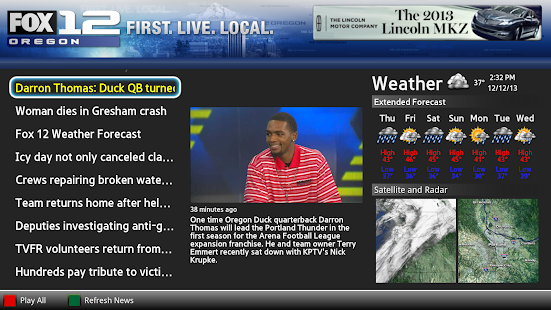
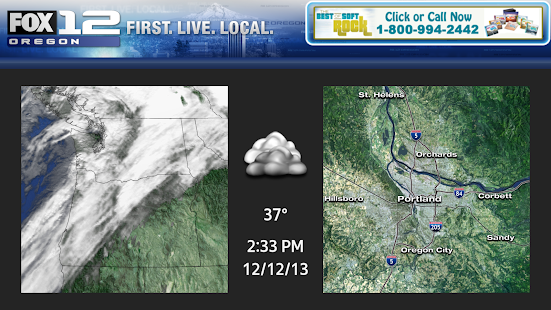
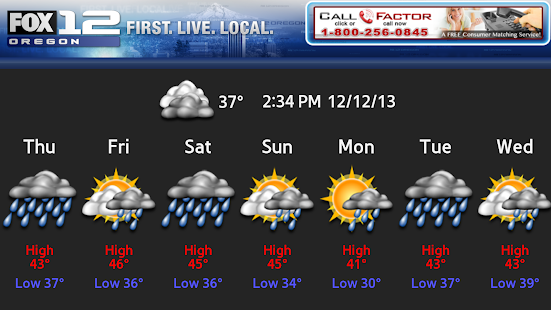
Fox12 Oregon Google TV Description
WATCH your latest Oregon area News, Weather, Traffic and more on demand on your Google TV device with the FOX12 Oregon App!keywords: KPTV
Download Fox12 Oregon Google TV 1.6 APK
Go to link download
Saturday, October 8, 2016
6 Ways to Increase Google Adsense Ad RPM and CPC Quickly!
6 Ways to Increase Google Adsense Ad RPM and CPC Quickly!

Anyway today I will discuss some basics of Adsense RPM and other co-factors specially how to increase Adsense RPM to increase Adsense earnings overnight. Lets have some fresh mode before reading...
Factors Related Impressions, Ad RPM and eCPM
Impressions are a normal behavior across website or webpages which relate to advertisements to make earning be displaying ads on requested pages. Ad RPM is auto calculated and reported to publisher account dashboard, eCPM is effective cost per thousand impressions which also relates to Adsense earning. Lets learn them deeply with explanation before diving deep the main article.What is Impression?
In general Impression can be expressed to be an specific item is viewed by a user on a website. This can be body content, a video, images, ad unit or an advertisement, specially this means the focus of a visitor after landing on a webpage. At the same time visitors have freedom to scroll up/down the page, take any action or leave page immediately without any engagement. Impressions are calculated by Google Analytics tracking code and Adsense ad tracking code, and you can see reports on both GA and Adsense account dashboard.What is Ad Impression?
Ad Impression is a bit different term than normal Impression occurs across a webpage. Ad Impression is auto generated and reported whenever an individual ad is requested and displayed on a webpage. Different ad formats generate different ad impression suppose, each time wide skyscraper ad unit displays on your site you see two ad impressions.What is Ad RPM? - Calculate eCPM
Ad RPM is simply meaning the ratio between Estimated earnings and total ad impression are multiplied by 1000. In calculation we see thatAd RPM = (Estimated earnings / Ad impressions) * 1000
To increase and decrease Adsense earnings Ad RPM plays great role indeed, since the advertising bit types are different and many advertisers prefer cost-per-thousand impressions (CPM) rather than CPC or CPE types so you can see a gradual rise up or drop in Adsense earnings which are mainly affected by Ad RPM
For example,
You have chosen two custom ad units "Large Rectangle" and "Leaderboard" respectively to place them on different spaces on your site to only test the eCPM rate. After 24 hours roundup you have checked your Adsense ad channels performances for these two ad units. You have seen the "Large Rectangle" channel receives 500 ad impressions and $3.26 in total earnings whereas the "Leaderboard" gets 200 ad impressions and $2.99 in total earnings by the same period.
To make them figure out you have calculated their Ad RPM rate by the formula above and seen the eCPM rate for "Large Rectangle" is $6.52 and "Leaderboard" is $14.95
So if your ads get 1000 impressions then "Large Rectangle" can generate $6.52 is less than "Leaderboard" who gives you $14.99 by the same impression rate. So this is more effective to place "Leaderboard" on other ad spaces instead the "Large Rectangle" on your site.
How to Improve Adsense RPM?
Use following strategies to increase Adsense Ad RPM effectively and increase your earning overnight.Reduce Bounce Rate
Bounce rate is related to search engine ranking factor which is calculated by measuring the % of visitors leave your site after visiting pages [may be a single page or multiple pages]. If more than half of your visitors leave your site by visiting only one single page then your bounce rate will drastically go up and you will be notified it on Audience overview under Google analytics account dashboard.Increased bounce rate hampers Adsense RPM rapidly!
Suppose you have placed maximum three "Ad units" on every single page of your site and each time a visitor visit your page you get 3 impressions/visit. If that visitor visits three pages at the same then you get 9 impressions/visit.
But if that visitor leaves your site from that single page then you lose 6 impressions from one visit. Thus more than half of your visitors leave by single page visit then you get lower and lower impressions. If it continues day by day you get fewer and fewer earnings day by day.
So you have to understand bounce rate of your site and apply strategies to decrease bounce rate. Here are quite few articles can help you to reduce website bounce rate.
Increase Ad CTR
CTR or Click through rate is calculated by clicks for impressions, views, queries in 100%. CTR is normally calculated and reported to Google webmaster tools also Google analytics when visitors are clicking on links from search engines results pages, social networking sites, or referring pages before entering a webpage.Ad CTR is a bit different than "CTR" which reports clicks for Ad impressions in 100%. To increase Adsense earning this is more important to increase Ad CTR. Read the following article:
How to Improve Google Adsense CPC and CTR up to 75% With These 10 Methods?
Choose Top Performing Ad Sizes
Over a decade Adsense team report many factors about the secrets of Adsense earning where "Top performing Ad Sizes" are one of the remarkable mentions. Adsense annalists have driven test on many Advertisement sizes and found that certain ads out perform and grow higher revenue than other similar ad units. Based on website content, quality and traffic growth there are suggested ad units that perform extremely well and generate double even triple earnings than a publishers expectation.These ad units definitely generate higher CTR which further lead to generate more CPC rate and more earnings.
This article explains what are the "Top Performing Ad Sizes Currently in Google Adsense?"
Switch to both Text & Image Ad
This is recommended by Adsense to create ad unit for both text and image ad in order to lead more competition between advertisers and grow more earnings. Look why we will choose text and image ad rather choosing only text or image ad.Because there are four bid types in AdWords advertising campaigns [cost-per-click (CPC), cost-per-thousand impressions (CPM), Active View cost-per-thousand impressions (Active View CPM), cost-per-engagement (CPE)] and eight Ad types [Text, Image, Rich media, Flash, Video, Animated image, Audio, Link units]
Advertisers choose their target ad spaces based on products and services and willing to pay on four big types. Some will pay you on CPC method and some on CPM, some for Active View CPM and some for CPE. As you dont know which advertisers will pay you for CPC, or CPM etc. bid types so its brilliant decision to switch both text and image ads to run ad competition between all the available advertisers and grow maximum revenue from your website traffic.
Ad Placement on Your Website
This is another strategy to increase your Adsense earning by right placing ads on your website.We know that ads placed above fold can generate more CTR than ads on footer, below content, or lower sections. But there are other valid reasons to give right placements to your ads which are also called the best practices of Ad placement. Look below
Here are two good examples of Adsense ad placement on post pages
Place your ads on right or left side close to the introductory part of your content. [Good practice]
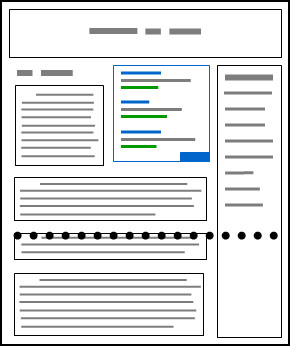
Place ads just after 4/5 sentences of introduction of your content body [Good practice]

The following is bad example of adsense ad placement practices
Place ads right below the fold. [Bad practice]

Blend Ad Colors with Website Design
There are three different ad styles that suite a website content.
Blend: To make the background and border color similar to background of article page and match Ad link color similar to anchor text color.

Complement: Use a default ad style which doesnt match article background or text color and provide lesser user experience in visual effect.

Contrast: Choose ad color that are different of website background color. This type of ad style is generally suited for dark background color where text color is white.
Conclusion
Adsense is a powerful ad publisher network in providing more money, highly useful ads from big brands of the world, and good user experience than any other online advertising network right ever now. Over millions of bloggers, and website owners have their career on Adsense revenue so any certain drop in Adsense earning can be an extremely headache to these publishers.Anyway by reading this article I hope you will get crystal clear conception about Adsense revenue per thousands impression "RPM" and how to improve Ad RPM to increase Adsense earnings. If you have any question regarding this article dont forget to ask me through commenting.
Wish you all happy blogging days :)
Go to link download
Download Sort 1 6 APK for Android
Download Sort 1 6 APK for Android

ID: org.browr.sort
Version: 1.6
File Size: 6.2Mb
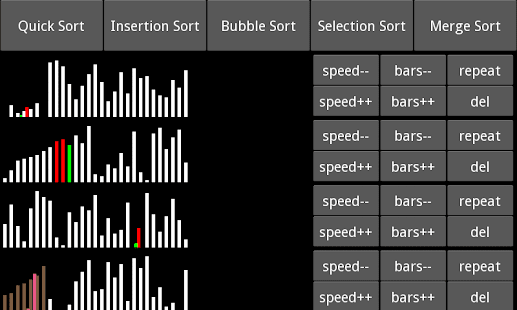
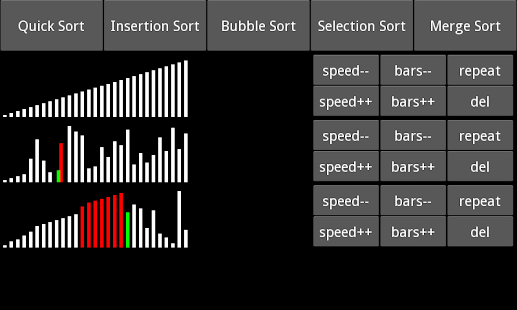
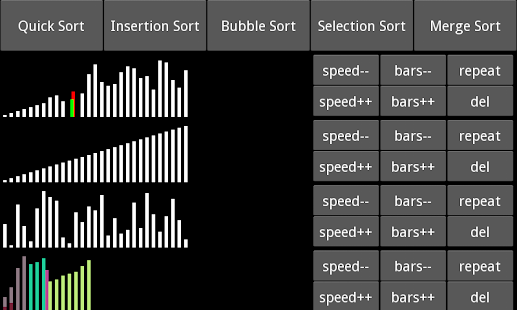
Sort Screenshots
Sort Description
Visualizations of common comparison sorting algorithms. Great for reminding yourself how these sorts work.Allows you to:
• Compare sorts (add / delete)
• Change the speed
• Change the number of elements being sorted
Current available sorts:
Quick sort - Insertion sort - Bubble sort - Selection sort - Merge sort
Keywords: computer science data structures sorting algorithms visualize animation
Download Sort 1.6 APK
Go to link download
Free Green Lantern Theme 1 6 torrent download
Free Green Lantern Theme 1 6 torrent download

Green Lantern Theme
Personalization
[Download Link >>]
version:1.6
rating: 4.8
rating count: 292
updated: 2014-12-29
size: 583 KB
installs: 500
cost: €0.56
Go to link download
Monday, October 3, 2016
Download Rádio Helix 1 4 6 APK for Android
Download Rádio Helix 1 4 6 APK for Android

ID: com.matutos.RadioHelix
Version: 1.4.6
File Size: 1.5Mb
Rádio Helix Screenshots


Rádio Helix Info
Aqui Você faz a diferença www.radiohelix.com.brDownload Rádio Helix 1.4.6 APK
Go to link download
Download Comunidade Católica Resgate 1 4 6 APK for Android
Download Comunidade Católica Resgate 1 4 6 APK for Android

ID: com.matutos.Resgate
Version: 1.4.6
File Size: 1.2Mb
Comunidade Católica Resgate Screenshots


Comunidade Católica Resgate Details
É com grande alegria que escrevo para meus irmãos internautas. Estamos iniciando um novo tempo, tempo de graça da parte de Deus.Nesse tempo, onde o homem alça vôo para cruzar o universo, nós da Comunidade Católica Resgate estamos dando os primeiros passos na era digital, campo que precisa ser urgentemente tocado pelo poder e graça de Deus, onde homens e mulheres são chamados a comunicar e informar de forma direta e precisa que Jesus vive e é o Senhor.
Por esse motivo estou aqui para proclamar que Jesus é Senhor da Vida. Nossa historia de Resgate na caminhada cristã iniciou-se há 24 anos atrás com a minha conversão a Cristo. Foi nesse tempo que nasceu o chamado para pregar a palavra de Deus, nos presídios, praças, ruas e casas, pregando e anunciando a ressurreição de Cristo.
Surgiu o Resgate, onde a palavra de Deus nos iluminou em Atos dos Apóstolos, capitulo 9, 15 "Mas o Senhor lhe disse: Vai, porque este homem é para mim um instrumento escolhido, que levará o meu nome diante das nações…". Esse carisma é percebido quando é colocado em prática, ou seja, quando o membro da Comunidade ou um irmão de fé, após conhecê-lo e apropriar-se da graça, permite o seu desenvolvimento. Então, seremos como que uma corda, um suporte nas mãos de Deus.
Essa fé de crer que Deus nos usará, conforme sua vontade e projeto, nos leva a descansar em Deus, sabendo que nossa responsabilidade não é mudar o mundo e as pessoas, pois só Deus muda. A nossa responsabilidade é sermos instrumentos nas mãos de Deus para a mudança, ou seja, Deus transformará e salvará o homem com a cooperação do homem, aí reside o nosso carisma: sermos cooperadores com Deus na transformação do mundo.
Não somos capacitados por nós mesmos, é Deus quem nos capacita a sermos o que Ele planejou e projetou para nós, por isso "nossa capacidade vem de Deus", você que lê este texto pode pensar que não é capaz e não consegue realizar na sua e nem na vida dos seus uma transformação, isso se deve ao foco que você tem em você mesmo. Porém, ao fazer como o Apóstolo Pedro que teve o foco em Cristo, e só olhava para Cristo poderá ser um grande homem de Deus.
Ser instrumento de Resgate é acima de tudo ser escolhido como Paulo foi escolhido, e isso é uma dádiva de Deus. Diz a Igreja que pelo Batismo fomos enxertados na videira que é Cristo, isto é, fazemos parte de Sua vida, e se estamos com Ele, com Ele recebemos toda a graça. Por isso quem é batizado não pode e nem deve se acomodar em sua vida, mas ser um missionário. Ser Resgate é viver o seu Batismo anunciando a ressurreição de Cristo, Ele vive e é o Senhor.
Portanto, convido você atirar-se nos braços do Pai e se deixar ser conduzido por Ele, como um instrumento. E aí você perceberá o dom da existência fluindo em você, e entenderá que sua vida tem um grande valor.
Seja bem vindo ao nosso site, e deixe-se ser conduzido por Deus, seja um instrumento de Resgate nas mãos de Deus.
Sergio Erilson Maciel
Fundador
Download Comunidade Católica Resgate 1.4.6 APK
Go to link download
Saturday, October 1, 2016
Download Crows Nest 1 6 APK for Android
Download Crows Nest 1 6 APK for Android

ID: com.crowsnest.mobile
Version: 1.6
File Size: 2.2Mb
Crows Nest Screenshots


Crows Nest Description
This is a companion app for businesses using the Crows Nest application for project management.A URL to a valid instance of the Crows Nest API is required for use.
Whats new in Crows Nest 1.6
Added support for configuring multiple servers and updated logos.Download Crows Nest 1.6 APK
Go to link download
Friday, September 30, 2016
NCK Dongle Module v0 6 Update Relsed 19 12 2014
NCK Dongle Module v0 6 Update Relsed 19 12 2014
Advance Merry Christmas To All & Happy New Yr
Added:
Sprint Unlock & Relock to network - Must Be Rooted
SPL-L502 (Galaxy S4 mini sprint) - Direct Unlock/Relock
SPL-L600 (Galaxy Mega 6.3 sprint) - Direct Unlock/Relock
SPL-L720 ( Galaxy S 4 sprint) - Direct Unlock/Relock
SPL-L720T ( Galaxy S 4 sprint) - Direct Unlock/Relock
SM-N900P (Galaxy Note® 3 sprint) - Direct Unlock/Relock
SM-G860P (Galaxy S 5 Sport sprint) - Direct Unlock/Relock
SM-G900P (Galaxy S 5 sprint) - Direct Unlock/Relock
More Sprint Mobile models are supported just to be tested
Flashing
GT-I8580 - Write Firmware/Change Language Via Flashing/Rd PIT.
GT-S7262 - Write Firmware/Change Language Via Flashing/Rd PIT.
GT-S7270 - Write Firmware/Change Language Via Flashing/Rd PIT.
GT-S7272 - Write Firmware/Change Language Via Flashing/Rd PIT.
GT-S7580 - Write Firmware/Change Language Via Flashing/Rd PIT.
GT-S7582 - Write Firmware/Change Language Via Flashing/Rd PIT.
SM-G800F - Write Firmware/Change Language Via Flashing/Rd PIT.
SM-G800H - Write Firmware/Change Language Via Flashing/Rd PIT.
SM-G800H/DS - Write Firmware/Change Language Via Flashing/Rd PIT.
SM-G800A - Write Firmware/Change Language Via Flashing/Rd PIT.
SM-G800Y - Write Firmware/Change Language Via Flashing/Rd PIT.
SM-G800M - Write Firmware/Change Language Via Flashing/Rd PIT.
SM-G800R4 - Write Firmware/Change Language Via Flashing/Rd PIT.
SM-G386F - Write Firmware/Change Language Via Flashing/Rd PIT.
SM-G7102 - Write Firmware/Change Language Via Flashing/Rd PIT.
SM-G7105 - Write Firmware/Change Language Via Flashing/Rd PIT.
SM-G7105L - Write Firmware/Change Language Via Flashing/Rd PIT.
SM-T335 - Write Firmware/Change Language Via Flashing/Rd PIT.
SM-T237P - Write Firmware/Change Language Via Flashing/Rd PIT.
SM-T537V - Write Firmware/Change Language Via Flashing/Rd PIT.
SM-T335F3 - Write Firmware/Change Language Via Flashing/Rd PIT.
SM-T537A - Write Firmware/Change Language Via Flashing/Rd PIT.
SM-T537R4 - Write Firmware/Change Language Via Flashing/Rd PIT.
SM-T535 - Write Firmware/Change Language Via Flashing/Rd PIT.
SM-T530 - Write Firmware/Change Language Via Flashing/Rd PIT.
SM-T531 - Write Firmware/Change Language Via Flashing/Rd PIT.
SM-T331 - Write Firmware/Change Language Via Flashing/Rd PIT.
SM-T365 - Write Firmware/Change Language Via Flashing/Rd PIT.
SM-T360 - Write Firmware/Change Language Via Flashing/Rd PIT.
SM-T327A - Write Firmware/Change Language Via Flashing/Rd PIT.
SM-T337A - Write Firmware/Change Language Via Flashing/Rd PIT.
SM-G3589W - Write Firmware/Change Language Via Flashing/Rd PIT.
SM-G3589V - Write Firmware/Change Language Via Flashing/Rd PIT.
SM-G3568V - Write Firmware/Change Language Via Flashing/Rd PIT.
SM-G3586V - Write Firmware/Change Language Via Flashing/Rd PIT.
SM-G3588V - Write Firmware/Change Language Via Flashing/Rd PIT.
SM-G3586H - Write Firmware/Change Language Via Flashing/Rd PIT.
SM-G3558 - Write Firmware/Change Language Via Flashing/Rd PIT.
SM-G3559 - Write Firmware/Change Language Via Flashing/Rd PIT.
SM-G3556D - Write Firmware/Change Language Via Flashing/Rd PIT.
SM-G355H - Write Firmware/Change Language Via Flashing/Rd PIT.
SM-G3518 - Write Firmware/Change Language Via Flashing/Rd PIT.
Download from main site (user & pass) required.
OR
Download from Main Support Site which You Access Via NCK Dongle Main Module or Support Access Software.
Official website:
NCK DONGLE
Follow us on twitter:
https://twitter.com/NCKTm
& on Face Book
https://www.facebook.com/ncktmproducts
NO THNX POSTS OR SPAM POSTS PLSE, ONLY DISCUSSION REGARDS THIS UPDATE OR TEST LOGS WITH RELATED MODELS.
PS. PLSE UNINSTALL ALL PREVIOUS VERSIONS AND INSTALL NEW VERSION FULLY TO AVOID HAVING ISSUES.
__________________
BR
NCK Tm
Powered By Fast Ltd.
Go to link download
Tuesday, September 27, 2016
Download Pagodart 1 6 APK for Android
Download Pagodart 1 6 APK for Android

ID: com.junnior.pagodart
Version: 1.6
File Size: 5Mb
Pagodart Screenshots


Pagodart Details
Escute as Músicas da banda 24 horas por dia no seu celular ou tablet!SHOWS
71 9105-6010 / 9191-7766 / 31 7171-7766
producao@pagodart.com
Features of Pagodart 1.6
COMPATÍVEL COM TABLETS DE 7" E 10" POLEGADASDownload Pagodart 1.6 APK
Go to link download
Saturday, September 24, 2016
O 8 6 stock rom firmware to unbrick your phone
O 8 6 stock rom firmware to unbrick your phone
Hi,

1. Bootloop
2. Damaged System UI
3. TP Upgrade only
4. Dead phone but it is detected in computer
5. Remove Gmail Account / Password / Pattern Lock (Alternative Way)
6. Privacy Protection Password Lock up
"DOWNLOAD THESE FILES"
Firmware Here -->O+ 8.6 Part 1
VCOM Driver -->VCOM Manual
Alternative Driver --> AutoInstaller
"Extract the files to your desired folder"
"If you encounter error in flashtool, use different version of it."
"I suggest to use 32bit Windows OS for compatibility of the driver"
Installing Driver with AutoInstaller
First try the Alternative Driver, which is the AutoInstaller. Just open the install.exe then it will automatically install the driver. To fully check if the driver is correctly installed in your computer.
Follow these steps:
- Turn off your phone (always powered off is a must)
- Press and hold volume up or down, or you can simple press the two button.
- Insert your USB cable without releasing the VOLUME button(s).
- In your computer, it must detect your phone and it will install the MTK Preloader or Mediatek USB VCOM driver.
- Repeat 1 to 4 if it does not detect your phone.
- If MTK Preloader/Mediatek USB VCOM Driver is installed you are good to go in flashing your phone ^_^
Reference Video using Driver Auto Installer (watch in HD)
Installing Manually using VCOM Driver

1. This is the first time that you will connect your phone and it will search for the correct driver.


3. If the driver is successfully installed MediaTek DA USB VCOM will appear in the New Hardware Wizard.
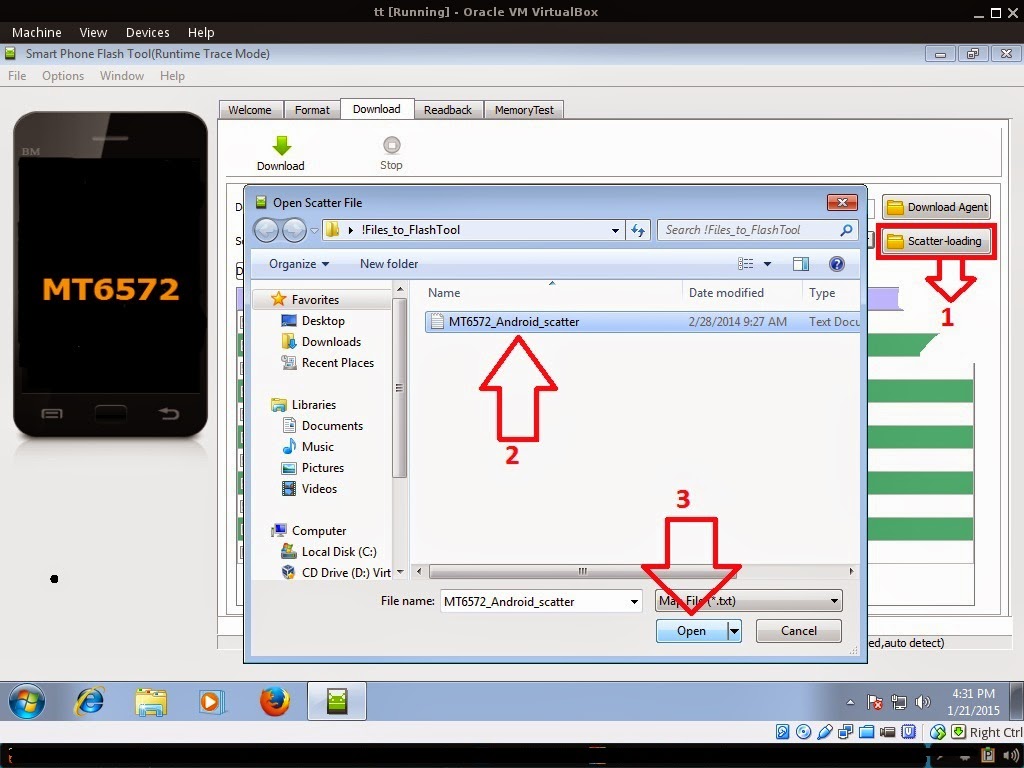
Reference Video Using FlashTool version 5.xxx (watch in HD)
3. After you load the file, UNCHECK PRELOADER only, press Press Download to Flash your Phone.
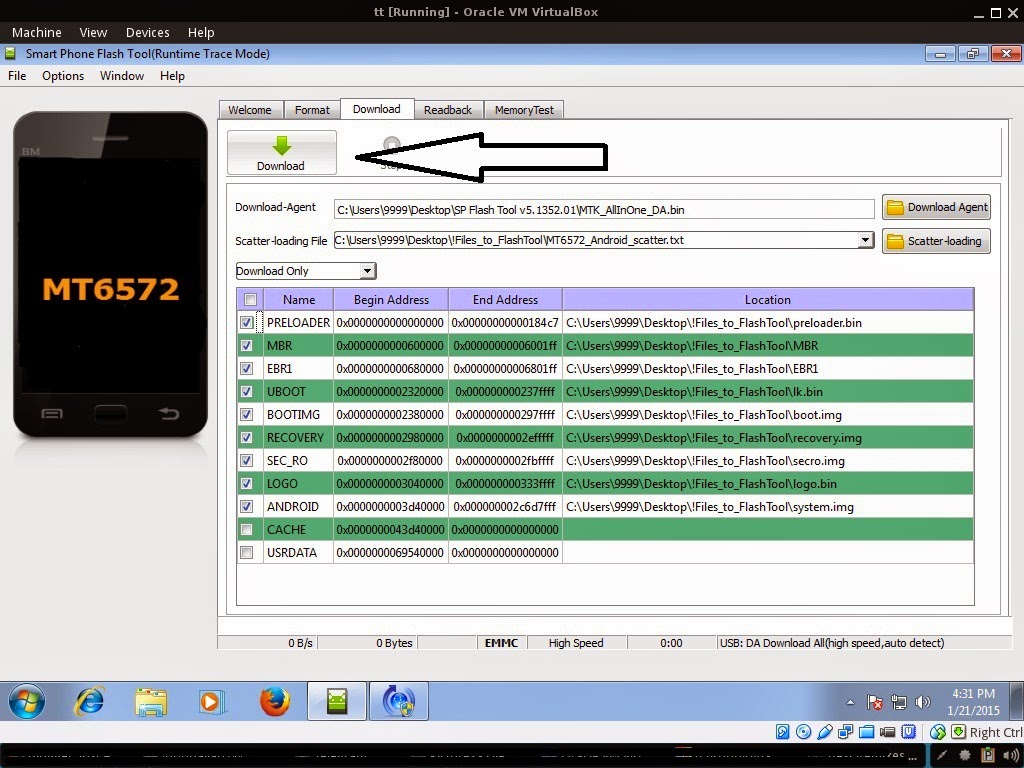
- Turn off your phone (always powered off is a must)
- Press and HOLD volume UP or Down or you can simply press it simultaneously
- Insert your USB cable without releasing the VOLUME button(s).
- Keep on repeating until Flashtool detected your phone.
Some workarounds:
PMT_CHANGED error occur when firmware is not compatible with your phone. Sometimes your phone has a different board version. You should check it too, if your firmware is compatible with your phone.
If you encounter Privacy Protection Password:
- Open flash_tool.exe
- Load the scatter file
- Goto Format Tab
- Click on Format except bootloader
- Press Play/Start Icon
- Then remove battery
- Insert the battery again
- Insert the USB cable (you should hear a beep on your computer, and it should proceed in formatting.)
- After done formatting proceed in Flashing.
- Goto Download tab (I assume that you loaded the scatter file already)
- Uncheck PRELOADER (this is very important)
- Press Download
- Then remove battery
- Insert Battery again
- Insert the USB cable (you should hear a beep on your computer, and it should proceed in flashing or downloading the firmware in your phone.)
- Power ON the phone after flashing.
- Restore your IMEI.
For Invalid IMEI:
- Root your phone via vRoot or your preferred method in rooting you device. Your phone must be rooted first.
- Download MTKDroidsTool version 2.4.8 and version 2.5.3
- Enable your USB debugging in Developer Option (you also need this in rooting your phone via PC)
- Okay in your PC -- Open MTKDroidstool version 2.4.8 (Mtkdroidstool.exe) first. Make sure that you connected your phone already.
- Still in Mtkdroidstool -- Click ROOT
- In your phone -- A pop up dialogue will appear, just grant or allow it.
- In your PC -- If root shell is granted/allowed, Click in IMEI/NVRAM tab. If it is grayed out this is the time when you open the MTKDroidsTool version 2.5.3.
- Enter your original IMEI
- Click Replace
- Reboot your phone
1. Make sure you have MTKDROIDSTOOL version 2.4.8 or version 2.5.3 (you can search it in google)
I hope this tutorial help you. Please drop a comment if something is not clear to you.
Tested by:
Me - Files / Flashing
Go to link download