 |
Showing posts with label huawei. Show all posts
Showing posts with label huawei. Show all posts
Saturday, October 15, 2016
Hard Reset your Huawei Y320 U10 and remove password pattern lock gmail account
Hard Reset your Huawei Y320 U10 and remove password pattern lock gmail account
This tutorial is for Huawei Y3200-U10....
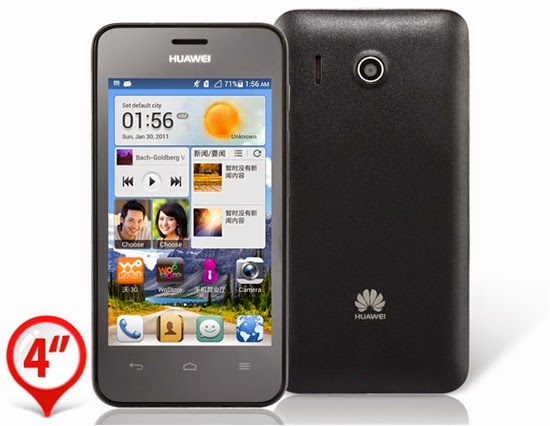
Hard resetting / factory resetting your phone will solve the following issues:
1. If you forgot your pattern lock
2. If you forgot your gmail account
3. If you forgot your password
4. Apps that automatically force closing
5. Stuck in Huawei Logo (sometimes does not work if the firmware is totally damage)
NOTE: Performing hard reset will erase your data.
To hard reset:
1. Turn off your phone
2. Press and Hold Volume UP + Power Button simultaneously. A boot menu will appear. Select Recovery Mode. Press VOLUME UP to navigate and PRESS VOLUME DOWN to confirm your selection.
3. An Android with exclamation will appear with "no command." word in it. Press option key (right side of home key) to activate android system recovery.
5. Select wipe datta / factory reset, press Volume rocker to navigate and press the HOME KEY to confirm the selection
6. Reboot your phone.
Note:
If performing hard reset did not succeed, you need to wipe the cache
first in the android system recovery before performing wipe / factory
reset.
I hope this tutorial helps you.. If you have any question just drop a comment.
Go to link download

Sunday, September 25, 2016
LGTOOL SGTOOL update news for Alcatel Huawei!
LGTOOL SGTOOL update news for Alcatel Huawei!
LGTOOL
by SEtool team
Version 2.34 released!
New version highlights:
Added all-new, worlds first algo for Alcatel Remote Calculator!
Added over 1Tb FW for HUAWEI phones!
DIRECT DOWNLOAD LGTOOL & SGTOOL
DOWNLOAD LGTOOL & SGTOOL FROM GOOGLE
New for LGTOOL remote services:
Alcatel 1060, 1060D, 1063, 1051A, 1051D, 1051N , 236G variants, 3116 variants,
1062, 2040G, 2040D, 2041G, 2041D, 3116N, 316 variants - Worlds first!
- calculate unlock codes by IMEI - Price is only 6 FREE credits or 1 paid credit
Other changes in LGtool, SGtool and remote services:
- Added 5697 files for 583 models (over 1tb!) for HUAWEI phones
- Fixed an issue with SGtool update
- HTC IMEI calc algo improved
You can view our official reseller list here. Resellers with credits available are marked as “In stock”, please contact them now to avoid disappointment.
Note:
Since v. 2.0 new license system for activated users is added. Please do not install LGtool 2.xx until you purchase LGtool license (paid activation).
New users should install v.1.99 first to register smart card.
LGTool/SGTool Official Support Forum
LGTool Official Website

Go to link download
Wednesday, September 21, 2016
Avator Dongle ver1 0 0 8 Brutal Out Huawei Bmobile Lanix Vtelca Full Support Added
Avator Dongle ver1 0 0 8 Brutal Out Huawei Bmobile Lanix Vtelca Full Support Added
AVATOR DONGLE VER1.0.0.8 RELEASED !!
Unique tool Avatorbox Support 4GB to 32GB Full EMMC Read / Write
Discussion thread here
Avator Dongle ver1.0.0.8 Brutal Out.. Huawei,Bmobile,Lanix,Vtelca Full Support.
Updates Note:
Huawei Smartphones
Quote:
| Huawei-G500_Pro -Read Info/ * Read Full Flash / * Write Full Flash/ Root / Repair Imei By ADB / * Repair Imei by META Mode / Read Patten lock / Reset Patten lock / Remove Gmail Id / Read Gmail ID /Remove phone password Huawei-G610 -Read Info/ * Read Full Flash / * Write Full Flash/ Root / Repair Imei By ADB / * Repair Imei by META Mode / Read Patten lock / Reset Patten lock / Remove Gmail Id / Read Gmail ID /Remove phone password Huawei-G700 -Read Info/ * Read Full Flash / * Write Full Flash/ Root / Repair Imei By ADB / * Repair Imei by META Mode / Read Patten lock / Reset Patten lock / Remove Gmail Id / Read Gmail ID /Remove phone password Huawei-G730 -Read Info/ * Read Full Flash / * Write Full Flash/ Root / Repair Imei By ADB / * Repair Imei by META Mode / Read Patten lock / Reset Patten lock / Remove Gmail Id / Read Gmail ID /Remove phone password Huawei-MS3A -Read Info/ * Read Full Flash / * Write Full Flash/ Root / Repair Imei By ADB / * Repair Imei by META Mode / Read Patten lock / Reset Patten lock / Remove Gmail Id / Read Gmail ID /Remove phone password Huawei-MEFAFON -Read Info/ * Read Full Flash / * Write Full Flash/ Root / Repair Imei By ADB / * Repair Imei by META Mode / Read Patten lock / Reset Patten lock / Remove Gmail Id / Read Gmail ID /Remove phone password Huawei-LOGIN2 -Read Info/ * Read Full Flash / * Write Full Flash/ Root / Repair Imei By ADB / * Repair Imei by META Mode / Read Patten lock / Reset Patten lock / Remove Gmail Id / Read Gmail ID /Remove phone password Huawei-Y220 -Read Info/ * Read Full Flash / * Write Full Flash/ Root / Repair Imei By ADB / * Repair Imei by META Mode / Read Patten lock / Reset Patten lock / Remove Gmail Id / Read Gmail ID /Remove phone password Huawei-Y320 -Read Info/ * Read Full Flash / * Write Full Flash/ Root / Repair Imei By ADB / * Repair Imei by META Mode / Read Patten lock / Reset Patten lock / Remove Gmail Id / Read Gmail ID /Remove phone password Huawei-Y321 -Read Info/ * Read Full Flash / * Write Full Flash/ Root / Repair Imei By ADB / * Repair Imei by META Mode / Read Patten lock / Reset Patten lock / Remove Gmail Id / Read Gmail ID /Remove phone password Huawei-Y330-U05 -Read Info/ * Read Full Flash / * Write Full Flash/ Root / Repair Imei By ADB / * Repair Imei by META Mode / Read Patten lock / Reset Patten lock / Remove Gmail Id / Read Gmail ID /Remove phone password Huawei-Y511 -Read Info/ * Read Full Flash / * Write Full Flash/ Root / Repair Imei By ADB / * Repair Imei by META Mode / Read Patten lock / Reset Patten lock / Remove Gmail Id / Read Gmail ID /Remove phone password Huawei-Y6 -Read Info/ * Read Full Flash / * Write Full Flash/ Root / Repair Imei By ADB / * Repair Imei by META Mode / Read Patten lock / Reset Patten lock / Remove Gmail Id / Read Gmail ID /Remove phone password |
Bmobile SmartPhones
Quote:
| Bmobile-AX510 -Read Info/ * Read Full Flash / * Write Full Flash/ Root / Repair Imei By ADB / * Repair Imei by META Mode / Read Patten lock / Reset Patten lock / Remove Gmail Id / Read Gmail ID /Remove phone password Bmobile-AX520 -Read Info/ * Read Full Flash / * Write Full Flash/ Root / Repair Imei By ADB / * Repair Imei by META Mode / Read Patten lock / Reset Patten lock / Remove Gmail Id / Read Gmail ID /Remove phone password Bmobile-AX530 -Read Info/ * Read Full Flash / * Write Full Flash/ Root / Repair Imei By ADB / * Repair Imei by META Mode / Read Patten lock / Reset Patten lock / Remove Gmail Id / Read Gmail ID /Remove phone password Bmobile-AX540 -Read Info/ * Read Full Flash / * Write Full Flash/ Root / Repair Imei By ADB / * Repair Imei by META Mode / Read Patten lock / Reset Patten lock / Remove Gmail Id / Read Gmail ID /Remove phone password Bmobile-AX610 -Read Info/ * Read Full Flash / * Write Full Flash/ Root / Repair Imei By ADB / * Repair Imei by META Mode / Read Patten lock / Reset Patten lock / Remove Gmail Id / Read Gmail ID /Remove phone password Bmobile-AX650 -Read Info/ * Read Full Flash / * Write Full Flash/ Root / Repair Imei By ADB / * Repair Imei by META Mode / Read Patten lock / Reset Patten lock / Remove Gmail Id / Read Gmail ID /Remove phone password Bmobile-AX690 -Read Info/ * Read Full Flash / * Write Full Flash/ Root / Repair Imei By ADB / * Repair Imei by META Mode / Read Patten lock / Reset Patten lock / Remove Gmail Id / Read Gmail ID /Remove phone password |
Lanix Smartphones
Quote:
| Lanix-S105_llium -Read Info/ * Read Full Flash / * Write Full Flash/ Root / Repair Imei By ADB / * Repair Imei by META Mode / Read Patten lock / Reset Patten lock / Remove Gmail Id / Read Gmail ID /Remove phone password Lanix-S120 -Read Info/ * Read Full Flash / * Write Full Flash/ Root / Repair Imei By ADB / * Repair Imei by META Mode / Read Patten lock / Reset Patten lock / Remove Gmail Id / Read Gmail ID /Remove phone password Lanix-S215_llium -Read Info/ * Read Full Flash / * Write Full Flash/ Root / Repair Imei By ADB / * Repair Imei by META Mode / Read Patten lock / Reset Patten lock / Remove Gmail Id / Read Gmail ID /Remove phone password Lanix-S400_llium -Read Info/ * Read Full Flash / * Write Full Flash/ Root / Repair Imei By ADB / * Repair Imei by META Mode / Read Patten lock / Reset Patten lock / Remove Gmail Id / Read Gmail ID /Remove phone password Lanix-S410 -Read Info/ * Read Full Flash / * Write Full Flash/ Root / Repair Imei By ADB / * Repair Imei by META Mode / Read Patten lock / Reset Patten lock / Remove Gmail Id / Read Gmail ID /Remove phone password Lanix-S500_llium -Read Info/ * Read Full Flash / * Write Full Flash/ Root / Repair Imei By ADB / * Repair Imei by META Mode / Read Patten lock / Reset Patten lock / Remove Gmail Id / Read Gmail ID /Remove phone password Lanix-S600 -Read Info/ * Read Full Flash / * Write Full Flash/ Root / Repair Imei By ADB / * Repair Imei by META Mode / Read Patten lock / Reset Patten lock / Remove Gmail Id / Read Gmail ID /Remove phone password Lanix-S700 -Read Info/ * Read Full Flash / * Write Full Flash/ Root / Repair Imei By ADB / * Repair Imei by META Mode / Read Patten lock / Reset Patten lock / Remove Gmail Id / Read Gmail ID /Remove phone password |
Vtelca Smartphones
Quote:
| Vtelca-V791 -Read Info/ * Read Full Flash / * Write Full Flash/ Root / Repair Imei By ADB / * Repair Imei by META Mode / Read Patten lock / Reset Patten lock / Remove Gmail Id / Read Gmail ID /Remove phone password Vtelca-V793 -Read Info/ * Read Full Flash / * Write Full Flash/ Root / Repair Imei By ADB / * Repair Imei by META Mode / Read Patten lock / Reset Patten lock / Remove Gmail Id / Read Gmail ID /Remove phone password |
------------: Repair Imei by Meta mode . Required to Connect Avatorbox
------------: All Others operations Must be enabled Usb Debug Mode
Check here to Download
Here the test post of Avatorbox/Dongle
Real World 1st blast in GSM field by AB brutal Key Samsung S5 Orginal ROOt/GMAIL ID
Huawei G610-All Variants - World First[Root + IMEI repair] "Brutal Key" Avator Dongle
Lenovo TAB A2107A-H [Original] IMEI repair Done www.AvatorBox.com Brutal Key !Unique!
Huawei Y330-U05 IMEi repair!! [Exclusive]New Method,New Models, First Our Dongle Ok!!
Huawei Y511-U251[OS 4.2.2]IMEI Null repair Supported [Just A Click]Phone Repaired Ok!
Huawei G610-U15 Claro-Colombia New BaseBand Supported for IMEI rebuild/repair Ok!!!
Vtelca V791[MTK Android Supported]Buy Now your Avator Dongle And Get The Best Support
Huawei G610 IMEi repair Success!! Exclusive--Easy and Safe "Brutal Avator Key" Go Go.
BLU Dash 3.2 [D150] IMEI rebuild Success [Active USB Debugg & Repair] Easy and Fast
Bmobile AX535 [Format EMMc Done!!]Buy Now your Avator Dongle And Get The Best Support
Vtelca V791 IMEI repair Done!! [www.AvatorBox.com]Feel The power.. Just A click Ok!!!
Mode Developer Activated! Brutal Key Aka "AB Dongle" Internal Module Beta Test report
Huawei Y511-U251 Imei Test Successfull [www.AvatorBox.com]Brutal Key Feel the power!!
Reading Gmail ID With Brutal Key SuccessFull [www.AvatorBox.com] Feel The Real power!
Huawei Y320-U351 Remove Pattern Lock WithOut Data Lost [USB Debugg Active]Brutal Key!
Huawei Y320-U351 IMEI Repair SuccessFull [Brutal Key]www.AvatorBox.com Feel The power
Avator Box- Yxtel G006 Gmail Unlock Done (No Data Lose)
Coolsand 16Mb writing Success with Combination of Avator brutal key,{ Beta test on}
Go to link download
Monday, September 19, 2016
Hua Dongle Version 1 2 7 Released Huawei Qualcomm Update
Hua Dongle Version 1 2 7 Released Huawei Qualcomm Update
Hua Dongle Version 1.2.7 Released
Qualcomm Update
Add
Direct Unlock
For
Huawei U9201L
Huawei Y301-A1 VALIANT
Huawei Y336-A1
Huawei Y550-L01
Huawei Y550-L02
Huawei Y550-L03
Huawei Ascend G535
Huawei Ascend G620S-L01
Huawei Ascend G7-L03
Huawei Ascend Mate2 MT2-L03
Huawei Ascend D LTE
Huawei Ascend MATE 2
Huawei Ascend MATE2 4G
Huawei Ascend P1 LTE
T-Mobile Prism II
Need ROOT And ADB
Download
HUA Dongle Powered With Asansam Team
NON STOP UPDATES
BR
ASANSAM TEAM
Go to link download
Sunday, September 11, 2016
Huawei Y320 U10 Stock ROM firmware to unbrick your phone
Huawei Y320 U10 Stock ROM firmware to unbrick your phone
Hi,
This firmware is for Huawei Y320-U10. I already tried and tested this firmware. The phone that I flashed was only showing Huawei Logo when I insert the SIM card.
So what I did, I basically reflash the firmware. I hope this firmware will help you fix your phone :)

You can fix the following issue in your phone:
1. Bootloop
2. Damaged System UI
3. TP Upgrade only
4. Dead phone but it is detected in computer
5. Remove Gmail Account / Password / Pattern Lock (Alternative Way)
"DOWNLOAD THESE FILES"
Firmware Here -->Huawei Y320-U10 Part 1
Firmware Here -->Huawei Y320-U10 Part 2
Firmware Here -->Huawei Y320-U10 Part 3
VCOM Driver -->VCOM Manual
Alternative Driver --> AutoInstaller
Firmware Here -->Huawei Y320-U10 Part 3
VCOM Driver -->VCOM Manual
Alternative Driver --> AutoInstaller
SPFlashTool --> LatestVersion
"Use WinRar or 7zip to extract the firmware"
"Extract the files to your desired folder" See picture below"
"If you encounter error in flashtool, use different version of it."
"I suggest to use 32bit Windows OS for compatibility of the driver"
Installing Driver with AutoInstaller
First try the Alternative Driver, which is the AutoInstaller. Just open the install.exe then it will automatically install the driver. To fully check if the driver is correctly installed in your computer.
Follow these steps:
- Turn off your phone (always powered off is a must)
- Press and hold volume up or down, or you can simple press the two button.
- Insert your USB cable without releasing the VOLUME button(s).
- In your computer, it must detect your phone and it will install the MTK Preloader or Mediatek USB VCOM driver.
- Repeat 1 to 4 if it does not detect your phone.
- If MTK Preloader/Mediatek USB VCOM Driver is installed you are good to go in flashing your phone ^_^
Reference Video using Driver Auto Installer (watch in HD)
Installing Manually using VCOM Driver
When installing it manually your phone must be turned off, then connect it to your computer/laptop while pressing VOLUME UP or VOLUME DOWN. This will detect and look for the driver.

1. This is the first time that you will connect your phone and it will search for the correct driver.

2. Check include this location ... ... and click on browse. Look for USB VCOM Driver and Click on 2K_XP_COM folder if you are using Windows XP or Win7 for Windows 7 and then press OK when you are done picking the right folder for the driver.

3. If the driver is successfully installed MediaTek DA USB VCOM will appear in the New Hardware Wizard.
Video Installing VCOM Driver (please watch in HD)
"Your Phone must be turned off when you are ready to connect and flash your phone"
Flashing
1. Launch FlashTool (flash_tool.exe)
2. In Flashtool, Click on Scatter-Loading, and load your scatter file. (see example below)
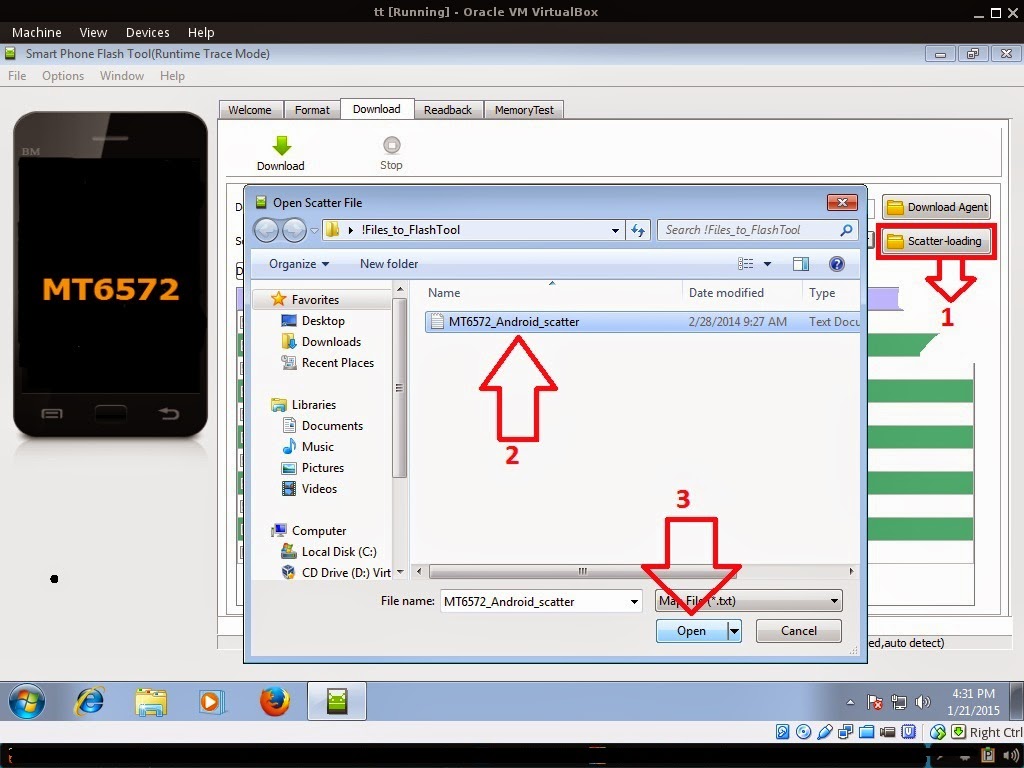
Reference Video Using FlashTool version 5.xxx (watch in HD)
3. After you load the file, press Press Download to Flash your Phone.
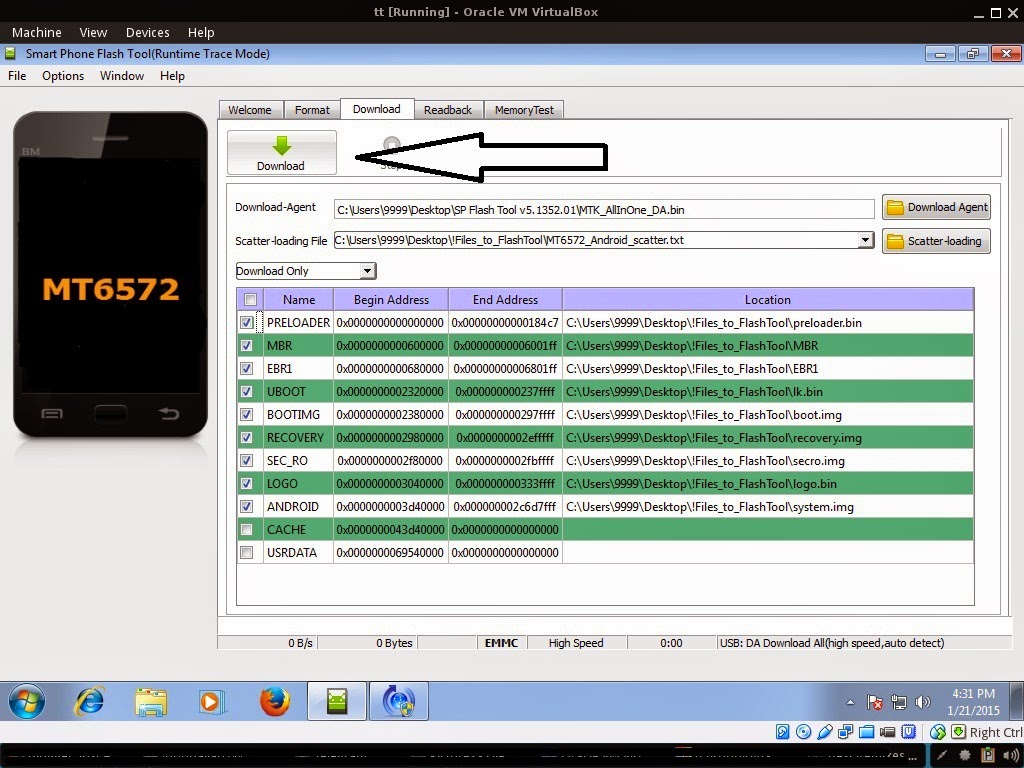
4. After you press Download Follow these steps
Some workarounds:
- Turn off your phone (always powered off is a must)
- Press and HOLD volume UP or Down or you can simply press it simultaneously
- Insert your USB cable without releasing the VOLUME button(s).
- Keep on repeating until Flashtool detected your phone.
"Hard reset your phone after flashing"
Some workarounds:
If you encounter PMT_Changed error here is what you do:
In Latest version of Flashtool
- Load the scatter file
- Choose Format all + Download (Underneath Scatter-loading file)
- Then Click Download and wait until it is done flashing
For Invalid IMEI:Your Phone/Tablet must be rooted first
Restore yong IMEI in MTKDroidTools version 2.5.3. You will have this error when you format your phone in Flashtool as I had experienced. To restore download MTKDroidTools version 2.5.3 After you extract the file. Open the green robot, you must enable the usb debugging in your phone. It is usually located in Settings>Devoloper Mode then look for usb debugging. After enabling it. Connect your phone in your computer then in MTKDroidTool click on ROOT. Wait for it to finish, then Click in IMEI/NVRAM, input 15 number in each box. Then click REPLACE. Then click Reboot or you can manually turn off your phone. Then turn your phone on again. You can see that you have fully restored your IMEI.
Restore yong IMEI in MTKDroidTools version 2.5.3. You will have this error when you format your phone in Flashtool as I had experienced. To restore download MTKDroidTools version 2.5.3 After you extract the file. Open the green robot, you must enable the usb debugging in your phone. It is usually located in Settings>Devoloper Mode then look for usb debugging. After enabling it. Connect your phone in your computer then in MTKDroidTool click on ROOT. Wait for it to finish, then Click in IMEI/NVRAM, input 15 number in each box. Then click REPLACE. Then click Reboot or you can manually turn off your phone. Then turn your phone on again. You can see that you have fully restored your IMEI.
I hope this tutorial help you. Please drop a comment if something is not clear to you.
Tested by:
Me - Files / Flashing
Go to link download
Monday, August 15, 2016
New Huawei Modem Unlocker
New Huawei Modem Unlocker
New Huawei Modem Unlocker
Go to link download
Subscribe to:
Posts (Atom)