Showing posts with label s3. Show all posts
Showing posts with label s3. Show all posts
Friday, October 14, 2016
Samsung SM G3812B S3 Slim stock rom firmware
Samsung SM G3812B S3 Slim stock rom firmware
Samsung stock rom download files flash by odin only ..so 1st download odin flasher for samsung...then flash it via odin.

Download link attached below
DOWNLOAD
Go to link download

Sunday, October 2, 2016
Hard Reset your Cherry Mobile Flare S3 Mini and remove password pattern lock and gmail account
Hard Reset your Cherry Mobile Flare S3 Mini and remove password pattern lock and gmail account
This tutorial is for Cherry Mobile Flare S3 Mini, follow my guide below.
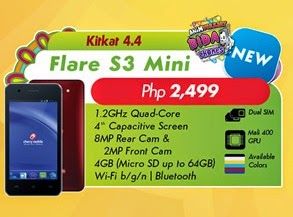
Hard resetting / factory resetting your phone will solve the following issues:
1. If you forgot your pattern lock
2. If you forgot your gmail account
3. If you forgot your password
4. Apps that automatically force closing
5. Stuck in Cherry Mobile Logo (sometimes does not work if the firmware is totally damage)
NOTE: Performing hard reset will erase your data.
To hard reset:
1. Turn off your phone
2. Press and Hold Volume Down + Power button simultaneously, keep on pressing until the phone power up. Release only the Power button when you see the the Flare S3 Mini Logo.
3. An Android Robot will appear with "NO COMMAND" label in it. Press VOLUME DOWN to activate Android System Recovery
4. Select wipe data / factory reset, then YES -- delete all user data, press Volume rocker to navigate and press the POWER button to confirm the selection
5. Reboot your phone.
Note:
If performing hard reset did not succeed, you need to wipe the cache first in the android system recovery before performing wipe / factory
reset.
I hope this tutorial helps you.. If you have any question just drop a comment.
Go to link download
Sunday, September 4, 2016
Cherry Mobile Flare S3 Lite firmware stock rom to unbrick your phone
Cherry Mobile Flare S3 Lite firmware stock rom to unbrick your phone
Hi all,
I recently uploaded the firmware or stock rom for Cherry Mobile Flare S3 Lite, credits to the maker of this file. To Cherry Mobile Flare S3 Lite FB Group thank you.
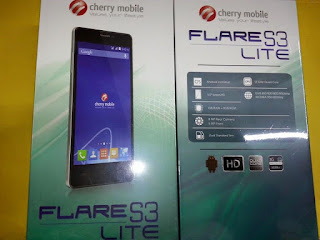
If you have any problem with your Cherry Mobile Flare S3 Lite you can join the FB Group for better assistance.
I have already tested the file and it is 100% rooted, the firmware is also pre-rooted with Kingroot installed.
I recently uploaded the firmware or stock rom for Cherry Mobile Flare S3 Lite, credits to the maker of this file. To Cherry Mobile Flare S3 Lite FB Group thank you.
If you have any problem with your Cherry Mobile Flare S3 Lite you can join the FB Group for better assistance.
I have already tested the file and it is 100% rooted, the firmware is also pre-rooted with Kingroot installed.
UPDATE -- THE DOWNLOAD LINK IS FOR DTC GT5S FIRMWARE. ILL CHANGE THE LINK LATER.
UPDATE 2 -- UPDATED THE CORRECT LINK FOR THE FIRMWARE
"If you are having hard time to download at datafilehost make sure that you UNCHECK the "Download with Secured Download Manager"
TOOLS
ResearchDownload --> DOWNLOAD HERE
Firmware --> Cherry Mobile Flare S3 Lite Part 1
Firmware --> Cherry Mobile Flare S3 Lite Part 2
Firmware --> Cherry Mobile Flare S3 Lite Part 3
Firmware --> Cherry Mobile Flare S3 Lite Part 4
Firmware --> Cherry Mobile Flare S3 Lite Part 5
"Extract to your desired folders"
DOWNLOAD THE FILES, AND EXTRACT. INSTALL DRIVER.
I suggest to use Windows with 32bit system for driver compatibility.
TO fully flash your phone.
1. Open Researchdownload
2. Load packet and look for file the .pac file.(first button in ResearchDownload). Pac file is the firmware that you downloaded.
3. Wait until the Pac file has been loaded, the Researchdownload may freeze its ok just wait for it to load the pac file.
4. Press the Play button to continue flashing.
When connecting your phone in the PC after you press the Play button in Research Download, press and hold either VOLUME UP or VOLUME DOWN, or you can press VOLUME UP and VOLUME DOWN simultaneously.
5. Just wait for it to show pass in ResearchDownload. Your phone will automatically reboot. And just wait for it. It may take 3 minutes to fully boot the system.
I hope this tutorial help you recover your phone :)
Go to link download
Tuesday, August 30, 2016
Samsung Galaxy S3 i9300 Stock ROM firmware to ubrick your phone
Samsung Galaxy S3 i9300 Stock ROM firmware to ubrick your phone
Hey all,
Im done uploading the firmware or stock rom for i9300 or the Samsung Galaxy S3. This is a La Fluer edition file. You will have a La Fluer bootanimation. I think the firmware version is 4.3 (Jellybean)

You need to download several files including the firmware
Odin --> Odin 3.07
Firmware -- > Samsung Galaxy S3 i9300 Part1
Firmware -- > Samsung Galaxy S3 i9300 Part2
Firmware -- > Samsung Galaxy S3 i9300 Part3
Firmware -- > Samsung Galaxy S3 i9300 Part4
Firmware -- > Samsung Galaxy S3 i9300 Part5
Firmware -- > Samsung Galaxy S3 i9300 Part6
Firmware -- > Samsung Galaxy S3 i9300 Part7
Firmware -- > Samsung Galaxy S3 i9300 Part8
Firmware -- > Samsung Galaxy S3 i9300 Part9
Samsung Driver -- > SamsungDriver
"Extract these files in your desired folder"
"Use 7zip or FileJoiner to extract the files"
Installing the driver
1. Install driver first just keep on hitting next.
2. After installing the driver Press and Hold Volume Down + Home Key + Power Button, a selection will appear if you would like to go in Download Mode, Press Volume Up to proceed in Download Mode.
3. Connect your phone in the PC via USB Cable
4. Wait for it to finish installing the driver.
"Note: Sometimes it is better to reboot your PC. After installing the driver."
BEFORE PROCEEDING IN FLASHING MAKE SURE THAT THE BATTERY IS FULLY CHARGED OR 50% CHARGED.
Flashing your Phone
1. Open Odin 3.07
2. Load the following file. PDA, Phone, CSC. No need to overwrite Boot. And its okey to not include the pit file (Flashing .pit file is dangerous) If you are only fixing bootloop. If you are fixing damage baseband include the PIT file and bootloader, the .pit file is for 16GB variant, that is what i read in forums. So dont flash if you have 32GB variant.
PIT --> mx.pit
Bootloader --> BOOTLOADER_I9300XXEMG4_1314436_REV00_user_low_ship.tar
PDA --> CODE_I9300XXEMG4_1314436_REV00_user_low_ship.tar
Phone --> MODEM_I9300XXEMG4_REV02_REV04_CL1360150.tar
CSC --> CSC_QXE_I9300QXEEMH1_CL1359448_REV00_user_low_ship.tar
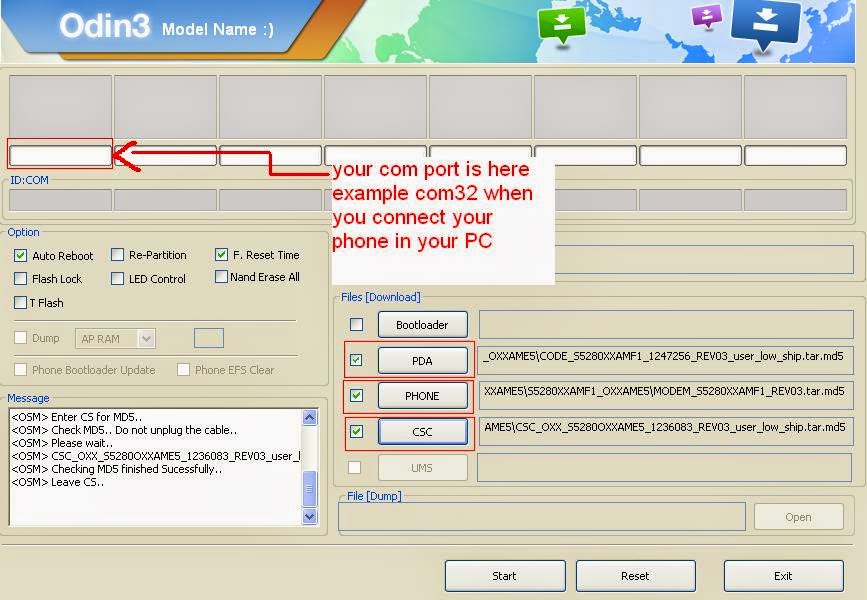
3. Do not check repartition in option key, copy only what is shown in the picture above.
4. When you are ready to flash your phone, Press and Hold Volume Down + Home Key + Power Button, a selection will appear if you would like to go in Download Mode, Press Volume Up to proceed in Download Mode.
5. Connect your phone in the PC via USB Cable, wait for a value in the ID:COM to appear. It will turn yellow with number example: COM32, if it nothing appear close Odin an open it again and load the file again.
6. Press START to proceed flashing your phone. Wait until it is done, the phone will reboot after flashing.
I hope this tutorial help you. Drop a comment if there is something is not clear to you. Cheers! ^_^
Go to link download
Subscribe to:
Posts (Atom)