Sunday, October 9, 2016
Torque Droidz Trend stock rom firmware to unbrick your device
Torque Droidz Trend stock rom firmware to unbrick your device
Hi,
You can flash CWM or Stock Recovery, just replace recovery.img in Flashtool.

You can fix the following issue in your phone:
1. Bootloop
2. Damaged System UI
3. TP Upgrade only
4. Dead phone but it is detected in computer
5. Remove Gmail Account / Password / Pattern Lock (Alternative Way)
6. And other issues with your phones firmware
"DOWNLOAD THESE FILES"
Firmware Here -->Torque Droidz Trend
Alternative Driver --> AutoInstaller
"Use WinRar or 7zip to extract the firmware"
"Extract the files to your desired folder"
"If you encounter error in flashtool, use different version of it."
Installing Driver with AutoInstaller
First try the Alternative Driver, which is the AutoInstaller. Just open the install.exe then it will automatically install the driver. To fully check if the driver is correctly installed in your computer.
Follow these steps:
- Turn off your phone (always powered off is a must)
- Press and hold volume up or down, or you can simple press the two button
- Insert your USB cable without releasing the VOLUME button(s).
- In your computer, it must detect your phone and it will install the MTK Preloader or Mediatek USB VCOM driver.
- Repeat 1 to 4 if it does not detect your phone.
- If MTK Preloader/Mediatek USB VCOM Driver is installed you are good to go in flashing your phone ^_^
Reference Video using Driver Auto Installer (watch in HD)
Installing Manually using VCOM Driver

1. This is the first time that you will connect your phone and it will search for the correct driver.


3. If the driver is successfully installed MediaTek DA USB VCOM will appear in the New Hardware Wizard.
Flashing
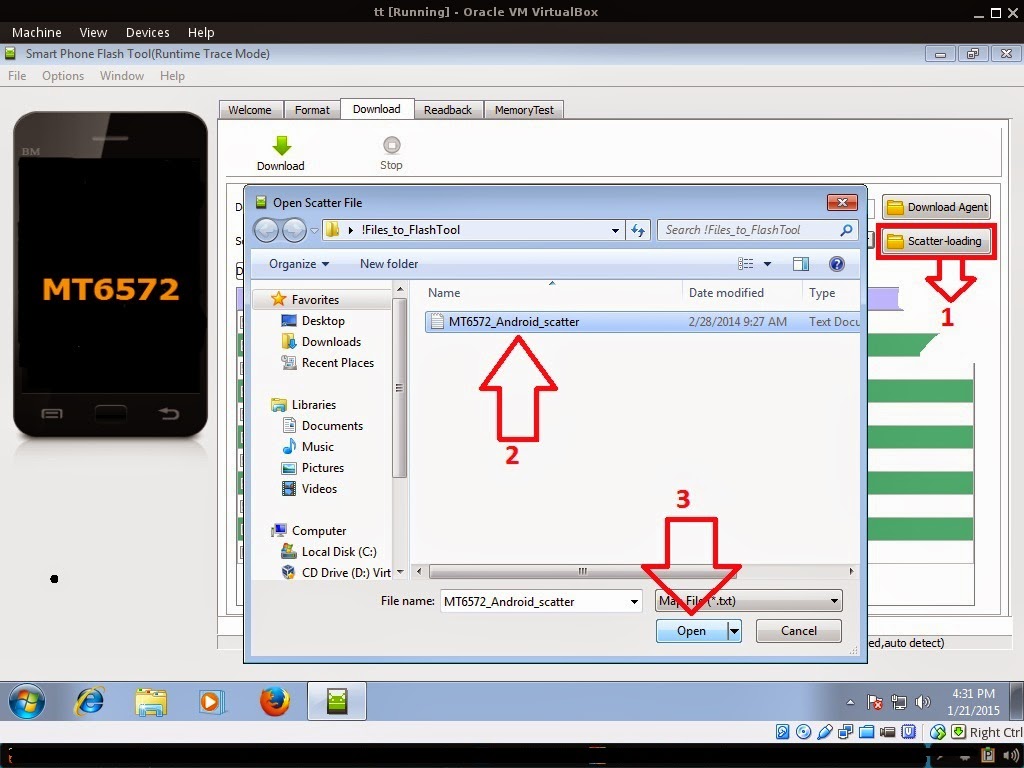
Reference Video Using FlashTool version 5.xxx (watch in HD)
3. After you load the file, press Press Download to Flash your Phone.
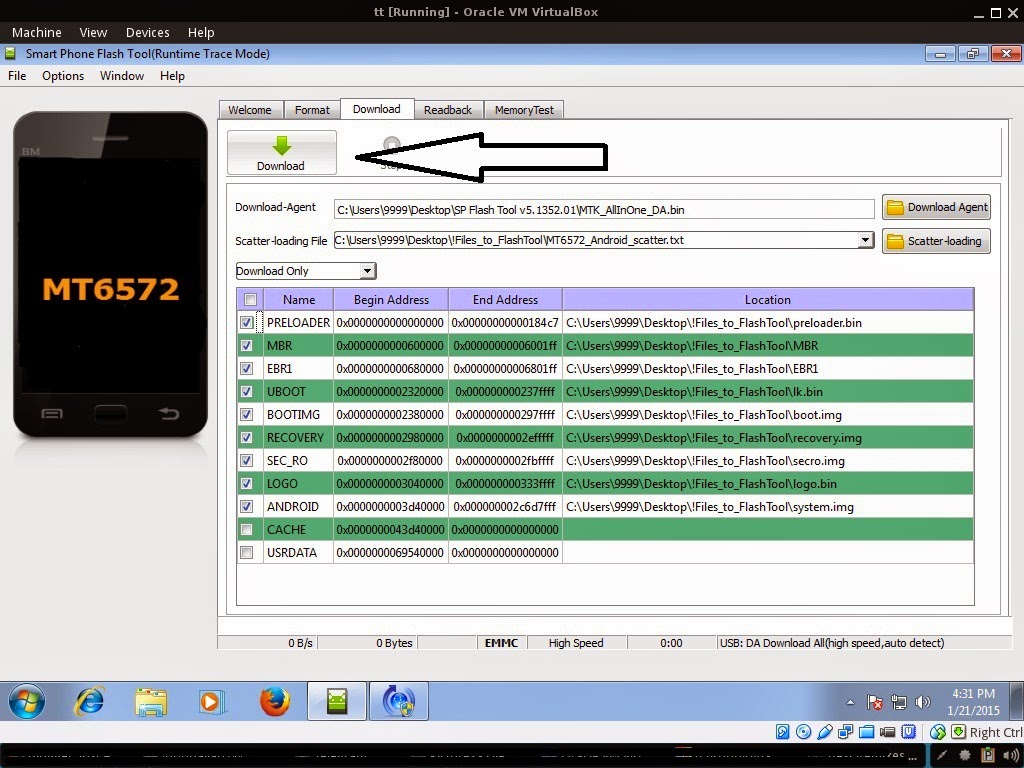
- Turn off your phone (always powered off is a must)
- Press and HOLD volume UP or Down or you can simply press it simultaneously
- Insert your USB cable without releasing the VOLUME button(s).
- Keep on repeating until Flashtool detected your phone.
Some workarounds:
- Load the scatter file
- Choose Format all + Download (Underneath Scatter-loading file)
- Then Click Download and wait until it is done flashing
Restore yong IMEI in MTKDroidTools version 2.5.3. You will have this error when you format your phone in Flashtool as I had experienced. To restore download MTKDroidTools version 2.5.3 After you extract the file. Open the green robot, you must enable the usb debugging in your phone. It is usually located in Settings>Devoloper Mode then look for usb debugging. After enabling it. Connect your phone in your computer then in MTKDroidTool click on ROOT. Wait for it to finish, then Click in IMEI/NVRAM, input 15 number in each box. Then click REPLACE. Then click Reboot or you can manually turn off your phone. Then turn your phone on again. You can see that you have fully restored your IMEI.
I hope this tutorial help you. Please drop a comment if something is not clear to you.
Go to link download

Thursday, October 6, 2016
MyPhone My28s a budget friendly device powered by SMART
MyPhone My28s a budget friendly device powered by SMART

4 inch LCD with 480x800 resolution
THE CAMERA


GAMING PERFORMANCE
Im not really into gaming but Ive tried to play Age of Wushu which is a graphic intensive game, you can notice a lag while starting up the game, but once the game started the game is playable. Expect lag when the hero is making skill and other hero is performing skill.
Light games are OK to play there is no lag at all. I played Angry Birds, Monster Shooter, Fruit Ninja and Candy Crush. Yes I did not tried COC but I can assure you that it is fully working with this phone. You can also ask at Facebook Group for any games that I have not tried. My28S community is friendly ;)
BATTERY LIFE
With its miniscule battery it will last a day if you use the phone moderately. But if you are playing games it can only last 1.5 - 2 hours. Using mobile data will kill the battery as the phone heats up too much like you are frying your hands :). It is advisable to use WiFi as WiFi consumes less battery.
CONCLUSION
If you are planning to buy a smartphone that is "SULIT". This would be your smartphone of choice. Great device for those who are studying which can help on researching and also for social media consumption. This device is better than Cherry Mobile C100/Cherry Mobile Astro/Cherry Mobile C200/Cherry Mobile Comet/Cherry Mobile B100 which offers limited internal storage and cost more and outdated OS (Jellybean and Kitkat)
Go to link download
Saturday, September 24, 2016
How to Find your Android Device ID
How to Find your Android Device ID

Today I would like to share a small trick with you. Its about your android device ID. Sometimes you might be asked to share your device ID. And its really tough to find out the unique ID of your android device. But there are different apps which help you get your device ID.
Whats Android Device ID?
Your Android Device ID is a unique alphanumeric code associated with your device. For example -
You may need this ID while getting support from the manufacturer or downloading apps from Google Play offline.
Its really difficult to locate your device ID manually. You may ask your manufacturer to help you locate your device ID. Or you can simply get it using one of the apps available in the Google Play.
Device ID App
I would like to share an small app with you - Device ID. Its a free tool and only 24KB in size! After running this app from your phone, it will show -
- Your Device ID - i.e. 3A7E6CCAGC746519
- Device Codename - i.e. M1
- Your registered Email ID - i.e. munnamark@gmail.com

Stay with Marks PC Solution to get more interesting IT topics!
Go to link download
Friday, August 26, 2016
Download Bagpipe Varies with device APK for Android
Download Bagpipe Varies with device APK for Android

ID: com.nettuno.bagpipe
Version: Varies with device
File Size: -1Mb
Bagpipe Screenshots

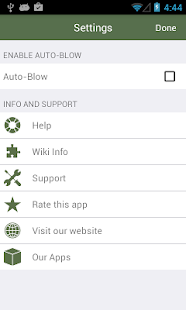

Bagpipe Details
Amaze your friends and relatives by playing scottish melodies, blown into your Android and touch the right keys to dip your house and everything else in a magical atmosphere. Approach this wonderful but little known musical instrument and discover the scot thats inside you!• Blow to play!
The app simulates a real scottish bagpipe! Blow into microphone. The virtual air bag will fill up and you will start playing.
• Play magical melodies
You can immediately start playing! The tutorial is always update with new songs. It helps, guides and teaches to you how to play some melodies. Play, and become a master like Hevia!
• Jam Session
join guitars, pianos and other classic musical instruments to create definitely new music tracks!
• Simple but realistic, suitable for everybody!
the virtual Bagpipe is easier to play than the real one, everybody can play it just touching one key at a time! Anyway we still preserve a great realism, if you dont blow the bagpipe will not play. So pump up your lungs, you will need them!
• Free worldwide!
You dont have to spend money thanks to the Ad support!
• High Res Graphic
The graphic is optimized for devices equipped with Retina Display.
• Tips…
For more informations and "how to" read the help section on the back view of the app.
Connect your device to an external speaker for a better sound.
• More info
The most famous bagpipe is the Scottish Great Highland Bagpipe, but there are many kinds of it from many countries, like the French Musette de cour, the Italians zampogna, piva, müsa and baghèt, the Spanish gaita, …
It is essentially made by the reeds (drones) that play a base bass sound, a bag that the player inflates by blowing air into it (and which is the "lung" of the instrument) and by a "Chanter" upon which the player creates the melody.
***************
Quick Help
***************
To play:
1. gently blow into the microphone, the drones will start playing the typical background sound of the bagpipe;
2. touch one hole at a time to hear the notes;
3. dont lose sight of the air indicator, when the air is about to finish you will need to blow into the microphone again or the bagpipe will stop playing!
4. to stop the sound simply press the STOP button.
Whats new in Bagpipe Varies with device
- New UI- Improved compatibility with tablet and phones
- Minor bug fixes
Download Bagpipe Varies with device APK
Go to link download