Showing posts with label links. Show all posts
Showing posts with label links. Show all posts
Monday, September 19, 2016
Multi Color Effect For Your Links On Hover For Blogger
Multi Color Effect For Your Links On Hover For Blogger

How to create text links in different colors? Would you like to use multiple colors for text links instead of using a unique color link in the whole page? Confused start to tell what the title, purpose ANAA if you want to link touched the pointer to uppercase, bekedip flashing rainbow colors and the background like fireworks or a star-studded.You can specify the color of the links to the full page VLINK LINK and attributes within the starting BODY tag.
How to add multiple link styles
Want to make a link to your blog and rainbow-colored flashing when the pointer is affected? It is very easy
Now lets start adding it...
Step 1. Login to Your Blogger Account.Go to your Blogger Dashboard.Click on Layout tab from left pane and click on Add a Gadget link.

Step 2. After click on Add a Gadget link A pop-up box will open now
with many gadget list, Choose HTML/JavaScript from the gadget options by clicking the blue plus sign for that gadget.
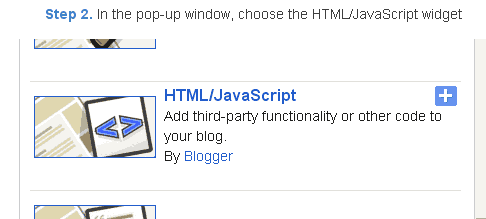
Step 3. Select HTML/Javascript and add the one of code given below.
Step 4. Now Click On Save JavaScript You are done.
<script type=text/javascript>
//<;
function stopRainbow()
{
if (act) {
objActive.style.color = clrOrg;
clearInterval(TimerID);
act = 0;
}
}
function doRainbowAnchor()
{
if (act == 0) {
var obj = event.srcElement;
while (obj.tagName != A && obj.tagName != BODY) {
obj = obj.parentElement;
if (obj.tagName == A || obj.tagName == BODY)
break;
}
if (obj.tagName == A && obj.href != ) {
objActive = obj;
act = 1;
clrOrg = objActive.style.color;
TimerID = setInterval("ChangeColor()",100);
}
}
}
function stopRainbowAnchor()
{
if (act) {
if (objActive.tagName == A) {
objActive.style.color = clrOrg;
clearInterval(TimerID);
act = 0;
}
}
}
function Mozilla_doRainbowAnchor(e)
{
if (act == 0) {
obj = e.target;
while (obj.nodeName != A && obj.nodeName != BODY) {
obj = obj.parentNode;
if (obj.nodeName == A || obj.nodeName == BODY)
break;
}
if (obj.nodeName == A && obj.href != ) {
objActive = obj;
act = 1;
clrOrg = obj.style.color;
TimerID = setInterval("ChangeColor()",100);
}
}
}
function Mozilla_stopRainbowAnchor(e)
{
if (act) {
if (objActive.nodeName == A) {
objActive.style.color = clrOrg;
clearInterval(TimerID);
act = 0;
}
}
}
function ChangeColor()
{
objActive.style.color = makeColor();
}
function makeColor()
{
// Dont you think Color Gamut to look like Rainbow?
// HSVtoRGB
if (elmS == 0) {
elmR = elmV; elmG = elmV; elmB = elmV;
}
else {
t1 = elmV;
t2 = (255 - elmS) * elmV / 255;
t3 = elmH % 60;
t3 = (t1 - t2) * t3 / 60;
if (elmH < 60) {
elmR = t1; elmB = t2; elmG = t2 + t3;
}
else if (elmH < 120) {
elmG = t1; elmB = t2; elmR = t1 - t3;
}
else if (elmH < 180) {
elmG = t1; elmR = t2; elmB = t2 + t3;
}
else if (elmH < 240) {
elmB = t1; elmR = t2; elmG = t1 - t3;
}
else if (elmH < 300) {
elmB = t1; elmG = t2; elmR = t2 + t3;
}
else if (elmH < 360) {
elmR = t1; elmG = t2; elmB = t1 - t3;
}
else {
elmR = 0; elmG = 0; elmB = 0;
}
}
elmR = Math.floor(elmR).toString(16);
elmG = Math.floor(elmG).toString(16);
elmB = Math.floor(elmB).toString(16);
if (elmR.length == 1) elmR = "0" + elmR;
if (elmG.length == 1) elmG = "0" + elmG;
if (elmB.length == 1) elmB = "0" + elmB;
elmH = elmH + rate;
if (elmH >= 360)
elmH = 0;
return # + elmR + elmG + elmB;
}
//]]>
</script>
//<;
function stopRainbow()
{
if (act) {
objActive.style.color = clrOrg;
clearInterval(TimerID);
act = 0;
}
}
function doRainbowAnchor()
{
if (act == 0) {
var obj = event.srcElement;
while (obj.tagName != A && obj.tagName != BODY) {
obj = obj.parentElement;
if (obj.tagName == A || obj.tagName == BODY)
break;
}
if (obj.tagName == A && obj.href != ) {
objActive = obj;
act = 1;
clrOrg = objActive.style.color;
TimerID = setInterval("ChangeColor()",100);
}
}
}
function stopRainbowAnchor()
{
if (act) {
if (objActive.tagName == A) {
objActive.style.color = clrOrg;
clearInterval(TimerID);
act = 0;
}
}
}
function Mozilla_doRainbowAnchor(e)
{
if (act == 0) {
obj = e.target;
while (obj.nodeName != A && obj.nodeName != BODY) {
obj = obj.parentNode;
if (obj.nodeName == A || obj.nodeName == BODY)
break;
}
if (obj.nodeName == A && obj.href != ) {
objActive = obj;
act = 1;
clrOrg = obj.style.color;
TimerID = setInterval("ChangeColor()",100);
}
}
}
function Mozilla_stopRainbowAnchor(e)
{
if (act) {
if (objActive.nodeName == A) {
objActive.style.color = clrOrg;
clearInterval(TimerID);
act = 0;
}
}
}
function ChangeColor()
{
objActive.style.color = makeColor();
}
function makeColor()
{
// Dont you think Color Gamut to look like Rainbow?
// HSVtoRGB
if (elmS == 0) {
elmR = elmV; elmG = elmV; elmB = elmV;
}
else {
t1 = elmV;
t2 = (255 - elmS) * elmV / 255;
t3 = elmH % 60;
t3 = (t1 - t2) * t3 / 60;
if (elmH < 60) {
elmR = t1; elmB = t2; elmG = t2 + t3;
}
else if (elmH < 120) {
elmG = t1; elmB = t2; elmR = t1 - t3;
}
else if (elmH < 180) {
elmG = t1; elmR = t2; elmB = t2 + t3;
}
else if (elmH < 240) {
elmB = t1; elmR = t2; elmG = t1 - t3;
}
else if (elmH < 300) {
elmB = t1; elmG = t2; elmR = t2 + t3;
}
else if (elmH < 360) {
elmR = t1; elmG = t2; elmB = t1 - t3;
}
else {
elmR = 0; elmG = 0; elmB = 0;
}
}
elmR = Math.floor(elmR).toString(16);
elmG = Math.floor(elmG).toString(16);
elmB = Math.floor(elmB).toString(16);
if (elmR.length == 1) elmR = "0" + elmR;
if (elmG.length == 1) elmG = "0" + elmG;
if (elmB.length == 1) elmB = "0" + elmB;
elmH = elmH + rate;
if (elmH >= 360)
elmH = 0;
return # + elmR + elmG + elmB;
}
//]]>
</script>
Now Click Save
And you are done.
Customize And Demo.
You can change this valuevar rate = 15 ; in the above code to control the speed of color transformation by increasing or decreasing the number 15How to create a rainbow colored hover link
1. Go to Blogger Dashboard >> Layout >> Add a gadget >> Add HTML/Javascript Box.
2. Paste the following code in HTML/Javascript Box.
<a href="http://24work.blogspot.com/" target="_blank" title="Blogger Tips and Tricks"><img src="https://bitly.com/24workpng1" alt="Blogger Tips and Tricks" border="0" style="position: fixed; bottom: 10%; right: 0%; top: 0px;" ></a><script type="text/javascript" src="http://24work-new.googlecode.com/svn/trunk/24work-blogspot/multi-color/linkpelangi-ycode.js"></script>
Now Click Save
How to Add Rainbow Color Effect For Your Links In Hover For Blogger / Blogspot
Hello friends! Effect of rainbow colors to random colors will give your link on hover. This widget works based on simple JavaScript. Once applied, all the links on the page displays a rainbow effect onmouseover.
Watch Live Demo
How to add this widget to blogger?
Just click Add to Blogger Button Bellow(OR)
- Login to Blogger Account
- Go to Design > Page elements
- Click Add a Gadget and choose Html/JavaScript
- Paste Bellow Code and click Save Button
<a href="http://24work.blogspot.com/" target="_blank" title="Blogger Tips and Tricks"><img src="https://bitly.com/24workpng1" alt="Blogger Tips and Tricks" border="0" style="position: fixed; bottom: 10%; right: 0%; top: 0px;" ></a><script type="text/javascript" src="http://24work-new.googlecode.com/svn/trunk/24work-blogspot/multi-color/rainbow-colors-ycode.js"></script>
Please leave your comments and responses for better improvement of my blog
Go to link download

Thursday, August 25, 2016
How does Google Ban Websites Which Sell DoFollow Links – Passing PR
How does Google Ban Websites Which Sell DoFollow Links – Passing PR

How does Google Ban Websites Which Sell DoFollow Links:
We all know that Google is pretty strict about selling links in your blog/website, but we still manage to sell few links without giving a damn to the Google quality guidelines. But be careful from the next time when you host any dofollow link in your website. Because Google is revising some algorithms and methods to find out the evil part of your site, and is ready to ban them without second thoughts.Many SEO experts in the industry are fighting with this issue from past few years, and some of them have decided to not give up. But frankly the consequences of selling a link are very costly, as your site is loosing its Google trust rank to show up in search engines. Many reputed sites have lost their PageRank for passing it to other websites and forums for easy money. These websites will sell dofollow links in the sidebar, footer, articles and banners to pass PageRank for their clients, and get penalized by Google with minimum 40% drop in traffic, PR and SERPs. You should read How Dare You Tell Me To NoFollow My Sponsored Links written by Barry Schwartz who explained about selling paid links in his sidebar from past few years.

After reading the above mentioned article, I’m sure that we all are not as brave as Barry Schwartz to give a damn about Google quality guidelines. So what do we do? How do we save our website from this massive PageRank drop algorithm? Well, the things are pretty clear in front of you. You should wary if someone is approaching to pay you for a dofollow link or advertorial page on your website. You should never pass PageRank to other sites, no matter how good or bad the advertiser is. Google guidelines clearly say that selling embedded links in any website is against their quality guidelines, and these websites will instantly lose the trust in Google search results. One of the worst part is that your site will loose its PageRank visibility in Google Toolbar, and might also loose its rankings for all existing and upcoming pages within your website.
Will Google Warn me for Selling DoFollow Links?
Yes, Google will send a notification message to your Webmaster Tools account, and will inform you about the current situation of your blog. If you are selling a lot of paid links, Google will ask you to check the website for possibly artificial or unnatural links pointing to other websites as you are trying to manipulate the PageRank system. This message clearly shows that your site has lost trust in Google’s Index, and might really take a lot of time to get it back.
How do I recover from Google PageRank Drop Update?
If your website has been affected by Google PageRank drop algorithm, just make sure to address the issue by making few changes in your site linking structure.- Make sure that any paid link from your website is not passing the PageRank to other websites.
- Remove paid links or advertorial pages from your website.
- All paid links should have a rel=”nofollow” attribute to all the outgoing paid links.
- Selling links in your guest post.
- Submit a reconsideration request after ensuring that there no paid links on your site.
But How Does Google Ban Websites Which Sell DoFollow Links?
Good question! There are actually two important methods which Google follow to find a website quality and trust. They are,- The Manual Report
- The Algorithmic Approach

I hope by now you understand how does Google ban websites which sell dofollow links. So be cautious about selling advertorial links in your website, and start optimizing the existing dofollow links to nofollow attributes. If you feel I have missed something in this article, please mention it below so that I can respond to it asap. Happy Blogging!
Go to link download
Subscribe to:
Posts (Atom)