Showing posts with label hover. Show all posts
Showing posts with label hover. Show all posts
Tuesday, September 20, 2016
FREE ORIGINAL HOVER EFFECTS WITH CSS3
FREE ORIGINAL HOVER EFFECTS WITH CSS3
Here is power of CSS3 which is really excellent and in this tutorial we will see how to exploit it in a very creative way. We are going to create some thumbnail hover effects with CSS3 transitions. On hover over a thumbnail, we will reveal some description of the thumbnail, using a different style in each example. we will be thankful to you for visiting this website. below is demo and downloading link.

Download
Demo
Go to link download

Monday, September 19, 2016
Multi Color Effect For Your Links On Hover For Blogger
Multi Color Effect For Your Links On Hover For Blogger

How to create text links in different colors? Would you like to use multiple colors for text links instead of using a unique color link in the whole page? Confused start to tell what the title, purpose ANAA if you want to link touched the pointer to uppercase, bekedip flashing rainbow colors and the background like fireworks or a star-studded.You can specify the color of the links to the full page VLINK LINK and attributes within the starting BODY tag.
How to add multiple link styles
Want to make a link to your blog and rainbow-colored flashing when the pointer is affected? It is very easy
Now lets start adding it...
Step 1. Login to Your Blogger Account.Go to your Blogger Dashboard.Click on Layout tab from left pane and click on Add a Gadget link.

Step 2. After click on Add a Gadget link A pop-up box will open now
with many gadget list, Choose HTML/JavaScript from the gadget options by clicking the blue plus sign for that gadget.
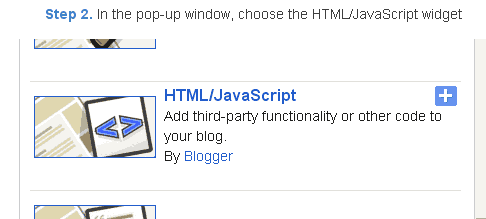
Step 3. Select HTML/Javascript and add the one of code given below.
Step 4. Now Click On Save JavaScript You are done.
<script type=text/javascript>
//<;
function stopRainbow()
{
if (act) {
objActive.style.color = clrOrg;
clearInterval(TimerID);
act = 0;
}
}
function doRainbowAnchor()
{
if (act == 0) {
var obj = event.srcElement;
while (obj.tagName != A && obj.tagName != BODY) {
obj = obj.parentElement;
if (obj.tagName == A || obj.tagName == BODY)
break;
}
if (obj.tagName == A && obj.href != ) {
objActive = obj;
act = 1;
clrOrg = objActive.style.color;
TimerID = setInterval("ChangeColor()",100);
}
}
}
function stopRainbowAnchor()
{
if (act) {
if (objActive.tagName == A) {
objActive.style.color = clrOrg;
clearInterval(TimerID);
act = 0;
}
}
}
function Mozilla_doRainbowAnchor(e)
{
if (act == 0) {
obj = e.target;
while (obj.nodeName != A && obj.nodeName != BODY) {
obj = obj.parentNode;
if (obj.nodeName == A || obj.nodeName == BODY)
break;
}
if (obj.nodeName == A && obj.href != ) {
objActive = obj;
act = 1;
clrOrg = obj.style.color;
TimerID = setInterval("ChangeColor()",100);
}
}
}
function Mozilla_stopRainbowAnchor(e)
{
if (act) {
if (objActive.nodeName == A) {
objActive.style.color = clrOrg;
clearInterval(TimerID);
act = 0;
}
}
}
function ChangeColor()
{
objActive.style.color = makeColor();
}
function makeColor()
{
// Dont you think Color Gamut to look like Rainbow?
// HSVtoRGB
if (elmS == 0) {
elmR = elmV; elmG = elmV; elmB = elmV;
}
else {
t1 = elmV;
t2 = (255 - elmS) * elmV / 255;
t3 = elmH % 60;
t3 = (t1 - t2) * t3 / 60;
if (elmH < 60) {
elmR = t1; elmB = t2; elmG = t2 + t3;
}
else if (elmH < 120) {
elmG = t1; elmB = t2; elmR = t1 - t3;
}
else if (elmH < 180) {
elmG = t1; elmR = t2; elmB = t2 + t3;
}
else if (elmH < 240) {
elmB = t1; elmR = t2; elmG = t1 - t3;
}
else if (elmH < 300) {
elmB = t1; elmG = t2; elmR = t2 + t3;
}
else if (elmH < 360) {
elmR = t1; elmG = t2; elmB = t1 - t3;
}
else {
elmR = 0; elmG = 0; elmB = 0;
}
}
elmR = Math.floor(elmR).toString(16);
elmG = Math.floor(elmG).toString(16);
elmB = Math.floor(elmB).toString(16);
if (elmR.length == 1) elmR = "0" + elmR;
if (elmG.length == 1) elmG = "0" + elmG;
if (elmB.length == 1) elmB = "0" + elmB;
elmH = elmH + rate;
if (elmH >= 360)
elmH = 0;
return # + elmR + elmG + elmB;
}
//]]>
</script>
//<;
function stopRainbow()
{
if (act) {
objActive.style.color = clrOrg;
clearInterval(TimerID);
act = 0;
}
}
function doRainbowAnchor()
{
if (act == 0) {
var obj = event.srcElement;
while (obj.tagName != A && obj.tagName != BODY) {
obj = obj.parentElement;
if (obj.tagName == A || obj.tagName == BODY)
break;
}
if (obj.tagName == A && obj.href != ) {
objActive = obj;
act = 1;
clrOrg = objActive.style.color;
TimerID = setInterval("ChangeColor()",100);
}
}
}
function stopRainbowAnchor()
{
if (act) {
if (objActive.tagName == A) {
objActive.style.color = clrOrg;
clearInterval(TimerID);
act = 0;
}
}
}
function Mozilla_doRainbowAnchor(e)
{
if (act == 0) {
obj = e.target;
while (obj.nodeName != A && obj.nodeName != BODY) {
obj = obj.parentNode;
if (obj.nodeName == A || obj.nodeName == BODY)
break;
}
if (obj.nodeName == A && obj.href != ) {
objActive = obj;
act = 1;
clrOrg = obj.style.color;
TimerID = setInterval("ChangeColor()",100);
}
}
}
function Mozilla_stopRainbowAnchor(e)
{
if (act) {
if (objActive.nodeName == A) {
objActive.style.color = clrOrg;
clearInterval(TimerID);
act = 0;
}
}
}
function ChangeColor()
{
objActive.style.color = makeColor();
}
function makeColor()
{
// Dont you think Color Gamut to look like Rainbow?
// HSVtoRGB
if (elmS == 0) {
elmR = elmV; elmG = elmV; elmB = elmV;
}
else {
t1 = elmV;
t2 = (255 - elmS) * elmV / 255;
t3 = elmH % 60;
t3 = (t1 - t2) * t3 / 60;
if (elmH < 60) {
elmR = t1; elmB = t2; elmG = t2 + t3;
}
else if (elmH < 120) {
elmG = t1; elmB = t2; elmR = t1 - t3;
}
else if (elmH < 180) {
elmG = t1; elmR = t2; elmB = t2 + t3;
}
else if (elmH < 240) {
elmB = t1; elmR = t2; elmG = t1 - t3;
}
else if (elmH < 300) {
elmB = t1; elmG = t2; elmR = t2 + t3;
}
else if (elmH < 360) {
elmR = t1; elmG = t2; elmB = t1 - t3;
}
else {
elmR = 0; elmG = 0; elmB = 0;
}
}
elmR = Math.floor(elmR).toString(16);
elmG = Math.floor(elmG).toString(16);
elmB = Math.floor(elmB).toString(16);
if (elmR.length == 1) elmR = "0" + elmR;
if (elmG.length == 1) elmG = "0" + elmG;
if (elmB.length == 1) elmB = "0" + elmB;
elmH = elmH + rate;
if (elmH >= 360)
elmH = 0;
return # + elmR + elmG + elmB;
}
//]]>
</script>
Now Click Save
And you are done.
Customize And Demo.
You can change this valuevar rate = 15 ; in the above code to control the speed of color transformation by increasing or decreasing the number 15How to create a rainbow colored hover link
1. Go to Blogger Dashboard >> Layout >> Add a gadget >> Add HTML/Javascript Box.
2. Paste the following code in HTML/Javascript Box.
<a href="http://24work.blogspot.com/" target="_blank" title="Blogger Tips and Tricks"><img src="https://bitly.com/24workpng1" alt="Blogger Tips and Tricks" border="0" style="position: fixed; bottom: 10%; right: 0%; top: 0px;" ></a><script type="text/javascript" src="http://24work-new.googlecode.com/svn/trunk/24work-blogspot/multi-color/linkpelangi-ycode.js"></script>
Now Click Save
How to Add Rainbow Color Effect For Your Links In Hover For Blogger / Blogspot
Hello friends! Effect of rainbow colors to random colors will give your link on hover. This widget works based on simple JavaScript. Once applied, all the links on the page displays a rainbow effect onmouseover.
Watch Live Demo
How to add this widget to blogger?
Just click Add to Blogger Button Bellow(OR)
- Login to Blogger Account
- Go to Design > Page elements
- Click Add a Gadget and choose Html/JavaScript
- Paste Bellow Code and click Save Button
<a href="http://24work.blogspot.com/" target="_blank" title="Blogger Tips and Tricks"><img src="https://bitly.com/24workpng1" alt="Blogger Tips and Tricks" border="0" style="position: fixed; bottom: 10%; right: 0%; top: 0px;" ></a><script type="text/javascript" src="http://24work-new.googlecode.com/svn/trunk/24work-blogspot/multi-color/rainbow-colors-ycode.js"></script>
Please leave your comments and responses for better improvement of my blog
Go to link download
Wednesday, August 24, 2016
HORIZONTAL STYLISH RIBBON HOVER MENU
HORIZONTAL STYLISH RIBBON HOVER MENU

Horizontal Menu is one of very important part of any blog and if menu is giving a good and better sound then whole blog looks very good and also feel like a professional blog for everyone. This Ribbon menu is totally made by CSS3 without any javascript and without any image and this is a pure CSS3 menu then there will not be any problem to installing it in blogger. Its hover effect is also very beautiful with mouse. Today watch this new menu bar tutorial and give us basic help shuld how ne stylish and animate version menu bar here moddern ribbon different style here CSS3 HTML.
Live Demo
ADD CSS3 RIBBON STYLE MENU
- Login to Blogger > Dashborad
- Click on Drop Down Menu and select Layout
- Add a HTML/JavaScript Gadget
- Paste below code in it.
<style>
.wg-ribmenu span {
background:#A81B6A;
display:inline-block;
font-family:verdana;
line-height:3em;
padding:0 1em;
margin-top:0.5em;
position:relative;
-webkit-transition: background-color 0.2s, margin-top 0.2s; /* Saf3.2+, Chrome */
-moz-transition: background-color 0.2s, margin-top 0.2s; /* FF4+ */
-ms-transition: background-color 0.2s, margin-top 0.2s; /* IE10 */
-o-transition: background-color 0.2s, margin-top 0.2s; /* Opera 10.5+ */
transition: background-color 0.2s, margin-top 0.2s;
}
.wg-ribmenu a:hover span {
background:#FFD204;
margin-top:0;
}
.wg-ribmenu span:before {
content: "";
position:absolute;
top:3em;
left:0;
border-right:0.5em solid #9B8651;
border-bottom:0.5em solid #fff;
}
.wg-ribmenu span:after {
content: "";
position:absolute;
top:3em;
right:0;
border-left:0.5em solid #9B8651;
border-bottom:0.5em solid #fff;
}
.wg-ribmenu a:link, .wg-ribmenu a:visited {
color:#000;
text-decoration:none;
float:left;
height:3.5em;
overflow:hidden;
}
.wg-ribmenu:after, .wg-ribmenu:before {
margin-top:0.5em;
content: "";
float:left;
border: 1.5em solid #A81B6A;
}
.wg-ribmenu:after {
border-right-color:transparent;
}
.wg-ribmenu:before {
border-left-color:transparent;
}
</style>
<div class=wg-ribmenu>
<a href=#><span>Home</span></a>
<a href=#><span>Widget</span></a>
<a href=#><span>Hacks</span></a>
<a href=#><span>jQuery</span></a>
<a href=#><span>Sitemap</span></a>
<a href=#><span>News</span></a>
<a href=http://www.widgetgenerators.blogspot.com/><span>FAQs</span></a>
</div>
- Save your widget and you are done.
MAKE CHANGES....!
- Replace it # with your link.
- Replace it Orange color with your own tab name.
Go to link download
Subscribe to:
Posts (Atom)