Showing posts with label button. Show all posts
Showing posts with label button. Show all posts
Friday, October 14, 2016
Print Screen Button Tips
Print Screen Button Tips

Each and every computer users are familiar with the Print Screen Button. Most of you know, you can take a picture of your screen through Print Screen button. In your Keyboard, you may notice the button as this name - Prt Sc/SysRq.
Do you know what is SysRq? Its an acronym for System Requirement which is a command used by Linux Kernel. To be honest, I know nothing about the use of SysRq. And in a Windows PC, this button has no standard use.
Using the Print Screen Button Smartly
Almost all of you can use the Print Screen button. But how many of you can use this button smartly? Not many people! :)
Print Screen
If you press this button, the picture of your screen will be sent to clipboard. Then you can paste the image in a program that allows you to paste images. Such as - Paint, Photoshop, MS Word etc.
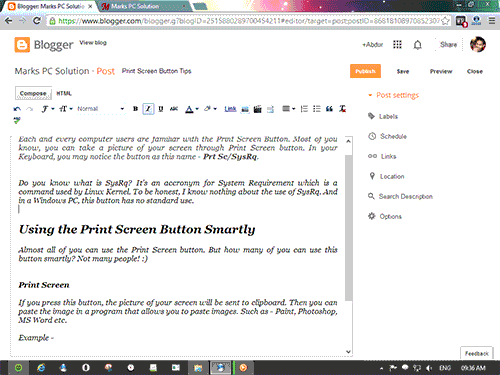
Example - I pressed the Print Screen button and paste the image in Photoshop. Now you can see the picture of the whole screen including task bar.
Alt + Print Screen
Suppose you dont need the whole screen. You just need the picture of your currently running screen or program. In that case, you can press Alt + Print Screen button.
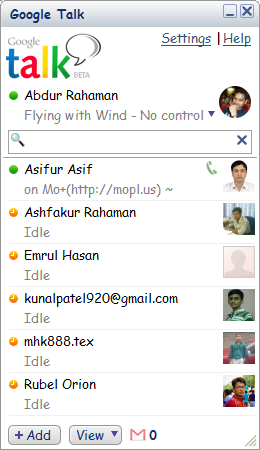
Example - Ive just opened Google Talk. Then pressed Alt + Print Screen and then paste it in Phtoshop. Only the picture of Google Talk has been pasted there.
Windows + Print Screen
Almost do the same job as Print Screen. But this time you dont need to paste the image anywhere. If you press Windows + Print Screen button at the same time, your monitor will blink for a moment, the image of your full screen will be saved in your picture folder automatically.
Just go to My Computer > Then hit on the Pictures from Left Panel > Now you will get a folder named Screenshots > All pictures taken by Windows + Print Screen button will be saved here.
Related Posts
- Take Screenshot by Snipping Tool
- Capture Screen by Microsoft Word
Stay with Marks PC Solution to get more interesting IT topics!
Go to link download

Tuesday, September 27, 2016
Facebook Gonna Introduce Unlike Button
Facebook Gonna Introduce Unlike Button
For last few days, its been a big question in the world of web. Is Facebook really thinking about a dislike button? Will Mark Zuckerberg allow it? Not only the facebookers, but the whole world of web is waiting for the answers! Lets explore . . .
You know, everything shared on Facebook can either be liked, shared or commented. But there is no option to express sad feelings. Not all stories could be liked. Let me recall you the following stories -
- The Heart-Breaking Death of 4-year Old Boy Jihad in Unsealed Deep Tube Well in Dhaka, Bangladesh
- Taliban Attack in Peshawar School, Pakistan (145 Killed)
- The Killing of 8 Children in Australia
- The Capsize of Oil Tanker in the Shella River in Sundarbans (350000 Liters Furnace Oil, Covering 350 Sq. KM Area)
- The Tragic Death of Australian Batsman Phillip Hughes
- Rana Plaza Tragedy in Savar, Bangladesh (Approx. 1129 Killed, 2515 Injured)
- The Missing of Flight 370 with 239 People
Wouldnt you hesitate to hit the like button when somebody shares any of the above news with you? Some people will find it totally illogical to give likes! But still many people will give like to the bad news just to share the posts with friends.
Okay Im gonna stop talking about major occurrences. But what about these?
- Your friend just lost his Samsung S4!
- Your colleague had an accident last night!
- Your brother failed in the exam
- Youve broken up with someone :(
What do you do in these situations? Or what you expect from others? Thousands of Likes??
Why People Give Likes to Sad Events?
Actually its been a tradition. More likes mean more popularity. So when someone shares a sad but important event, people usually give likes. At the same time, they think -
If I could give a Dislike/ Unlike!
But you know, its still impossible since Facebook has only the Like button.
Whats Zuckerbergs Plan?
Zuckerbergs said -
Whats Zuckerbergs Plan?
Zuckerbergs said -
Facebook thinking about "dislike," but maybe not through a dislike button. We need to figure out the right way to do it so it ends up being a force for good, not a force for bad.
Actually Zuckerberg is worried about the possible negative impacts of Dislike button. If Facebook adds the dislike button, there could be a disaster in the largest social network. Definitely people will start using the Dislike button heavily. And within a week, there is a possibility of Dislike war among facebookers!
Same thing happened to Facebook Friend. Facebook users can only be friends. Whatever the relation between two persons, they are always friend in Facebook. However, Facebook was able to avoid this issue. But Google Plus is very clever right from the beginning. In Google Plus, you can create different circles.
Now the people of the web are waiting to see how Zuckerberg handles the issue . . .
Stay with Marks PC Solution to get more interesting IT topics!
Go to link download
Sunday, August 28, 2016
How to add Google 1 button and Badge for Blogger
How to add Google 1 button and Badge for Blogger

Googles new GPlus +1 button for blogger,that lets to share your blog with like minded people across the world. Blogger introduces two Google+ gadgets (+1 Button and Google+ Badge) .Google+ button is almost same as Facebook Like button.Unlike the Google+ button appears below the post,the gadget is specific to your blog.Google+ gadget allows your visitors to recommend your blog and able to share on their circles.
Here i am going to show how to add this gadgets..
- Sig in to your Blogger
- Go to Layout and click Add Gadget
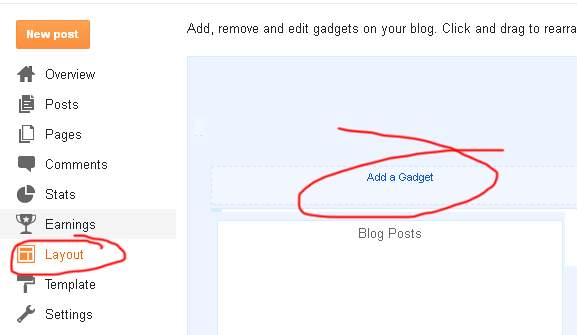
- Take +1 button or Google+ Badge as you need
- If you take Google+ badge give page ID

- Thats all....
Go to link download
Subscribe to:
Posts (Atom)