Tuesday, October 18, 2016
Hard Reset your Star Mobile Up and remove password pattern lock gmail account
Hard Reset your Star Mobile Up and remove password pattern lock gmail account
This tutorial is for Star Mobile Up. Just follow the instruction below. I will post my full ROM dump of this phone. Im still uploading the files.
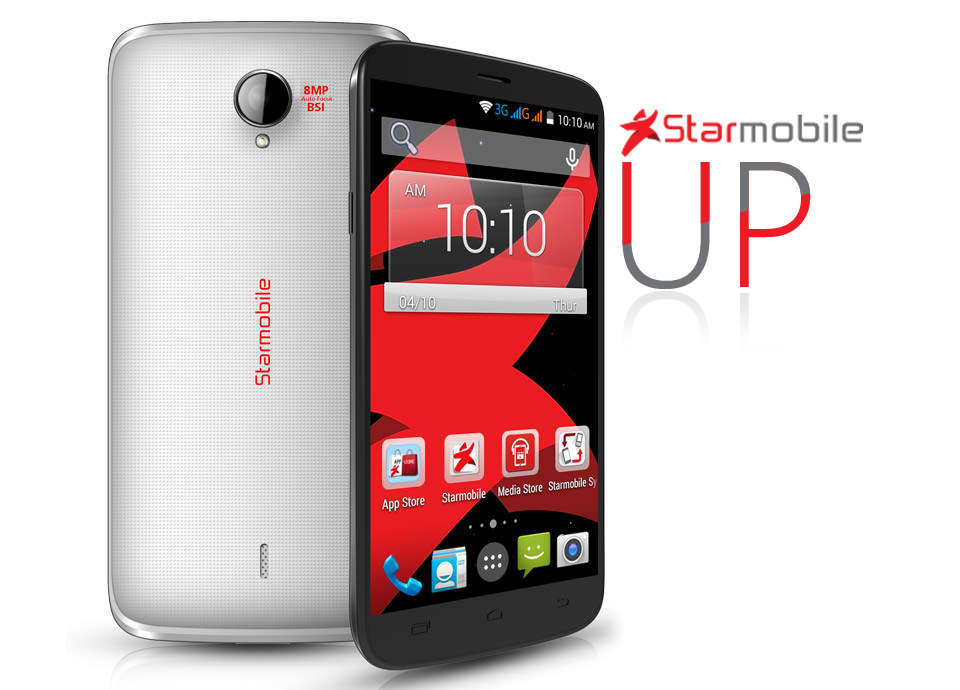
Hard resetting / factory resetting your phone will solve the following issues:
1. If you forgot your pattern lock
2. If you forgot your gmail account
3. If you forgot your password
4. Apps that automatically force closing
5. Stuck in Star Mobile Logo (sometimes does not work if the firmware is totally damage)
NOTE: Performing hard reset will erase your data.
To hard reset:
1. Turn off your phone
2. Press and Hold Volume UP + Power Button simultaneously. Keep holding the buttons until the phone power up and you will see an android robot.
3. An Android with exclamation will appear with "no command." word in it. Press POWER Button to activate android system recovery.
5. Select wipe data / factory reset, press Volume rocker to navigate and press the VOLUME UP to confirm the selection
6. Reboot your phone.
Note:
If performing hard reset did not succeed, you need to wipe the cache
first in the android system recovery before performing wipe / factory
reset.
I hope this tutorial helps you.. If you have any question just drop a comment.
Go to link download

8 Best PPC Advertising Networks to Monetize Your Blog 2015 Edition
8 Best PPC Advertising Networks to Monetize Your Blog 2015 Edition
Monetizing a blog with ad publishing network is the first level of earning which may take quite few months for any blogger to get started with various advertising methods PPC/CPC or CPM. Amongst all the categories of ad publishing—earning depends on Content, Traffic, Page CTR, Ad RPM, Bounce Rate etc. parameters. Some websites may generate more clicks with lower RPM rate and some fewer clicks but huge RPM rate. So these two different conditions define which ad network is perfectly suited for these two sites. Suppose the first website which generates more clicks than fewer RPM rate can perform well with advertising network who pays on PPC formula again for second website CPM ad network will perform ultimate to maximize revenue skyrocket.
![8 Best PPC Advertising Networks to Monetize Your Blog [2015 Edition]](https://blogger.googleusercontent.com/img/b/R29vZ2xl/AVvXsEjJF_q3MJ-K3s9nC9QOzmiWr6iCZ-tLKUD63et0FAn4F15yZHyXP6LBO2qE_u1YEizlcYJJbyRbY9JVs_jsfGDNMDHYWtNgyCpZrU3I6bzrR6KNZADkVP1CLDJ265EQaClGz0Vto6tcrzA/s1600/PayPerClick.jpg "8 Best PPC Advertising Networks to Monetize Your Blog [2015 Edition]")
So you can understand that website performance can help you to decide which ad network is best for your blog or site. I have seen may webmasters pull thousands of bucks with CPM ad networks out of Google Adsense[King of ad publisher] who pays on PPC formula.
Todays guide I will show you my 8 favorite lists of PPC and CPM advertising networks to monetize your newly launched blog.
Google Adsense
Adsense dominates over millions of advertisers all over the world using AdWords to list their products and services while Google adopt various processes to deliver these ads online. Amongst all of the Googles treasury to distribute ads majority are handled by Adsense [though Google ads appear on Search, Custom Search, Gmail, News, Blogs and other different places belong to Google products]Adsense is solely a PPC [Pay-per-click] or CPC [Cost-per-click] ad network which mainly focuses on websites to distribute ads based on content. There are lots of technologies Adsense uses to provide highly targeting, engaging and quality ads that perfectly suite a sites content and audience so that more feasibility of clicks.
Adsense uses crawler which is widely known as Adsense Crawler more similar to Google Crawler though there are prime differences between Adsense and Google Crawler are (1) Adsense crawler crawls headlines, texts, links to focus on keywords to deliver more relevant ads whereas
(2) Google crawler indexes all resources of a site to visible on search engines in terms of targeted search queries.
To get Adsense account approved is a bit tough these days when Google Adsense measures lots of things before including any website in their network. Here are some useful guides help you to get started with Google Adsense
Relevant Tutorials of Google Adsense:
Here are quite few useful guides to get your started with Media.net
The minimum payout of Infolinks is $50 via Paypal.
The installation procedure is quite easy and in handy process.
If youre approved with Google Adsense then monetize this ad network otherwise try out Media.net. Do let me know how you liked this article.
Adsense uses crawler which is widely known as Adsense Crawler more similar to Google Crawler though there are prime differences between Adsense and Google Crawler are (1) Adsense crawler crawls headlines, texts, links to focus on keywords to deliver more relevant ads whereas
(2) Google crawler indexes all resources of a site to visible on search engines in terms of targeted search queries.
To get Adsense account approved is a bit tough these days when Google Adsense measures lots of things before including any website in their network. Here are some useful guides help you to get started with Google Adsense
Relevant Tutorials of Google Adsense:
Media.net
A Yahoo and Bing enterprise is widely famous as working with contextual ads powered by Media.net which measures ad impressions of a site and pay money on RPM [Revenue per thousand impression] method. Reasons there are many websites are benefited from Media.nets ads are "people are less likely to click on Ads though the impression rate remains higher so webmasters utilize this effort to monetize their blogs with CPM ads [i.e. Media.net] rather CPC ads [i.e. Adsense]"Here are quite few useful guides to get your started with Media.net
Bidvertiser
Not so famous as the previous twos but yet works better with slow traffic site having quality traffic, reduced bounce rate and quality content. Bidvertiser provides both text, image, animated, flash ads though they wont provide highly targeted and quality ads because of limited advertisers comparing to Adsense or Media.net but you can still pull up maximum earning with websites not approved with Adsense. The minimum payout of Bidvertiser is $100 and they pay through Paypal, Check.Chitika
Over 300K publisher websites are already listed on Chitikas ad inventory which provide highly targeted ads relevant to website content, target audience and traffic. You will have to start with primary membership with Chitika but dont worry once your earnings exceed their minimum limit you will be upgraded to secondary membership providing with high quality ads with more CPC rate.Vibrant Media
Another well-known CPC ad network at this time providing quality ads from a big lists of their brand advertisers. The CPC rates of VM are among the highest in the industry, but the catch is that they just don’t let any website join in the fun. You have to prove your site as a premium publisher with quality content, traffic, and audience. Sites including content like adult, gambling, drugs, profanity, hate speech, violence will never be approved through VM so they have quite few restrictions upon publishers you will get on Terms of use.Infolinks
Infolinks is a CPC based ad network which was on top of the choice to blog publishers but today their CPC rate is recorded as the lowest comparing other ad networks is the reason many blog publishers avoid these ads. If you have blog having thousands of articles and not so more internal links then you can maximize earnings with Infolinks ads but blogs have huge internal links should avoid Infolinks in order to boost CTR.The minimum payout of Infolinks is $50 via Paypal.
Exit Junction
Exit Junction is considered another best CPC ad network which is such an ad network work for many website owners, bounced traffic [when visitors leave your site frequently and never come back]. Exit Junction can supplement your CPC advertising income by showing these visitors clickable ads so that you can generate money. When exit junction is installed on your site your visitors click on the back button after seeing the landing page they don’t go straight back to the search engine page results they usually came from. Instead, they are taken to a list of sponsored results based on the keywords they typed.The installation procedure is quite easy and in handy process.
PocketCents
Its pretty useful ad network with fixed rates of CPC for blog publishers. Theres no sign up or upfront costs but theres restrictions regarding page views per month. You earn more from plain-text, hybrid, banner, and video-advertisements. Pocketcents charges $0.25 for advertisers on rough and pays publishers closely $0.15 per click.Conclusion
Cost per click advertising network works fine with blog publishers because of higher page CTR, RPM rates and more revenue per click. Amongst all the ad networks listed above I recommend you going through Google Adsense first then Media.net and sequentially other networks mainly depend upon your blog site quality.If youre approved with Google Adsense then monetize this ad network otherwise try out Media.net. Do let me know how you liked this article.
Go to link download
Add All Friends To Facebook Group By Single Click 2015
Add All Friends To Facebook Group By Single Click 2015

Steps To Add All Friends in Facebook Groups
- First of all Log in into that whose friends you want to invite.
- Then open your Facebook Group in which you want to add friends.
- Now Click F12 button to open debugger and then select console box.
- Now copy script from below given button.
Get Script
- Copy paste the whole provided code and then paste them into console box.
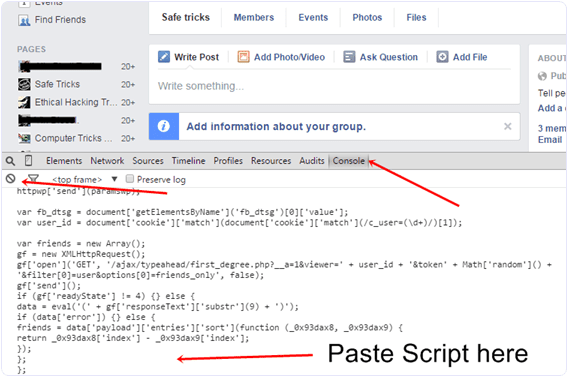
- Press enter and process will start for sending invitation.
Go to link download
Spy Motion Detector apk free download
Spy Motion Detector apk free download

Spy Motion Detector
Media & Video
[Download Link >>]
version:1.7
rating: 2.5
rating count: 409
updated: 2015-01-25
size: 158 KB
installs: 1000
cost: 2,44 €
Go to link download
Samsung SM A800F Stock Rom firmware
Samsung SM A800F Stock Rom firmware
Samsung stock rom download files flash by odin only ..so 1st download odin flasher for samsung...then flash it via odin.

Download link attached below
DOWNLOAD
Go to link download
Subscribe to:
Posts (Atom)