Showing posts with label s7392. Show all posts
Showing posts with label s7392. Show all posts
Tuesday, September 13, 2016
Samsung Galaxy Trend S7392 firmware stock to unbrick your phone
Samsung Galaxy Trend S7392 firmware stock to unbrick your phone
Hey all,
I have a new firmware and this is for Samsung Galaxy Trend or S7392. I have already tried this firmware. I flashed it in a reboot loop phone or stuck in Samsung logo.
This firmware is a single file or one package file only.

This firmware is a single file or one package file only.
Download These Files First before proceeding
Odin --> Odin 3.07
Firmware -- > S7392XXUANC3_S7392OJVANB4 Part 1
Firmware --> S7392XXUANC3_S7392OJVANB4 Part 2
Firmware --> S7392XXUANC3_S7392OJVANB4 Part 3
Firmware --> S7392XXUANC3_S7392OJVANB4 Part 4
Samsung Driver -- > SamsungDriver
"Extract these files in your desired folder"
Installing the driver
1. Install driver first just keep on hitting next. (Open/Execute/Run SamsungDrivePack)
2. After installing the driver Press and Hold Volume Down + Home Key + Power Button, a selection will appear if you would like to go in Download Mode, Press Volume Up to proceed in Download Mode.
3. Connect your phone in the PC via USB Cable
4. Wait for it to finish installing the driver.
"Note: Sometimes it is better to reboot your PC. After installing the driver."
BEFORE PROCEEDING IN FLASHING MAKE SURE THAT THE BATTERY IS FULLY CHARGED OR 50% CHARGED.
Flashing your Phone
1. Open Odin 3.07
2. Load the file (PDA Only). Click on PDA then look for the firmware that you had extracted.
PDA --> S7392XXUANC3_S7392OJVANB4_S7392XXUANC1_HOME.tar.md5
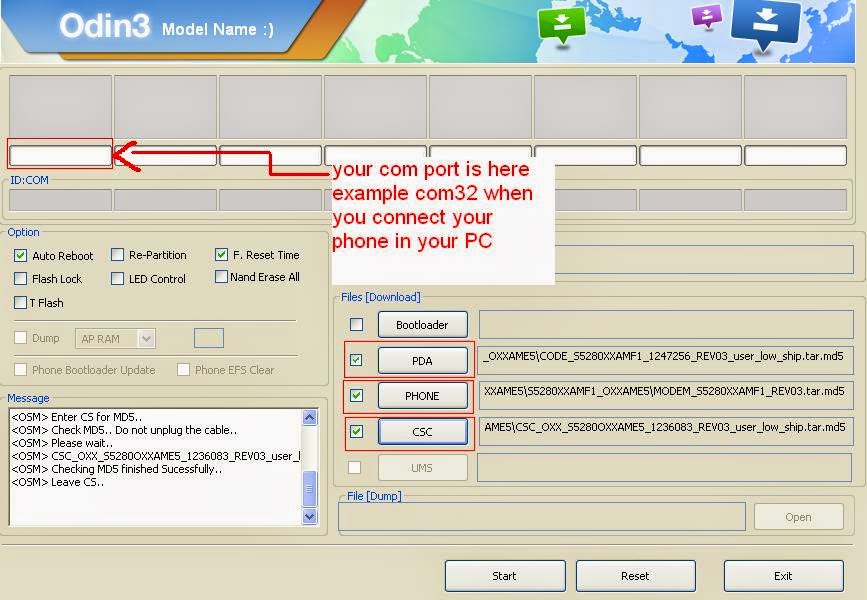 |
| Picture is example only. |
3. Do not check repartition.
4. When you are ready to flash your phone, Press and Hold Volume Down + Home Key + Power Button, a selection will appear if you would like to go in Download Mode, Press Volume Up to proceed in Download Mode.
5. Connect your phone in the PC via USB Cable, wait for a value in the ID:COM to appear. It will turn yellow with number example: COM32, if it nothing appear close Odin an open it again and load the file again.
6. Press START to proceed flashing your phone. Wait until it is done, the phone will reboot after flashing.
I hope this tutorial help you. Drop a comment if there is something is not clear to you. Cheers! ^_^
Tested by:
ME
Go to link download

Sunday, August 28, 2016
Samsung GT S7392 Stock Rom firmware
Samsung GT S7392 Stock Rom firmware
Samsung stock rom download files flash by odin only ..so 1st download odin flasher for samsung...then flash it via odin.

Download link attached below
DOWNLOAD
Go to link download
Subscribe to:
Posts (Atom)